Overview
In the fast-paced modern business landscape, efficiency remains your greatest competitive asset. If a client views your physical brochure, you have mere seconds to provide value. The primary barrier to professional growth is often physical document friction. Manual searches for specific product manuals or menus usually lead to lost interest. To solve this, you should create PDF QR code assets for your business today. These smart digital tools act as an instant bridge to your data.
They move users from the physical world directly into your document library. This transition happens in a single second with one quick scan. Consequently, you reduce the bounce rate of potential leads significantly. Furthermore, your brand stays top of mind because information access is immediate. Ultimately, this small digital upgrade creates a massive ripple effect for your growth. Moreover, it allows you to share massive files through simple visual branding. Therefore, your marketing strategy becomes much more immersive and modern. You turn every static flyer into a dynamic, paperless touchpoint. As a result, your audience interacts with your files more frequently. This constant engagement builds a strong foundation for long-term loyalty.
What Exactly is a PDF QR Code?
A PDF QR code acts as a scannable bridge for your digital documents. In fact, it connects your offline marketing to your mobile files perfectly. Furthermore, scanning the code opens a PDF file on any smartphone. Consequently, it eliminates the need for users to carry heavy paper catalogs. Moreover, this tool turns passive readers into active digital participants.
As a result, it makes sharing your brand reports or menus completely effortless. Therefore, you no longer need to rely on expensive printing services. Ultimately, your users can access your brochures with a single tap. In turn, your content consumption will likely see a steady increase. Specifically, modern users value the time you save them during work. Additionally, these codes help you stand out in a paper-heavy market. They offer a unique blend of high functionality and visual appeal. Therefore, you gain an edge over competitors using bulky paper packets.
Why Your Business Needs a Document Scan
Consider why this tool is vital for modern mobile entrepreneurs. It offers several key advantages for your consolidated digital strategies. Specifically, it streamlines how you distribute technical data and sales guides.
create PDF QR code and get Centralized Document Access
High-quality platforms house all your digital assets in one place. To simplify this journey, you must create PDF QR code links right now. By doing so, a single code allows users to see your story. In turn, this level of organization builds deep trust with clients. As a result, they see that your brand is professional and modern.
Moreover, it gives you a direct line to their mobile screens. Specifically, you can send detailed price lists that land right in their pocket. Consequently, your conversion rates will reflect this new level of digital intimacy. Furthermore, images in PDFs create an emotional bond text cannot match. Therefore, you provide a rich media experience without the printing cost. Ultimately, centralized access ensures your latest version is always available to everyone.
create PDF QR code and get Zero Search Friction for Clients
Users do not need to hunt for your specific download page. Instead, they scan the code and your document appears instantly. Consequently, this removes every barrier between the user and your data. Ultimately, high friction always leads to a lower reader count. Therefore, you must make the path as smooth as possible.
In addition, this ease of use encourages users to save your files. As a result, your brand reach grows without extra distribution spend. Moreover, you capture their attention before they look at other brands. Thus, you secure more loyal followers with very little effort. Specifically, a direct scan bypasses slow search engine results entirely. Furthermore, users appreciate the direct nature of a scan-to-read document. Consequently, you foster a reputation for being helpful and efficient.
The Strategic Power of Custom Design
One unique feature of modern codes is the use of graphics. In fact, you can link your QR code to a PDF. Furthermore, this creates an interactive experience for all your customers. Consequently, they are not just reading; they are feeling your vibe. Moreover, this type of engagement is highly memorable for them.
As a result, users are more likely to remember your shop. Therefore, your marketing becomes an experience rather than a flat ad. Ultimately, this builds a fun and loyal community around you. Specifically, your logo defines the mood of your brand perfectly. Furthermore, custom designs increase the likelihood of a scan. Consequently, you maximize the utility of every printed marketing asset. In addition, branded codes look much better on high-end business cards.
How to Create PDF QR Code
The process is quick and efficient for your business. Follow these steps to generate your professional code now:
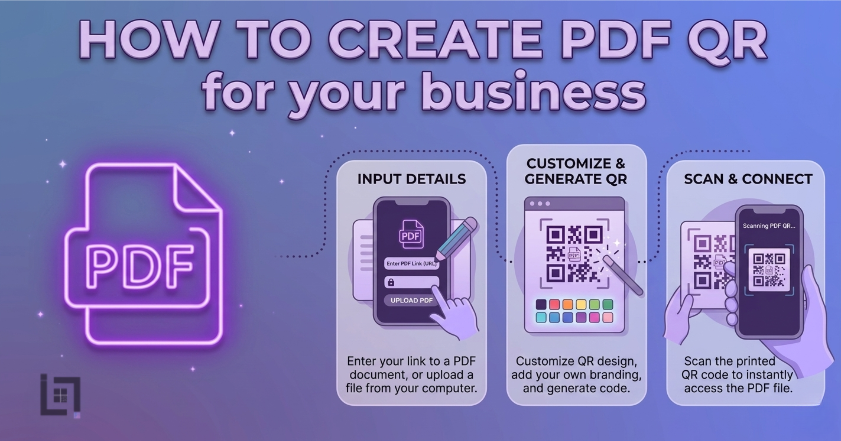
- Access the Generator: Log in to your ScanMyQR dashboard right away. Then, navigate to the specific PDF upload section.
- Upload Your Document: Select your PDF file from your computer or cloud. Ensure the file size is optimized for fast mobile loading.
- Refine the Details: To create PDF QR code labels that work, check your file name. Specifically, ensure the title is clear and professional.
- Upload Your Brand Mark: Click the button to add your official logo. This allows you to create a code that is unique.
- Generate and Customize: Click the purple generate QR code button now. Consequently, you can download your high-resolution image file. Finally, it is now ready for high-quality printing today.
Where to Place Your PDF Codes
Place your codes where your users naturally want to learn. Strategic placement ensures a much higher rate of engagement. Furthermore, it guides the customer journey with total precision.
Professional Instruction Manuals
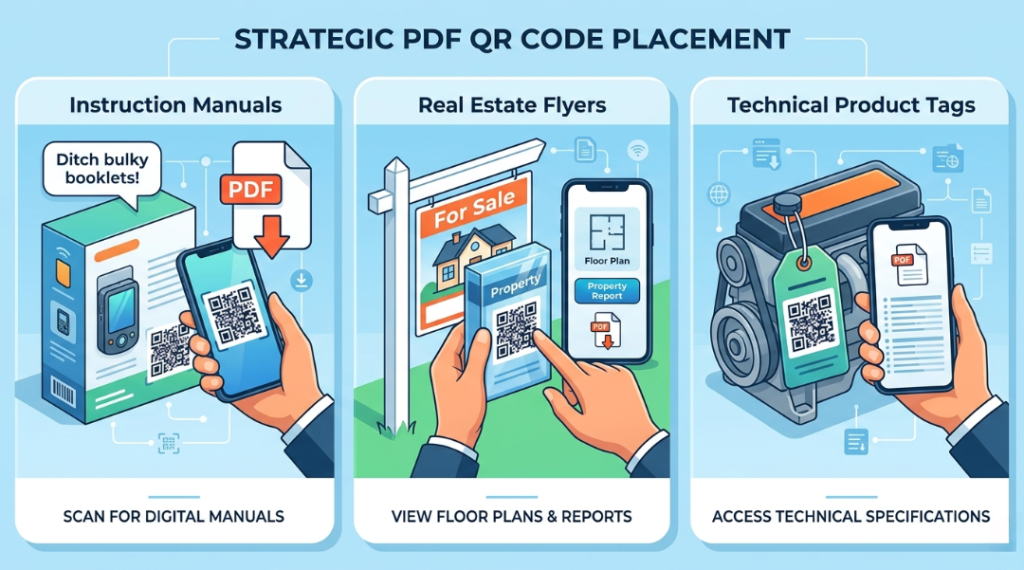
Do not print massive booklets for your new products. Instead, add a single branded code to the box. By doing this, you keep the packaging clean. Furthermore, it invites the person to see video guides. Moreover, it makes your product support much more memorable. Consequently, users can find help instantly on their phones.
create PDF QR code and get Modern Real Estate Flyers
In property sales, a code can lead to floor plans. Furthermore, it can link to full property history reports. As a result, buyers stay engaged while they tour homes. Consequently, their overall buying experience feels more professional. Additionally, it creates a modern look for your listing materials. Therefore, you stand out as a tech-forward agent.
Technical Product Data Sheets
Place a code on your physical product sample tags. Specifically, link it to a full specification PDF file. Consequently, buyers get a feel for technical details instantly. In turn, you create a multi-sensory shopping trip. Ultimately, this leads to higher customer satisfaction scores. Furthermore, it allows for instant updates to technical data.
Building Trust Through Visual Clarity
A scan is just the start of the user journey. In fact, the quality of your branding closes the deal. Users scan your code looking for expert answers. To succeed, you must use professional tools. Using these tools shows you are a reliable partner. Specifically, it provides a clear record of your quality.
This transparency, in turn, builds a layer of reliability. Ultimately, it turns a simple scan into a relationship. Furthermore, consistent updates keep that trust alive over time. Consequently, your brand becomes a household name for clients. In addition, high-quality PDFs reflect your professional standards. Therefore, you should avoid blurry or poorly formatted documents. Specifically, mobile-friendly layouts are essential for scan success.
3 Golden Rules for PDF QR Success
To ensure your codes work perfectly, follow these rules. Consistency is the key to maintaining a high scan rate.
- Always Use a Call to Action: A code without instructions is a mystery box. Therefore, tell users why they should scan it.
- Prioritize Size and Contrast: If the code is too small, cameras fail. Specifically, keep it at least 2cm wide on items.
- The Pre-Flight Test: Never skip this final step before printing. Always scan the code yourself using different mobile devices.
Troubleshooting Common Scan Issues
Technical hiccups can occur even with the best tools. For instance, one common issue is a dead link. In fact, if you delete the file, the code fails. However, professional tools allow you to update the PDF. Consequently, you can fix files without re-printing assets. Furthermore, another common issue is poor physical placement.
Specifically, avoid placing codes behind highly reflective glass. Additionally, dimly lit areas also make scanning very difficult. Therefore, ensure your codes are placed in well-lit spots. Moreover, ensure the PDF file size is not too large. As a result, users with slow data can still view it. Ultimately, a fast-loading file ensures a better user experience.
Data-Driven Decisions for Growth
Using QR codes allows you to gather vital intelligence. Specifically, you can see the time of every scan. This helps you, in turn, identify peak traffic hours. Consequently, you can then focus your efforts on those times. Therefore, data takes the guesswork out of your management.
Ultimately, it empowers you to grow with total confidence. In addition, you can see which physical posters work best. As a result, you can optimize your marketing budget effectively. You make smarter choices based on real user behavior. Specifically, you can see which documents are most popular. Furthermore, this helps you refine your future content strategy. Consequently, you provide exactly what your customers need.
Ready to Supercharge Your Business
In a competitive market, you cannot afford digital friction. Removing barriers to your data makes it easy to trust. A professional create PDF QR code strategy is more than convenience. Specifically, it shows your business is modern and responsive. By digitizing your documents, you save money and time.
If you’re looking for more ways to connect with customers using QR codes, check out our detailed guide on How to Create a Facebook qr code. It covers everything you need to know about setting up a Facebook qr code to let customers reach you instantly with just a scan.
Leave a Reply