Author: Team ScanMyQR

  • SMS QR Code Free Guide: How to Generate & Deploy Easily

    SMS QR Code Free Guide: How to Generate & Deploy Easily

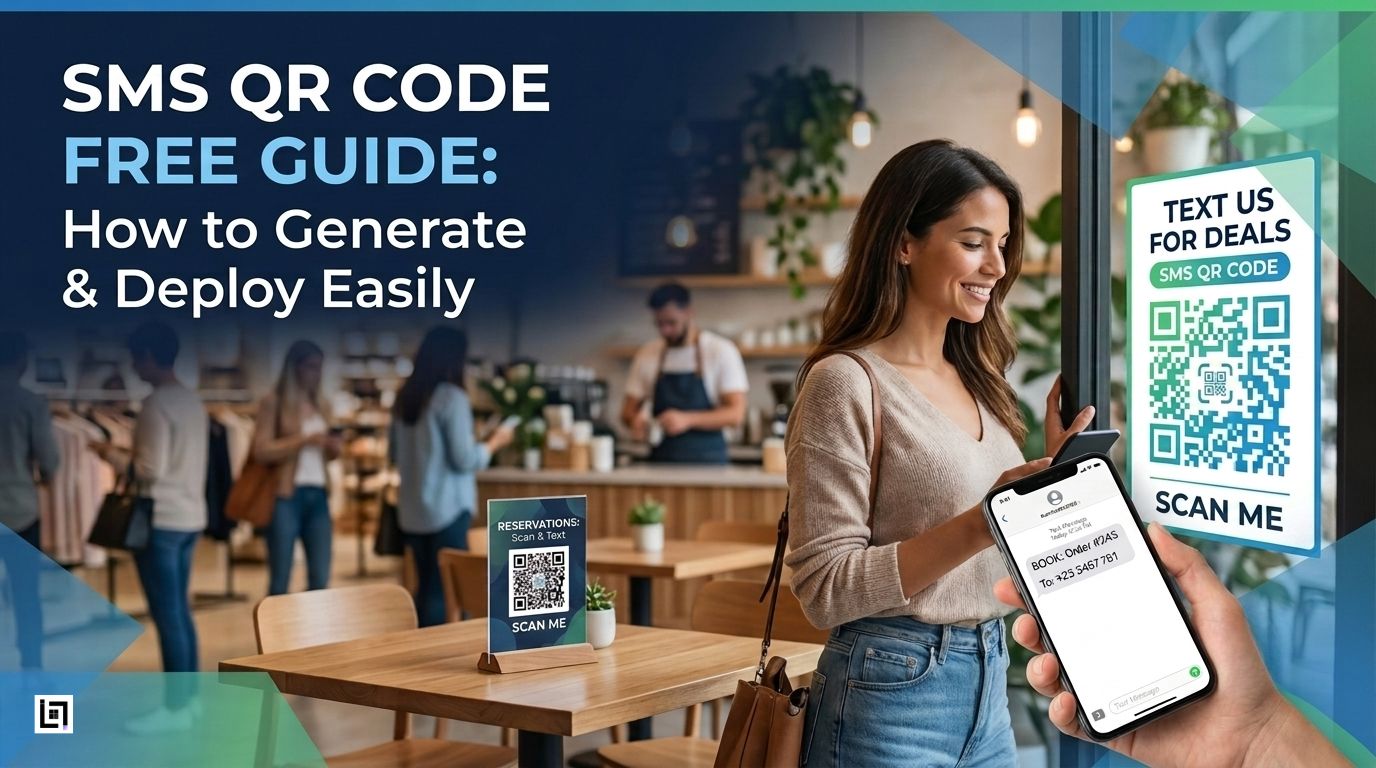
    Imagine this: A customer sees your QR code, taps their phone camera, and a text message window opens with your phone number and message already filled in. They just hit send.

    That’s an SMS QR code.

    No typing errors. Never lose phone numbers. Enjoy a hassle-free experience. Just one simple scan, and your customers can reach you instantly.

    In a mobile-first world, every extra step costs you a customer. SMS QR codes remove that friction completely.

    Why SMS QR Codes Work?

    • What’s more, 98% of SMS messages are read within 3 minutes (compared to 20% for email).
    • Additionally, it’s 8× faster than filling out a contact form.
    • Best of all, it works instantly on any smartphone, no app download required.
    • As a result, it delivers higher engagement than Instagram, push notifications, or web forms.

    By doing so, when you place an SMS QR code on your receipt, storefront, product packaging, or service menu, you’re giving customers the fastest possible path to contact you.

    How SMS QR Codes Actually Work

    Here’s what happens when someone scans your SMS QR code:

    1. Customer scans the QR code with their phone camera
    2. The phone recognizes the code as a text message link
    3. The text app opens automatically
    4. Your number and message appear pre-filled
    5. Customer taps send with one touch

    Best of all, the entire process takes less than 2 seconds.

    The code itself contains two pieces of information:

    • Your business phone number (where messages go)
    • A pre-written message (what appears in their text field)

    Static vs. Dynamic SMS QR Codes: Which One Do You Need?

    Static SMS QR Codes: Best for Most Businesses

    Cost: Completely free

    Best for:

    • Small businesses just starting out
    • Single business location
    • Fixed phone numbers that won’t change
    • No cost, ever
    • Never expires
    • Works immediately after download
    • No software or dashboard needed
    • Works offline and on any network

    Limitations:

    • Can’t change the phone number or message once printed
    • No tracking or analytics data
    • If your number changes, you’d need to reprint everything


    What it means: The phone number and message are permanently coded directly into the QR code itself.


    Dynamic QR Codes (Advanced Option)

    Best for: Growing businesses, multi-location campaigns, A/B testing.

    How they work: The code points to a short URL that redirects to your SMS. You control the destination on a dashboard.

    Pros:

    • Update the number or message anytime without reprinting
    • Full analytics: scan counts, timestamps, locations
    • Test different messages
    • Professional tracking

    Cons:

    • Requires a subscription (though some tools offer free tiers)
    • Recommendation: Start static and free. If you’re running campaigns across multiple locations or testing messages, upgrade to dynamic.

    How to Create an SMS QR Code in 5 Simple Steps

    You can create a working SMS QR code in less than 5 minutes— completely free. Here’s exactly how.

    Step 1: Choose Your QR Code Generator

    Pick a free QR code generator that supports SMS codes. Popular
    options include:

    • ScanMyQR (user-friendly, no hidden fees, customization options)

    Go to your chosen generator’s website in your browser. Look for an option labeled “SMS QR Code” or “Text Message QR Code.”

    Why this matters: Not all generators support SMS codes, so make sure to pick one that does.

    Step 2: Enter Your Business Phone Number
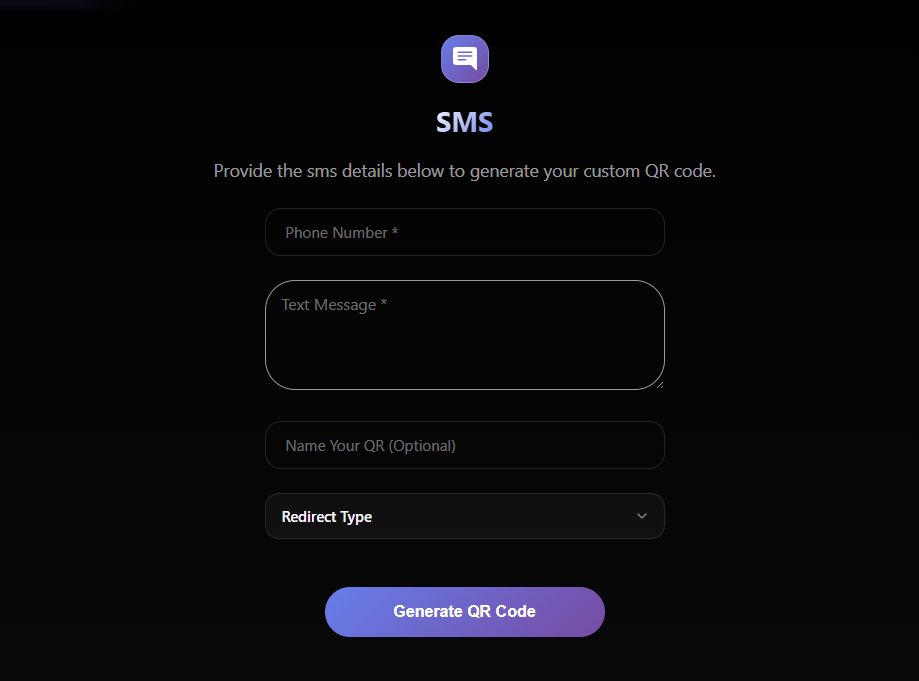
    In the phone number field, type the number where you want customers to text:

    ✓ Use your actual business phone number
    ✓ Double-check the number is correct (a typo here ruins everything)

    Step 3: Write a Simple Pre-Filled Message

    This is the message that appears in the customer’s text field
    When they scan.

    Keep it short, clear, and action-focused:

    Use CasePre-Filled Message
    Get helpSUPPORT
    Join the email listJOINCLUB or GETDEALS
    Book an appointmentBOOKNOW
    Request informationINFO
    Customer feedbackFEEDBACK
    Schedule serviceAPPOINTMENT

    Why short messages work: Customers see the message pre-filled. A simple word tells them exactly what happens next. They just tap send.

    Step 4: Customize the Aesthetic Style

    Most generators let you:

    • Change colors to match your brand
    • Add a border with a call-to-action label (“Scan to Text Us”)
    • Customize the design elements

    Important: Keep a high contrast between the code and the background. Test your phone camera to make sure it scans.

    Step 5: Download & Test

    Before printing anything:

    1. Open your phone camera
    2. Scan the preview code
    3. Verify it opens the SMS app with the correct number and message

    Once confirmed, download in the right format:

    • PNG – for digital use (emails, websites, social media)
    • SVG/EPS – for printing (scales perfectly at any size)

    4 Proven Ways to Use SMS QR Codes for Your Business

    1. Grow Your Text Message List (Highest ROI)

    The goal: Build your customer texting list without manual collection.

    How to set it up:

    1. Create an SMS QR code with a pre-filled message: “JOINCLUB” or “GETDEALS”
    2. Print the code on
      – Checkout receipts
      – Cash register counters
      – Menu boards
      – Product packaging
      – Business cards
      – Product packaging
      – Business cards

    3. When customers scan and text the keyword, add them to your SMS list.
    4. Send an immediate welcome message with a discount or offer.

    Results: Text message marketing has a 98% open rate.
    Each scan becomes a subscriber.

    Best for: Retail stores, restaurants, salons, gyms, coffee shops.


    2. Offer Instant Customer Support

    The goal: Help customers without them having to search for
    your number.

    How to set it up:

    1. Create an SMS QR code with the message: “SUPPORT”
    2. Place it on:
      – Product packaging and instructions
      – Hotel room information cards
      – Service counter signs
      – Warranty cards
      – Invoice or order documentation
    3. When customers text, they get routed to your support team
    4. Tag incoming messages by location (if using multiple codes)

    Results: Customers get help instantly. No phone tree, no hold
    music, no lost calls.

    Best for: E-commerce, hospitality, customer service teams,
    tech support

    4 Critical Rules for QR Code Design & Placement

    Your QR code only works if customers can actually scan it.
    Follow these 4 rules to ensure 100% scannability.

    Rule 1: Keep High Contrast (Most Important)

    What it means: Make sure your QR code stands out from
    Its background.

    Best practices:

    • Black QR code on a white or light background
    • Dark blue on light gray
    • Dark green on white
    • Black on dark gray (won’t scan in shadows)
    • Pastel colors (too soft to read)

    Why it matters: Phone cameras struggle with low contrast,
    especially in dim lighting. Poor contrast is the #1 reason codes
    fail to scan.

    Test it: Take a photo in dim light and make sure the code
    is still clearly visible.

    Rule 2: Leave a White Border Around the Code

    What it means: Don’t let your QR code touch text, images,
    or design elements.

    Best practices:

    • Always leave at least 0.5 inches (1.3 cm) of empty white space
      around all sides
    • This “quiet zone” helps phone cameras identify where the QR code starts and ends
    • Never place a code right next to a photo or busy background pattern

    Why it matters: Phone cameras need white space to recognize and lock onto the code.

    Visual example: Think of it like a document margin—the code
    Needs breathing room.

    Quick Checklist Before Printing

    Use this checklist before you print a single copy:

    • QR code is at least 1×1 inch (2.5×2.5 cm)
    • Code is significantly darker than the background
    • White space surrounds the code on all sides
    • Clear label is visible (“Scan to Text Us”)
    • Tested scanning in dim lighting
    • Tested on both iPhone and Android
    • The message appeared correctly after scanning

    Start Free, Scale Smart!

    SMS QR codes are one of the fastest ways to reduce friction
    between a curious customer and your business.

    • 2 seconds to scan
    • 1 tap to text
    • Phone number and message already filled in
    • Works on every smartphone

    For small businesses, startups, agencies, and anyone looking to
    boost customer engagement instantly, SMS QR codes are a proven game-changer.

    Start Now: Your First SMS QR Code (Free)

    Ready to generate your first code?

    Time required: Less than 5 minutes
    Cost: Completely free
    What you’ll need:

    • Your business phone number
    • A simple message (1-2 words)
    • Access to a QR code generator

    Next Steps:

    1. Pick your use case (list, support, leads, or appointments)
    2. Choose a free QR generator (ScanMyQR)
    3. Follow the 5 steps outlined above
    4. Test on your phone before printing
    5. Print or share with confidence

    That’s it. You’ve created a customer engagement tool that
    works 24/7.

    Ready to create your SMS QR code? Start now—it’s free and takes 5 minutes. Your customers are waiting to reach you.

  • How Salon QR Codes Automate Bookings & Google Reviews

    How Salon QR Codes Automate Bookings & Google Reviews

    The Problem Every Salon Owner Faces

    Your phone rings constantly. A client calls to reschedule. Another wants to know your pricing. A third needs to leave a Google review but can’t find your location on Google Maps. Meanwhile, you’re missing the opportunity to actually work with clients—the part of the business you genuinely love.

    The reality? Salon owners spend too much time answering the phone and not enough time with clients.

    This inefficiency doesn’t just frustrate you; it costs you money. Research shows that 72% of salon customers expect online booking options, yet most salons still rely on phone calls. Every missed opportunity is revenue walking out the door.

    What if there was a simple, code-based solution that could handle bookings, reviews, pricing information, and portfolio showcasing all without you lifting a finger?

    Welcome to the receptionist in a code: dynamic QR codes designed specifically for beauty and wellness businesses.

    What Is a Dynamic QR Code for Salons?

    A salon booking QR code isn’t just a static link. It’s a dynamic, data-driven tool that can:

    • Direct clients to your appointment calendar for 24/7 booking
    • Display your service and pricing menu instantly (as a PDF or interactive page)
    • Collect Google reviews while clients are relaxed and happy
    • Showcase your Instagram portfolio, so prospects see your work
    • Process payments for deposits or full services
    • Track every scan with analytics to measure which marketing channels work

    Unlike generic QR codes, these are customizable, trackable, and purpose-built for the beauty industry.

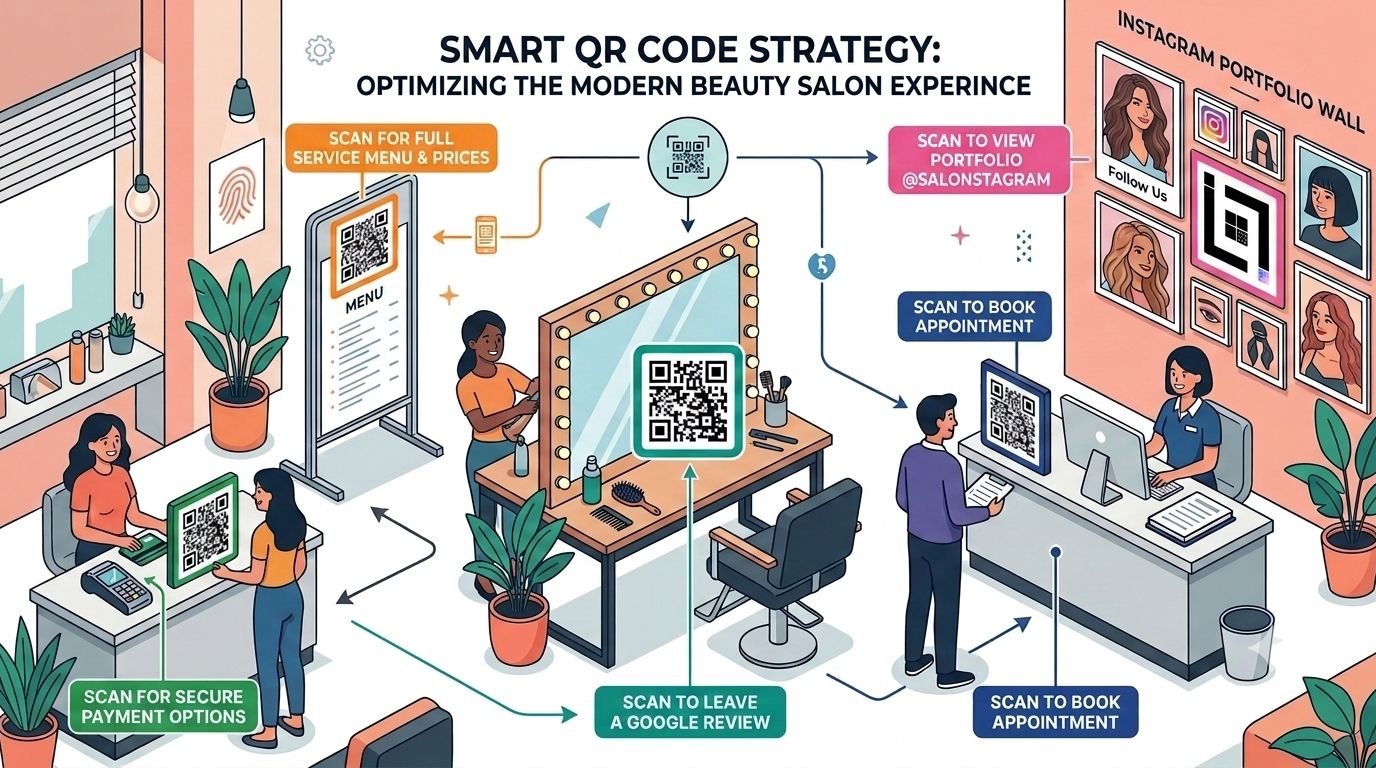
    The 5 Essential QR Code Touchpoints for Your Salon


    1. Schedule Appointment QR Code (At Your Storefront)

    Location: Window display, business cards, flyers

    What it does: Sends clients directly to your online calendar—even after hours.

    Why it matters:

    • Clients can book at midnight without calling you at 9 AM
    • Reduces double-bookings and miscommunications
    • Works for walk-ins curious about availability
    • Particularly powerful for salons with extended hours or online-first models

    SEO Benefit: Drives organic traffic to your booking page, signals “appointments available online” to search engines.

    2. Spa Menu QR Code PDF (At Check-In Counter)

    Location: Reception desk, service stations, appointment confirmations

    What it does: Instantly displays your complete service menu, pricing, and duration as a professional PDF.

    Why it matters:

    • New clients don’t have to ask verbal questions
    • Reduces staff interruptions
    • Clients can review services before committing to a chair
    • Upsell opportunities (clients see premium services they didn’t know existed)

    Pro Tip: Update your PDF monthly with seasonal promotions. The QR code stays the same, but the destination updates dynamically.

    3. Google Review QR for Salons (At Mirror Stations)

    salon mirror qr code google review

    Location: Station mirrors, makeup areas, finishing stations

    What it does: One scan takes clients directly to your Google Reviews page while they’re looking fabulous and feeling great about their service.

    Why it matters:

    • Timing is everything clients are most likely to leave reviews when they’re happy
    • Increases review volume (average increase: 300-400% when placed at mirror stations)
    • Google reviews directly impact your local search rankings
    • Trust signals for new clients searching for “salons near me”

    4. Instagram Portfolio QR Code (At Waiting Area)

    Location: Reception area, waiting chairs, appointment reminders

    What it does: Lets clients scroll through your recent work while they wait for their appointment to start.

    Why it matters:

    • Keeps clients entertained and engaged
    • Increases Instagram followers organically
    • Creates social proof (more followers = more trust)
    • Encourages clients to tag and share your salon on their own posts

    Strategic Insight: Clients waiting 10-15 minutes will often follow you, save images, and share your work. That’s organic marketing you don’t have to pay for.

    5. Beauty Salon Payment QR (At Checkout)

    Location: Billing counter, invoice receipts, service cards

    What it does: Enables contactless, secure payments through Razorpay, PayU, or your preferred processor.

    Why it matters:

    • Faster checkout (no cash handling, no card reader waiting)
    • Secure and PCI-compliant
    • Clients can deposit for future appointments
    • Creates a record for accounting and GST compliance

    How to Set Up Your Salon QR Code System: Step-by-Step

    Step 1: Choose Your QR Code Platform (ScanMyQR or Similar)

    What to look for:

    • Dynamic QR codes (not static—they let you update destinations without reprinting)
    • Detailed analytics dashboard
    • Customization options (add your logo, brand colors)
    • Integration with calendars (Google, Calendly, Acuity Scheduling)
    • Support for multiple file types (PDFs, URLs, VCards, SVG)

    Recommended Setup Time: 30 minutes

    Step 2: Create Your QR Codes (One for Each Purpose)

    Do this:

    1. Booking QR:
      • Generate URL: Your online calendar link (Calendly, Acuity, or Google Calendar)
      • Customize: Add salon logo in the center
      • Name it: “Appointment_Booking_QR”
    2. Menu QR:
      • Upload your service menu PDF (include prices, durations, therapist specialties)
      • Customize with salon colors
      • Name it: “Service_Menu_QR”
    3. Google Review QR:
      • Get your Google Business Profile review link
      • Generate QR code
      • Customize and name: “Google_Review_QR”
    4. Instagram QR:
      • Use Instagram’s built-in QR code feature or platform-generated code
      • Customize with salon branding
      • Name it: “Instagram_Portfolio_QR”
    5. Payment QR:
      • Generate through your payment processor
      • Customize with salon name
      • Name it: “Payment_QR”

    Pro Tip: Keep a spreadsheet tracking all QR code names, links, and placement locations. This helps you manage updates and troubleshoot scanning issues.

    Step 3: Place QR Codes Strategically

    Booking QR Code Placement:

    • Window display (largest, most visible)
    • Business cards (for appointment reminders)
    • Flyers and local advertisements
    • Email signatures

    Menu QR Placement:

    • Reception counter (eye level)
    • Each service station
    • Appointment confirmation emails
    • SMS reminders to returning clients

    Review QR Placement:

    • Behind mirror stations (the golden location—clients are in the best mood here)
    • Billing counter
    • Exit area (clients can scan on their way out)
    • Follow-up thank-you cards

    Instagram Portfolio Placement:

    • Waiting area seating (kills boredom)
    • Above service stations
    • Printed portfolio books (alongside traditional photos)

    Payment QR Placement:

    • Checkout counter
    • Service invoices
    • Receipt printouts
    • Appointment reminder cards

    Step 4: Train Your Staff

    What to teach:

    • Where each QR code is and what it does
    • How to explain QR codes to clients (“Scan here to book your next appointment”)
    • When to suggest scanning (e.g., “While we finish your nails, why not follow us on Instagram?”)
    • How to troubleshoot common issues (bad WiFi, camera focus)

    Step 5: Monitor Analytics (The Profit Part)

    This is where Salon booking QR Code analytics becomes your superpower.

    Open your ScanMyQR dashboard and track:

    Scan Volume by Location

    Which mirror station gets the most review scans?

    Does your window QR or printed flyer get more traffic?

    Answer: Focus marketing spend on the highest-performing channel

    Time-Based Insights

    Peak booking times (e.g., Mondays 6-8 PM)

    Seasonal trends (e.g., bridal season bookings spike in October)

    Action: Schedule extra staff during peak periods

    Conversion Tracking

    How many people scan vs. actually book?

    Calculate your “booking conversion rate”

    Example: 200 scans → 40 bookings = 20% conversion rate

    Device & Browser Data

    Are users scanning on iPhone or Android?

    Are they mobile or desktop?

    Action: Optimize your calendar for the dominant device type

    Marketing ROI Measurement

    Place different QR codes on different marketing materials

    Track which brings the most bookings

    Example: “Window display QR brought 3x more bookings than local magazine ad”

    Conclusion: Invest more in storefront visibility, reduce magazine ad spend

    The ScanMyQR Value: Analytics Dashboard for Salon Marketing ROI

    Here’s the game-changer:

    Imagine you spend ₹5,000 on a beautiful printed flyer with a QR code. You also spend ₹5,000 on a local magazine advertisement with a different QR code.

    With traditional marketing, you’d guess which one worked better. With dynamic QR for beauty parlor analytics:

    ChannelScansBookingsBooking RateCost per Booking
    Printed Flyer3406820%₹74
    Magazine Ad2102110%₹238

    Decision: Flyers are 3x more effective. Next month, print 3,000 flyers instead of buying another magazine ad.

    This is actual data-driven decision making—not guesswork.

    Other metrics ScanMyQR provides:

    • Geolocation tracking: See where your highest-converting clients come from
    • Repeat scans: Identify loyal clients who scan multiple times
    • Bounce rates: If your booking page has a 70% bounce rate, your UX needs work
    • A/B testing: Create two versions of a QR code destination and see which converts better
    • Custom reports: Export data for board meetings or financial planning

    Real-World Example: How One Salon Increased Bookings 250%

    The Business: Elite Unisex Salon, Ahmedabad (60-seat operation, 40+ staff)

    The Challenge:

    • Receptionist was answering 80+ calls per day
    • Clients complained about wait times to book
    • Google reviews stalled at 3.2 stars (clients couldn’t find the review option)
    • Social media wasn’t growing

    The Solution (Salon Booking QR Code System):

    1. Placed booking QR on storefront (large, professional)
    2. Placed review QR at each of the 15 mirror stations
    3. Added Instagram portfolio QR to waiting area
    4. Integrated menu QR with digital pricing updates
    5. Set up a payment QR for deposits

    Results (After 90 Days):

    • Bookings: Up 250% (phone-based + online combined)
    • Google Reviews: From 3.2 to 4.6 stars (118 new reviews)
    • Instagram Followers: From 1,200 to 4,800
    • Receptionist Time: Freed up 30 hours/week (hired one fewer staff, redirected person to client-facing roles)
    • Average Transaction Value: Up 18% (menu QR + upselling worked)

    Analytics Insight: Review QR at mirror stations converted 35% of clients, vs. 8% who organically left reviews before.

    Why Touchless Salon Booking QR Code Matters Now

    The post-pandemic consumer has changed. Clients now expect:

    • Contactless interactions – QR codes eliminate paper forms and face-to-face interactions
    • 24/7 access – Book at 2 AM for a 10 AM appointment
    • Fast checkout – Payment QR instead of waiting for card processing
    • Hygiene – No shared tablets or keypads
    • Convenience – One scan instead of a 10-minute phone call

    Salons without QR booking are losing younger clients (Gen Z and millennials expect this as standard).

    Common Mistakes to Avoid

    MistakeWhy It HurtsSolution
    Static QR codesCan’t update destination; must reprint if link changesUse dynamic QR codes only
    Poor placementClients never see the QR codePlace booking QR at eye level on storefront; review QR at mirror stations
    No staff trainingStaff don’t promote QR codes; clients don’t know they existTrain the team on why and when to suggest scanning
    Ugly, low-contrast QR codes40% of users can’t scan due to poor designUse branded QR codes with adequate contrast; test with multiple phones
    Broken linksQR code goes to 404 error; clients get frustratedTest all QR codes weekly; monitor broken links in analytics
    No analytics monitoringYou can’t measure ROI or optimize placementCheck the ScanMyQR dashboard daily; export reports monthly
    Too many QR codesClients are confused about which to scanLimit to 5-6 codes; clear signage explaining each

    Getting Started: Your 7-Day Action Plan for Salon Booking QR Code Preparation

    Day 1: Choose ScanMyQR or a similar platform; sign up
    Day 2: Create 5 QR codes (booking, menu, review, Instagram, payment)
    Day 3: Design custom QR codes with salon branding
    Day 4: Print high-quality codes; place at all locations
    Day 5: Train staff on locations and promotion
    Day 6: Monitor first scans; troubleshoot any issues
    Day 7: Check analytics dashboard; plan optimization for next month

    The Future of Salon Operations Is Here!

    Salon owners no longer need to choose between client time and administrative work. Dynamic QR codes for beauty parlors automate the friction points that waste your day:

    • Bookings happen 24/7 without staff involvement
    • Clients leave reviews when they’re happiest (at the mirror station)
    • Pricing and menu questions are answered instantly
    • Portfolio showcase drives Instagram growth
    • Payments are contactless and secure
    • You get real data to optimize your marketing

    The salons that implement this now are gaining a competitive advantage. Clients choose salons that respect their time and offer convenience. QR-enabled salons deliver exactly that.

    Ready to become the tech-forward salon that clients rave about? Start with your storefront booking QR this week. Add review QRs at mirror stations next week. Monitor analytics religiously.

    Your future self—the one with less phone work and more client time will thank you.

  • Retail QR Code Strategy: Turn Window Shoppers Into Buyers

    Retail QR Code Strategy: Turn Window Shoppers Into Buyers

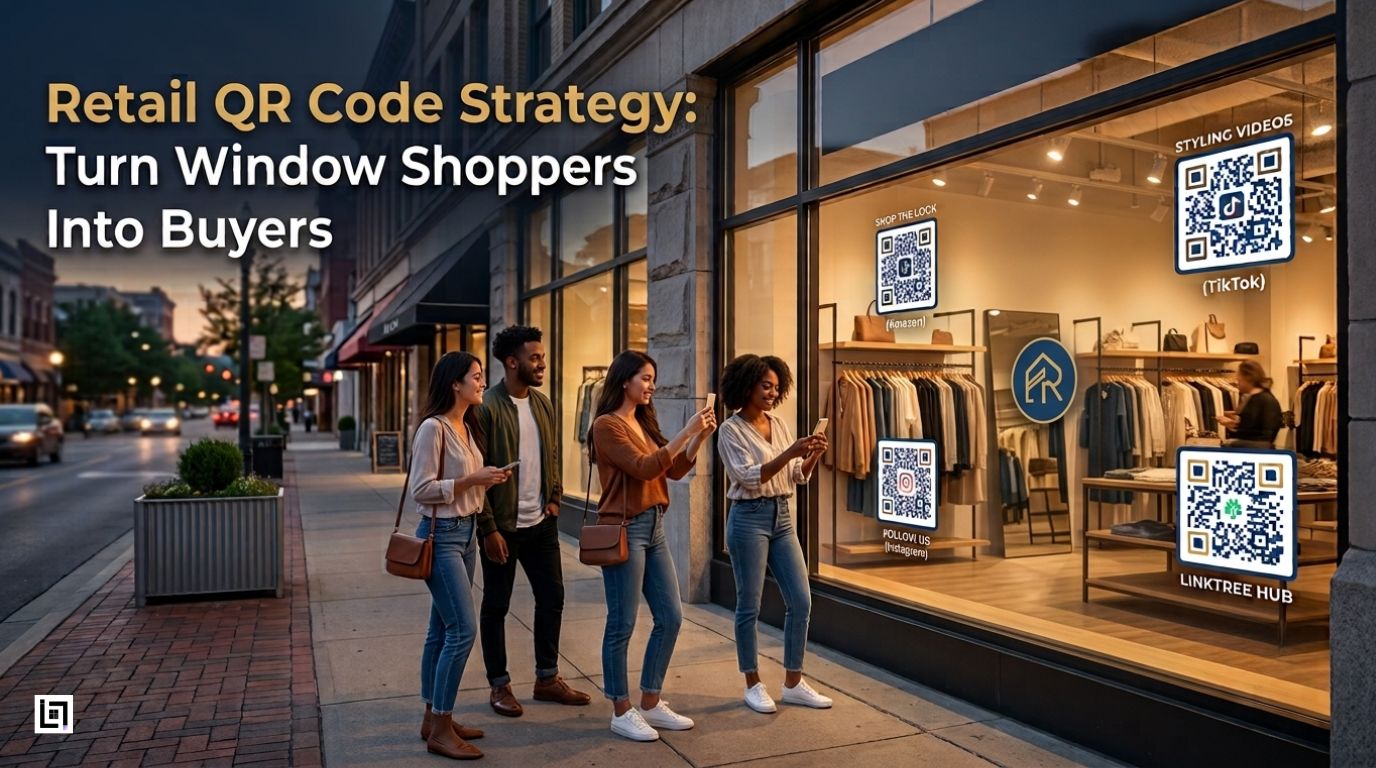
    Have you ever watched someone admire your storefront window, pull out their phone, and then simply walk away? In retail, that isn’t a missed moment, it’s a lost customer. The fastest way to recover those walk-aways is a branded retail QR code strategy that hands every passer-by a one-scan path into your store, your socials, and your online shop, even after closing time.

    There is a real, frustrating gap between a boutique’s physical storefront and its online presence. When your doors close for the evening, or when a specific size sells out, your sales shouldn’t grind to a halt. The most successful local boutiques bridge that gap by converting passive window shoppers into active followers, loyalty members, and online buyers, and they do it with intentional, trackable QR touchpoints rather than one generic black-and-white square.

    Retail QR Code Strategy

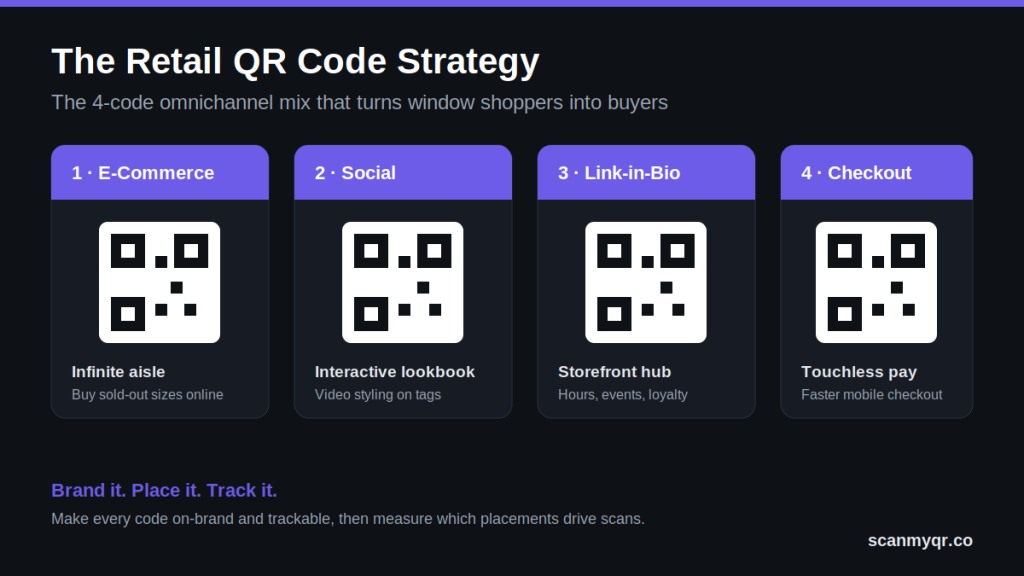
    Place a small set of purpose-built QR codes across your store, from window to receipt, so customers can buy out-of-stock items online, follow your socials, join loyalty, and check out faster. Make every code on-brand and trackable with a dynamic QR code generator so you can see exactly which placements drive scans.

    Why a Retail QR Code Strategy Beats a Generic Square

    A retail QR code strategy works because it removes friction at the exact moment a customer is interested. Instead of hoping a shopper remembers your store name, a single scan moves them from the sidewalk to a sale, a follow, or a sign-up. The difference between a code that performs and one that’s ignored comes down to three things: it’s branded, it’s placed where intent is highest, and it’s measurable.

    Generic codes fail on all three. They clash with a carefully curated display, they sit in low-intent spots, and they give you zero data on what’s working. Switching to trackable dynamic QR codes fixes that, because you can change the destination after printing and watch performance in real time.

    The Omnichannel QR Code Mix for Modern Boutiques

    To blend your brick-and-mortar footprint with your digital channels, you need an interconnected set of intentional touchpoints, not a single link. These four carry the most weight in a retail QR code strategy.

    1. The “Infinite Aisle”: E-Commerce and Amazon Product Codes

    Never let an out-of-stock item dictate your revenue. By placing an Amazon or e-commerce product QR code on product tags, a customer can buy online instantly when their size or color isn’t on the rack. The sale follows the shopper home instead of disappearing the moment they leave.

    2. The Interactive Lookbook: TikTok and Instagram Codes

    Hanger appeal only goes so far. Adding social media QR codes to clothing tags and racks lets you show how a piece fits, moves, and looks on real models through short video styling guides. It turns a static garment into a mini lookbook and grows your following at the same time.

    3. The Digital Storefront Hub: Link-in-Bio Codes

    Consolidate your entire digital footprint into one scan. A link-in-bio QR code placed prominently on your storefront window can house your hours, upcoming events, loyalty sign-up, and every social channel, so even a late-night browser can engage while your doors are locked.

    4. Frictionless Checkout: Touchless Payment Codes

    Keep your cash wrap moving. A touchless checkout QR code at the counter enables quick, secure mobile payments and cuts wait times during weekend rushes, which protects sales you’d otherwise lose to a long line.

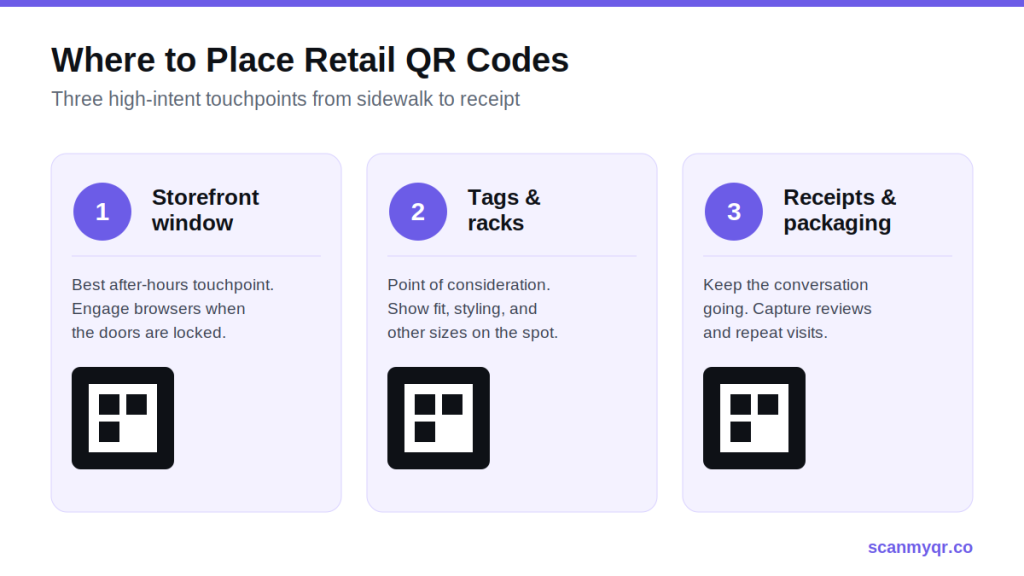
    High-Impact Placement: Where to Drive Scans

    Where you put a code matters as much as what it links to. A retail QR code strategy only pays off when codes sit where customer attention and intent are highest.

    Retail QR Code Strategy
    • Storefront windows: Turn late-night window shoppers into community members by giving them a way to engage even when you’re closed. This is your single best after-hours touchpoint.
    • Product tags and racks: Deliver instant product info, styling inspiration, and alternative purchase options right at the point of consideration, the exact second a customer is deciding.
    • Receipts and post-purchase packaging: Keep the conversation going. The bottom of a receipt is perfect for a Google review QR code or Retail QR Code Marketing, an exclusive discount on the next visit, capturing reviews, and repeat business while the experience is fresh.

    Elevating Retail QR code strategy: Aesthetics with ScanMyQR

    Retail is about curation, branding, and aesthetics, and a clunky, generic code instantly disrupts a beautiful display or a thoughtfully designed tag. This is where a  earns its place: you can match every code to your brand so it reads as part of the design, not a sticker slapped on top.

    • Seamless logo customization: Embed your boutique’s logo directly in the center of the code so it’s recognizable at a glance.
    • Brand-matched color palettes: Swap standard black-and-white for your exact signature hex codes.
    • Powerful in-store analytics: Because these are dynamic codes, you can log into the QR code analytics dashboard and see which windows, racks, or receipt campaigns generate the most engagement.

    That last point is the difference between guessing and knowing. When you can see that the window code outperforms the rack code three to one, you stop spreading effort evenly and start doubling down on what works.

    Putting Your Retail QR Code Strategy Together

    Stop letting foot traffic walk out the door. A frictionless, trackable, beautifully branded in-store journey turns casual browsers into lifelong digital advocates, and it starts with one scan. Pick two or three placements to begin, brand each code, and track every scan so your next decision is driven by data rather than guesswork.

    Ready to build it? Start with a free dynamic QR code and add the rest of your retail mix from there.

    Frequently Asked Questions

    What is Retail QR Code Marketing?

    A retail QR code strategy is a coordinated set of branded, trackable QR codes placed across a store, from the window to the receipt, that connect physical shoppers to digital actions like buying online, following socials, joining loyalty, or paying at checkout.

    Are dynamic QR codes better than static ones for retail?

    For most retail uses, yes. Dynamic codes let you change the destination after printing and track scans by location, device, and time, so you can update campaigns and measure performance without reprinting a single tag.

    Where should a boutique place QR codes for the most scans?

    The highest-intent spots are storefront windows (for after-hours engagement), product tags and racks (at the point of consideration), and receipts or packaging (for reviews and repeat visits). Start there before expanding.

    Can I add my logo and brand colors to a QR code?

    Yes. A custom logo QR code generator lets you embed your logo and apply your exact brand colors so the code matches your store’s aesthetic instead of clashing with it, while still scanning reliably.

    How do I know which retail QR codes are working?

    Use dynamic codes with a built-in analytics dashboard. You’ll see scan counts by placement, location, and device, which tells you which windows, racks, or campaigns are driving engagement so you can focus your effort.

  • How to Create Google doc QR Code Free

    How to Create Google doc QR Code Free

    Overview

    In the fast-paced modern business landscape, efficiency remains your greatest competitive asset. If a client views your physical brochure or training manual, you have mere seconds to provide value. The primary barrier to professional growth is often physical document friction. Manual searches for specific cloud links or typing long URLs usually lead to lost interest. To solve this, you should create Google doc QR code free assets for your business today. These smart digital tools act as an instant bridge to your cloud data.

    They move users from the physical world directly into your digital library. This transition happens in a single second with one quick scan. Consequently, you reduce the bounce rate of potential leads significantly. Furthermore, your brand stays top of mind because information access is immediate. Ultimately, this small digital upgrade creates a massive ripple effect for your growth. Moreover, it allows you to share massive text files through simple visual branding. Therefore, your marketing strategy becomes much more immersive and modern. You turn every static flyer into a dynamic, paperless touchpoint. As a result, your audience interacts with your files more frequently. This constant engagement builds a strong foundation for long-term loyalty.

    What Exactly is a Google Doc QR Code?

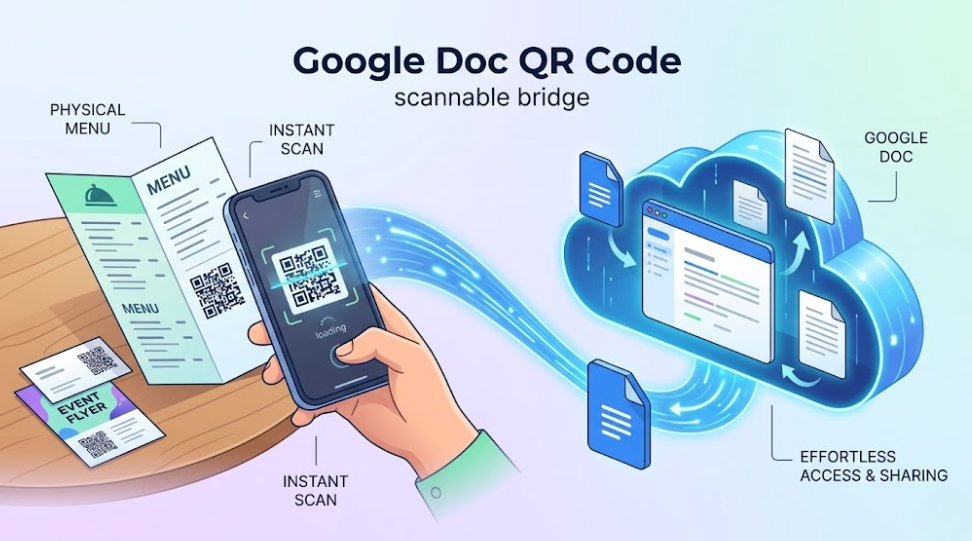
    A Google Doc QR code acts as a scannable bridge for your cloud-based documents. In fact, it connects your offline marketing to your mobile files perfectly. Furthermore, scanning the code opens a Google Document on any smartphone browser instantly. Consequently, it eliminates the need for users to manually type complex web addresses. Moreover, this tool turns passive readers into active digital participants.

    create Google doc QR code

    As a result, it makes sharing your brand reports, daily menus, or study guides completely effortless. Therefore, you no longer need to rely on expensive printing services. Ultimately, your users can access your information with a single tap. In turn, your content consumption will likely see a steady increase. Specifically, modern users value the time you save them during work. Additionally, these codes help you stand out in a paper-heavy market. They offer a unique blend of high functionality and visual appeal. Therefore, you gain an edge over competitors using bulky paper packets.

    Why Your Business Needs a Cloud Document Scan

    Consider why this tool is vital for modern mobile entrepreneurs. It offers several key advantages for your consolidated digital strategies. Specifically, it streamlines how you distribute technical data and internal company guides.

    Create Google Doc QR Code Free and Get Centralized Access

    High-quality cloud platforms house all your digital text assets in one place. To simplify the user journey, you must create Google doc QR code free links right now. By doing so, a single code allows users to see your updated information immediately. In turn, this level of organization builds deep trust with clients. As a result, they see that your brand is professional and modern.

    Moreover, it gives you a direct line to their mobile screens. Specifically, you can send detailed price lists that land right in their pocket. Consequently, your conversion rates will reflect this new level of digital intimacy. Furthermore, cloud documents can be edited in real-time. Therefore, you provide a constantly updated experience without any reprinting cost. Ultimately, centralized access ensures your latest version is always available to everyone.

    Create Google Doc QR Code Free and Get Zero Search Friction

    Users do not need to hunt for your specific download page or email attachment. Instead, they scan the code and your document appears instantly. Consequently, this removes every barrier between the user and your data. Ultimately, high friction always leads to a lower reader count. Therefore, you must make the path as smooth as possible.

    In addition, this ease of use encourages users to save your files to their own Drive. As a result, your brand reach grows without extra distribution spend. Moreover, you capture their attention before they look at other brands. Thus, you secure more loyal followers with very little effort. Specifically, a direct scan bypasses slow search engine results entirely. Furthermore, users appreciate the direct nature of a scan-to-read document. Consequently, you foster a reputation for being helpful and efficient.

    The Strategic Power of Custom Design

    One unique feature of modern codes is the use of graphics. In fact, you can link your QR code to a Google Doc while keeping it visually appealing. Furthermore, this creates an interactive experience for all your customers. Consequently, they are not just reading; they are interacting with your brand identity. Moreover, this type of engagement is highly memorable for them.

    As a result, users are more likely to remember your business. Therefore, your marketing becomes an experience rather than a flat ad. Ultimately, this builds a professional and loyal community around you. Specifically, your logo placed in the center of the code defines the mood of your brand perfectly. Furthermore, custom designs increase the likelihood of a scan. Consequently, you maximize the utility of every printed marketing asset. In addition, branded codes look much better on high-end business cards and event posters.

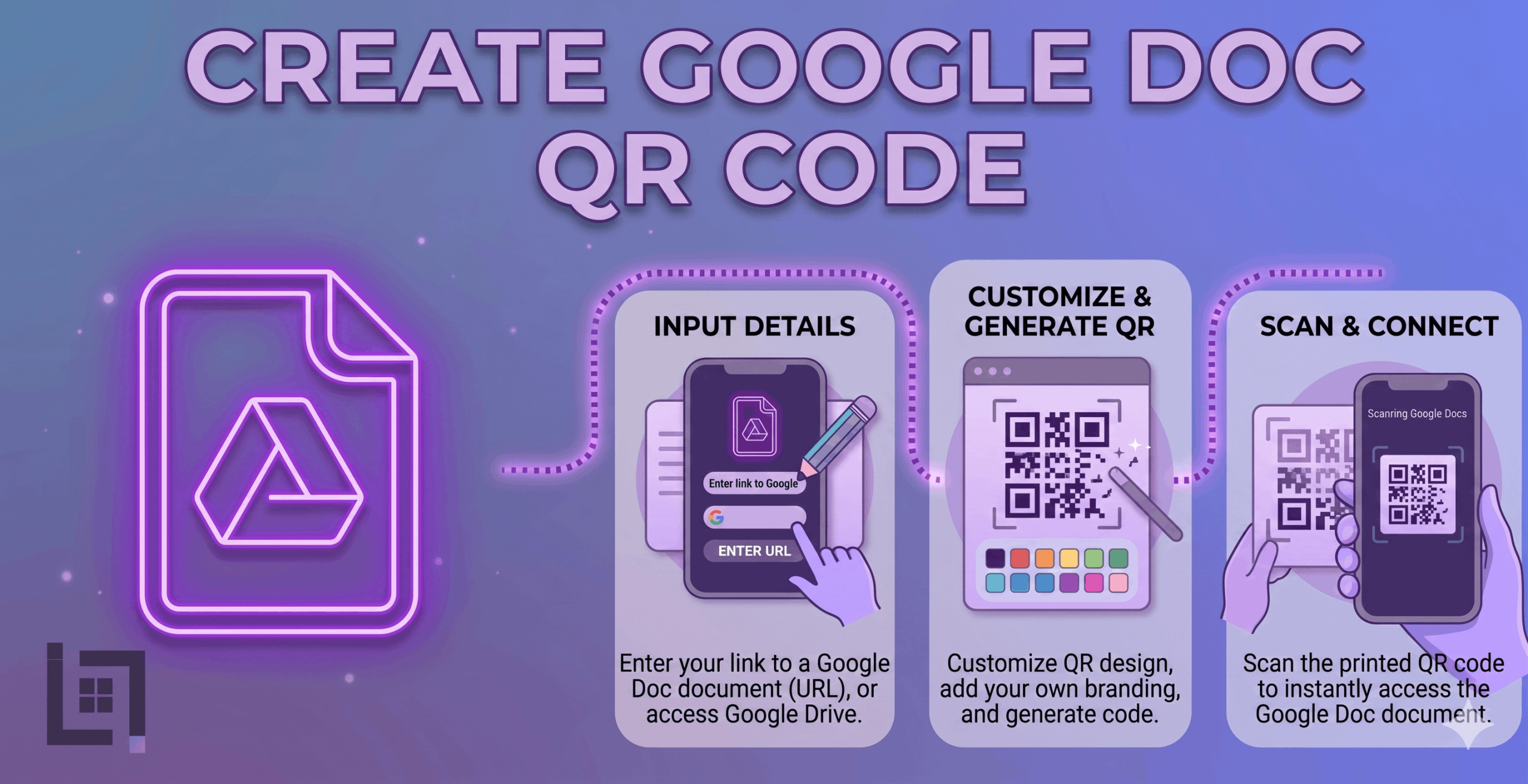
    How to Create Google Doc QR Code Free

    The generation process is quick and efficient for your business. Follow these exact steps to generate your professional code now:

    1. Access the Generator: Log in to your ScanMyQR dashboard right away. Then, navigate to the specific URL upload section.
    2. Prepare Your Document: Open your Google Doc. You must change the sharing permissions to “Anyone with the link can view.” Copy that link.
    3. Input the Link: Paste your copied Google Doc URL into the generator field. Specifically, ensure you copy the entire link.
    4. Upload Your Brand Mark: Click the button to add your official logo. This allows you to create a code that is unique to your company.
    5. Generate and Customize: Click the purple generate QR code button now. Consequently, you can download your high-resolution image file. Finally, it is now ready for high-quality printing today.

    Where to Place Your Cloud Document Codes

    Place your codes where your users naturally want to learn. Strategic placement ensures a much higher rate of engagement. Furthermore, it guides the customer journey with total precision.

    Professional Instruction Manuals

    Do not print massive paper booklets for your new products. Instead, add a single branded code to the box that links to a Google Doc manual. By doing this, you keep the packaging clean. Furthermore, it invites the person to see your most updated instructions. Moreover, it makes your product support much more memorable. Consequently, users can find help instantly on their phones.

    Create Google Doc QR Code Free for Educational Syllabuses

    In the education sector, a code can lead to daily study materials. Furthermore, it can link to full classroom schedules hosted on Google Docs. As a result, students stay engaged and organized. Consequently, their overall learning experience feels more professional. Additionally, it creates a modern look for your coaching center. Therefore, you stand out as a tech-forward educator.

    Restaurant Menus and Daily Specials

    Place a code on your physical restaurant tables. Specifically, link it to a Google Doc containing your daily specials. Consequently, diners get a feel for your fresh offerings instantly. In turn, you create an efficient dining trip. Ultimately, this leads to higher customer satisfaction scores. Furthermore, it allows for instant updates to your menu without reprinting table cards.

    Building Trust Through Visual Clarity

    A scan is just the start of the user journey. In fact, the quality of your document formatting closes the deal. Users scan your code looking for expert answers. To succeed, you must ensure your Google Doc is mobile-friendly. Using clean formatting shows you are a reliable partner. Specifically, it provides a clear record of your quality.

    This transparency, in turn, builds a layer of reliability. Ultimately, it turns a simple scan into a long-term relationship. Furthermore, consistent real-time updates keep that trust alive over time. Consequently, your brand becomes a household name for clients. In addition, high-quality text documents reflect your professional standards. Therefore, you should avoid messy or poorly formatted paragraphs. Specifically, mobile-friendly text sizing is essential for scan success.

    3 Golden Rules for Cloud QR Success

    To ensure your codes work perfectly, follow these rules. Consistency is the key to maintaining a high scan rate.

    1. Always Use a Call to Action: A code without instructions is a mystery box. Therefore, tell users why they should scan it (e.g., “Scan for the Study Guide”).
    2. Prioritize Size and Contrast: If the code is too small or light, cameras fail. Specifically, keep it at least 2cm wide with dark colors on a light background.
    3. The Pre-Flight Test: Never skip this final step before printing. Always scan the code yourself using different mobile devices to ensure the Google Doc opens.

    Troubleshooting Common Scan Issues

    Technical hiccups can occur even with the best tools. For instance, one common issue is the permission error. In fact, if you forget to change the Google Doc to “Anyone with the link,” the code fails and asks for a login. However, you can fix this instantly on your Google Drive. Consequently, you can fix access without re-printing physical assets. Furthermore, another common issue is poor physical placement.

    Specifically, avoid placing codes behind highly reflective glass. Additionally, dimly lit areas also make scanning very difficult. Therefore, ensure your codes are placed in well-lit spots. Moreover, ensure the Google Doc is formatted for easy reading. As a result, users with smaller screens can still view it comfortably. Ultimately, a fast-loading, well-formatted file ensures a better user experience.

    Data-Driven Decisions for Growth

    Using dynamic QR codes allows you to gather vital intelligence. Specifically, you can see the time and location of every scan. This helps you, in turn, identify peak traffic hours. Consequently, you can then focus your efforts on those times. Therefore, data takes the guesswork out of your management.

    Ultimately, it empowers you to grow with total confidence. In addition, you can see which physical posters work best. As a result, you can optimize your marketing budget effectively. You make smarter choices based on real user behavior. Specifically, you can see which documents are most popular. Furthermore, this helps you refine your future content strategy. Consequently, you provide exactly what your customers need.

    Ready to Supercharge Your Business

    In a competitive market, you cannot afford digital friction. Removing barriers to your data makes it easy to trust. A professional create Google doc QR code free strategy is more than convenience. Specifically, it shows your business is modern and responsive. By digitizing your text distribution, you save money and time.

    If you’re looking for more ways to connect with customers using QR codes, check out our detailed guide on How to Create a Facebook QR code. It covers everything you need to know about setting up a Facebook QR code to let customers reach you instantly with just a scan.

    If you’re looking for more ways to connect with customers using QR codes, check out our detailed guide on How to Create a Facebook qr code. It covers everything you need to know about setting up a Facebook qr code to let customers reach you instantly with just a scan

  • How to Create Calendar QR Code Free

    How to Create Calendar QR Code Free

    How to Create Calendar QR Code Free

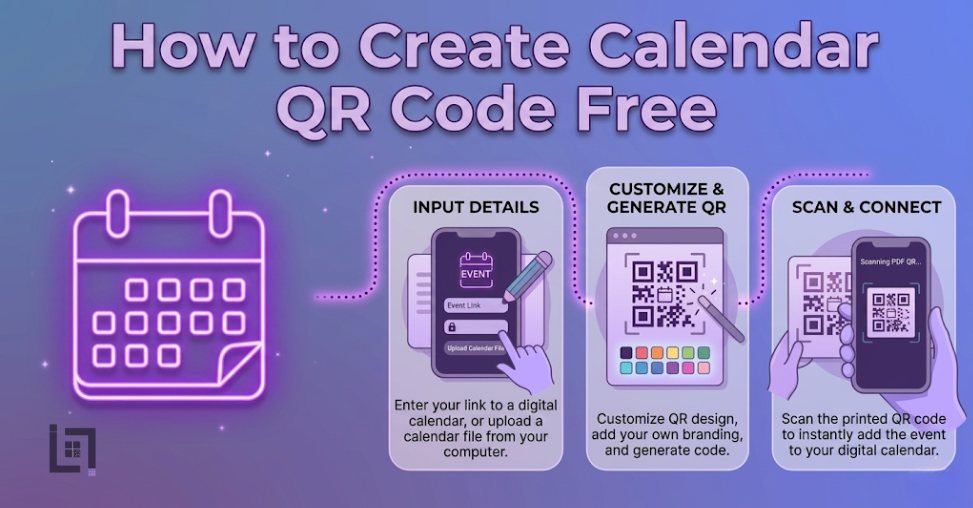
    Managing a successful event schedule in todays world requires more than just a date and a venue because the digital landscape is noisier than ever before. Currently, event organizers and business owners face a massive hurdle in converting physical impressions into actual attendance. Specifically, when a potential attendee sees your poster or social media ad, they often intend to come, but they forget to add the details to their personal schedules. Consequently, your conversion rates drop because of simple human forgetfulness. Therefore, understanding How to Create Calendar QR Code Free represents the most effective way to remove this friction and bridge the gap between interest and action. In this deep-dive guide, we explore the technical infrastructure, strategic placement, and psychological triggers that turn a simple scan into a locked-in appointment.

    The Evolution of Event Entry and The Friction Gap

    In previous years, marketers relied on the hope that users would manually type event details into their phones. However, this old method creates too many opportunities for error and distraction. Specifically, a user might get a notification while opening their calendar app, causing them to abandon the entry process entirely. Moreover, if your event has a complex name or location, the likelihood of a typo increases. Consequently, your guests might show up at the wrong place or at the wrong time. Ultimately, these small points of friction destroy your return on investment.

    Instead, a calendar-specific barcode automates the entire transaction. When a user points their camera at your code, the smartphone immediately recognizes the standardized calendar format. Subsequently, the device prompts the user to save the event with one single tap. This transition from manual entry to automated syncing is why businesses are searching for ways to implement this technology right now. Furthermore, as mobile-first markets like India continue to dominate the global digital economy, providing instant solutions is no longer optional; it is a fundamental requirement for success.

    Why Your Business Needs This Solution Immediately

    Before we walk through the technical generation process, you must understand the strategic advantages of this tool. If you are not using automated scheduling, you are essentially leaving your event attendance to chance.

    First, you guarantee data integrity across all user devices. Specifically, whether your attendee uses an iPhone or an Android, the code communicates the exact start and end times regardless of the operating system. Consequently, everyone receives the same accurate information. Therefore, you prevent the chaos of mismatched schedules.

    Second, you benefit from the “set and forget” psychology. When someone saves your event to their calendar, they often receive automated reminders one hour or one day before the start. Thus, your brand stays at the top of their mind without you having to send a single follow-up email. Moreover, these system-level notifications are far more effective than social media posts, which algorithms often hide.

    Third, you drastically reduce your long-term marketing costs. Specifically, when you use a dynamic solution, you can update your event location or time on the backend without reprinting your physical flyers. Consequently, you save thousands on printing and distribution fees. This flexibility is particularly vital for growing startups that may need to adjust venues based on registration numbers.

    Deep Dive Step-by-Step: The Professional Generation Process

    Generating a high-quality, professional-grade barcode is a straightforward process when you use the right infrastructure. Specifically, our ScanMyQR platform provides the specific tools needed to handle complex data fields efficiently.

    Step 1: Data Preparation and Time Zone Alignment

    Initially, you must gather every piece of relevant information. This includes the event title, the full physical address or digital link, and the exact duration. Furthermore, you should pay close attention to time zones, especially if you are hosting a webinar or a global event. If you enter the wrong time zone, your attendees will miss the event entirely. Subsequently, write a short, persuasive description that reminds the user why they wanted to attend in the first place.

    Step 2: Utilizing the Generator Interface

    Next, navigate to the creation dashboard and select the calendar category. Once you arrive at this section, you will see fields specifically designed for event data. Type your information carefully into each box. Additionally, ensure that your location data is specific enough for a GPS application to recognize it. Consequently, when a user scans the code, they can also get one-tap directions to your venue.

    Step 3: Visual Branding and Customization

    Many users ask us How to Create Calendar QR Code Free without making it look like a generic, robotic square. Fortunately, modern tools allow you to inject your brand personality into the design. Specifically, you should adjust the color palette to match your company logo. Moreover, you can change the corner styles and the internal pattern to make the code look more inviting. Therefore, the barcode becomes an integrated part of your marketing design rather than an eyesore. [Image Placeholder: A side-by-side comparison of a boring black-and-white QR code versus a branded, colorful calendar QR code].

    Step 4: Testing and Verification and Create Calendar QR Code Free

    Finally, you must conduct a pre-flight test before you print a single copy. Specifically, scan your generated code with multiple devices to ensure the event drafts correctly. Consequently, you confirm that the title appears correctly and the notification triggers are active. Only after you verify these details should you download the high-resolution PNG or SVG file for your design team.

    Strategic Placement for High-Impact Results After Create Calendar QR Code Free

    Even the most beautiful barcode will fail if nobody sees it. Therefore, you must think like your customer and place the code where they have the time and motivation to scan.

    In the Indian market, for instance, placing these codes at the entrance of local festivals or near UPI payment counters is incredibly effective. Specifically, as people wait for a transaction to complete, they have a few seconds of idle time. Consequently, they are much more likely to scan a code for a future event.

    Furthermore, consider these high-conversion locations:

    • Direct Mail and Invitations: Placing the code on a physical wedding or wedding invitation ensures guests save the date before they lose the paper.
    • Storefront Windows: If you are hosting an in-store sale, place the code at eye level on your front window. Thus, even after-hours window shoppers can save the sale date.
    • Email Signatures: Add a small calendar code to your professional email signature. Specifically, this allows clients to save recurring meeting times or special webinars with every communication you send.
    • Product Packaging: If you sell physical goods, include a code that schedules a “How-to-Use” live session. Consequently, you improve your customer onboarding experience and build long-term loyalty.

    Common Mistakes That Kill Your Conversion Rates After Create Calendar QR Code Free

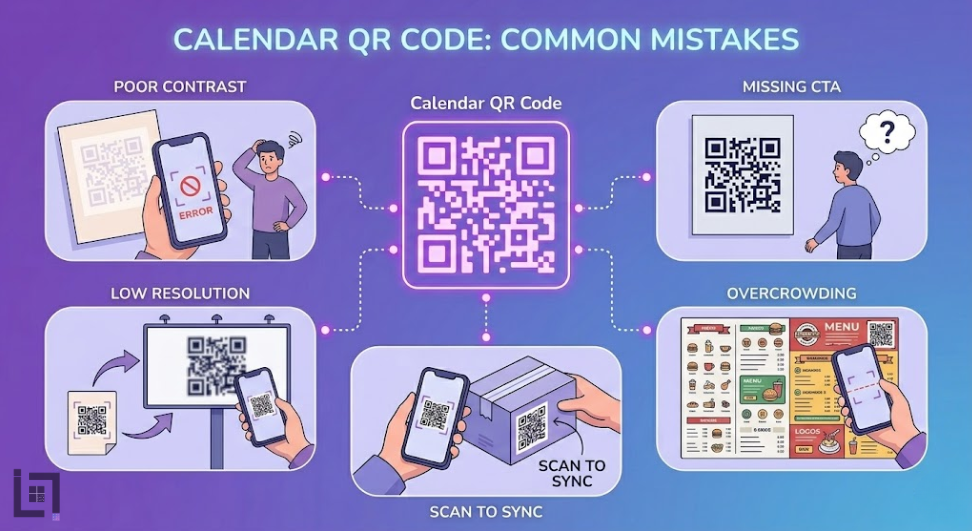
    While the process is simple, many businesses make avoidable errors that prevent scans. Specifically, you must avoid these four major pitfalls:

    Create Calendar QR Code Free
    1. Poor Contrast: If you make the code too light or use colors that blend into the background, smartphone cameras will struggle to read it. Consequently, the user gets frustrated and walks away.
    2. Missing Call to Action (CTA): A code sitting alone is a mystery. Therefore, you must always include text that says, Scan to Save the Event! or Don’t Miss Out – Add to Calendar.
    3. Low Resolution: If you download a small file and stretch it to fit a poster, the code will become blurry. Thus, the camera will fail to decode the information. Always use SVG files for large prints.
    4. Overcrowding: Do not place the code too close to other text or images. Specifically, give it quiet zone space so the scanner can identify the boundaries of the barcode clearly.

    Advanced Features: Dynamic vs. Static Codes

    As you learn How to Create Calendar QR Code Free, you will encounter the choice between static and dynamic types.

    A static code embeds the data directly into the pattern. Specifically, once you print it, you cannot change it. However, a dynamic code allows you to change the destination data at any time. For instance, if your guest speaker changes or the event moves from 2:00 PM to 4:00 PM, a dynamic code lets you update that information instantly. Consequently, you don’t have to throw away thousands of printed flyers. Moreover, dynamic codes offer analytics, allowing you to see exactly how many people scanned your code and from which location.

    Frequently Asked Questions (FAQ)For Create Calendar QR Code Free

    Can I create a code for a recurring meeting? Yes, you can. Specifically, most calendar formats support recurring rules. However, it is often better to create a code for each specific major event to avoid confusion.

    Which calendar apps are supported? The code supports all major applications, including Google Calendar, Apple Calendar, and Outlook. Therefore, you can reach 100% of your smartphone-using audience.

    Is there a limit to how many events I can create? No, you can generate as many codes as you need for various campaigns. Specifically, our tool is built for high-velocity builders who need to ship multiple systems quickly.

    Does the user need a special app to scan? No, in 2026, almost every native smartphone camera includes a built-in scanner. Consequently, the experience is completely frictionless for the end user.

    Can I add a link to a Zoom or Google Meet? Absolutely. Furthermore, adding the meeting link directly into the location field allows users to join the call with one tap when the reminder pops up on their screen.

    How do I track my scan data? By using a professional dashboard, you can view real-time analytics. Specifically, you can see which posters or flyers are driving the most attendance. Thus, you can optimize your marketing spend.

    What is the best size for printing? For business cards, aim for at least 2cm. For posters, the code should be large enough to be seen from the typical walking distance. Ultimately, bigger is usually safer for scannability.

    Can I include multiple dates in one code? Generally, one code should represent one specific event to ensure a clean user experience. However, you could link to a landing page that contains multiple calendar download buttons instead.

    Will the code work in areas with poor internet? The initial scan usually requires a data connection to load a dynamic link. However, a static calendar code contains the data within the pattern and can often work offline.

    Can I use this for university or school schedules? Yes, this is an excellent use case. Specifically, students can scan a syllabus and have all their exam dates populated instantly. Consequently, you reduce the number of missed deadlines.

    The Human Psychology Behind the Scan

    Ultimately, your goal is to trigger a specific behavior. People scan things because they believe it will save them time or provide immediate value. By offering a “Calendar Sync” option, you are promising the user that they won’t have to worry about remembering your event. Specifically, you are taking a mental load off their shoulders. Therefore, when you present your code, frame it as a benefit rather than a task. Specifically, use language like “Secure your spot” or “Sync for instant reminders.” Consequently, you tap into the user’s desire for organization and efficiency.

    Conclusion: Finalizing Your Growth Strategy

    Mastering How to Create Calendar QR Code Free is a vital skill for any modern marketer or developer. By removing the manual entry barrier, you ensure that your audience actually follows through on their intent to attend. Stop letting your hard-earned leads slip through the cracks of a busy schedule. Instead, leverage the power of automated syncing to lock in your attendance and grow your brand. Whether you are hosting a local workshop in India or a global tech summit, the principles of friction-free scheduling remain the same. Start generating your professional event codes today and watch your engagement metrics transform instantly.

    If you’re looking for more ways to connect with customers using QR codes, check out our detailed guide on How to Create a Facebook qr code. It covers everything you need to know about setting up a Facebook qr code to let customers reach you instantly with just a scan.

  • How to create PDF QR code for your business

    How to create PDF QR code for your business

    Overview

    In the fast-paced modern business landscape, efficiency remains your greatest competitive asset. If a client views your physical brochure, you have mere seconds to provide value. The primary barrier to professional growth is often physical document friction. Manual searches for specific product manuals or menus usually lead to lost interest. To solve this, you should create PDF QR code assets for your business today. These smart digital tools act as an instant bridge to your data.

    They move users from the physical world directly into your document library. This transition happens in a single second with one quick scan. Consequently, you reduce the bounce rate of potential leads significantly. Furthermore, your brand stays top of mind because information access is immediate. Ultimately, this small digital upgrade creates a massive ripple effect for your growth. Moreover, it allows you to share massive files through simple visual branding. Therefore, your marketing strategy becomes much more immersive and modern. You turn every static flyer into a dynamic, paperless touchpoint. As a result, your audience interacts with your files more frequently. This constant engagement builds a strong foundation for long-term loyalty.

    What Exactly is a PDF QR Code?

    A PDF QR code acts as a scannable bridge for your digital documents. In fact, it connects your offline marketing to your mobile files perfectly. Furthermore, scanning the code opens a PDF file on any smartphone. Consequently, it eliminates the need for users to carry heavy paper catalogs. Moreover, this tool turns passive readers into active digital participants.

    As a result, it makes sharing your brand reports or menus completely effortless. Therefore, you no longer need to rely on expensive printing services. Ultimately, your users can access your brochures with a single tap. In turn, your content consumption will likely see a steady increase. Specifically, modern users value the time you save them during work. Additionally, these codes help you stand out in a paper-heavy market. They offer a unique blend of high functionality and visual appeal. Therefore, you gain an edge over competitors using bulky paper packets.

    Why Your Business Needs a Document Scan

    Consider why this tool is vital for modern mobile entrepreneurs. It offers several key advantages for your consolidated digital strategies. Specifically, it streamlines how you distribute technical data and sales guides.

    create PDF QR code and get Centralized Document Access

    High-quality platforms house all your digital assets in one place. To simplify this journey, you must create PDF QR code links right now. By doing so, a single code allows users to see your story. In turn, this level of organization builds deep trust with clients. As a result, they see that your brand is professional and modern.

    Moreover, it gives you a direct line to their mobile screens. Specifically, you can send detailed price lists that land right in their pocket. Consequently, your conversion rates will reflect this new level of digital intimacy. Furthermore, images in PDFs create an emotional bond text cannot match. Therefore, you provide a rich media experience without the printing cost. Ultimately, centralized access ensures your latest version is always available to everyone.

    create PDF QR code and get Zero Search Friction for Clients

    Users do not need to hunt for your specific download page. Instead, they scan the code and your document appears instantly. Consequently, this removes every barrier between the user and your data. Ultimately, high friction always leads to a lower reader count. Therefore, you must make the path as smooth as possible.

    In addition, this ease of use encourages users to save your files. As a result, your brand reach grows without extra distribution spend. Moreover, you capture their attention before they look at other brands. Thus, you secure more loyal followers with very little effort. Specifically, a direct scan bypasses slow search engine results entirely. Furthermore, users appreciate the direct nature of a scan-to-read document. Consequently, you foster a reputation for being helpful and efficient.

    The Strategic Power of Custom Design

    One unique feature of modern codes is the use of graphics. In fact, you can link your QR code to a PDF. Furthermore, this creates an interactive experience for all your customers. Consequently, they are not just reading; they are feeling your vibe. Moreover, this type of engagement is highly memorable for them.

    As a result, users are more likely to remember your shop. Therefore, your marketing becomes an experience rather than a flat ad. Ultimately, this builds a fun and loyal community around you. Specifically, your logo defines the mood of your brand perfectly. Furthermore, custom designs increase the likelihood of a scan. Consequently, you maximize the utility of every printed marketing asset. In addition, branded codes look much better on high-end business cards.

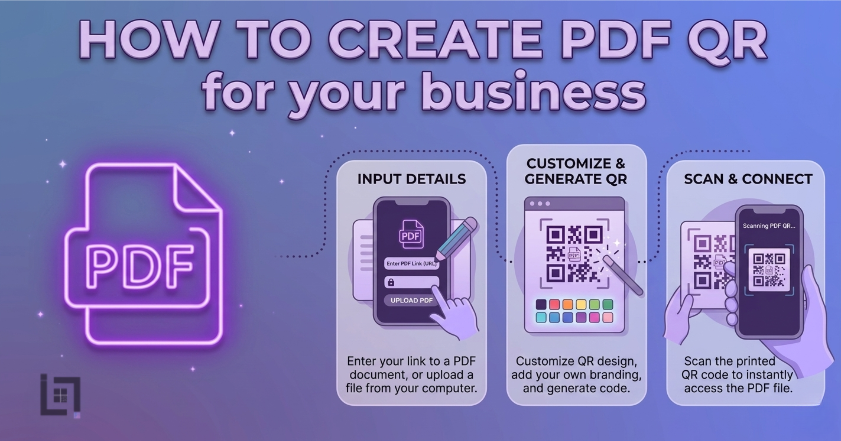
    How to Create PDF QR Code

    The process is quick and efficient for your business. Follow these steps to generate your professional code now:

    1. Access the Generator: Log in to your ScanMyQR dashboard right away. Then, navigate to the specific PDF upload section.
    2. Upload Your Document: Select your PDF file from your computer or cloud. Ensure the file size is optimized for fast mobile loading.
    3. Refine the Details: To create PDF QR code labels that work, check your file name. Specifically, ensure the title is clear and professional.
    4. Upload Your Brand Mark: Click the button to add your official logo. This allows you to create a code that is unique.
    5. Generate and Customize: Click the purple generate QR code button now. Consequently, you can download your high-resolution image file. Finally, it is now ready for high-quality printing today.

    Where to Place Your PDF Codes

    Place your codes where your users naturally want to learn. Strategic placement ensures a much higher rate of engagement. Furthermore, it guides the customer journey with total precision.

    create PDF QR code

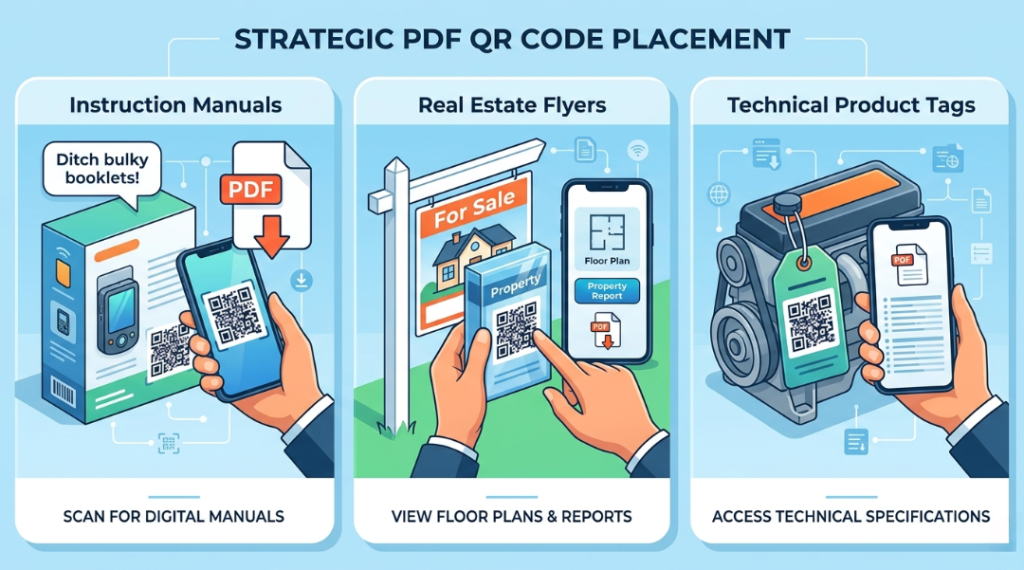
    Professional Instruction Manuals

    Do not print massive booklets for your new products. Instead, add a single branded code to the box. By doing this, you keep the packaging clean. Furthermore, it invites the person to see video guides. Moreover, it makes your product support much more memorable. Consequently, users can find help instantly on their phones.

    create PDF QR code and get Modern Real Estate Flyers

    In property sales, a code can lead to floor plans. Furthermore, it can link to full property history reports. As a result, buyers stay engaged while they tour homes. Consequently, their overall buying experience feels more professional. Additionally, it creates a modern look for your listing materials. Therefore, you stand out as a tech-forward agent.

    Technical Product Data Sheets

    Place a code on your physical product sample tags. Specifically, link it to a full specification PDF file. Consequently, buyers get a feel for technical details instantly. In turn, you create a multi-sensory shopping trip. Ultimately, this leads to higher customer satisfaction scores. Furthermore, it allows for instant updates to technical data.

    Building Trust Through Visual Clarity

    A scan is just the start of the user journey. In fact, the quality of your branding closes the deal. Users scan your code looking for expert answers. To succeed, you must use professional tools. Using these tools shows you are a reliable partner. Specifically, it provides a clear record of your quality.

    This transparency, in turn, builds a layer of reliability. Ultimately, it turns a simple scan into a relationship. Furthermore, consistent updates keep that trust alive over time. Consequently, your brand becomes a household name for clients. In addition, high-quality PDFs reflect your professional standards. Therefore, you should avoid blurry or poorly formatted documents. Specifically, mobile-friendly layouts are essential for scan success.

    3 Golden Rules for PDF QR Success

    To ensure your codes work perfectly, follow these rules. Consistency is the key to maintaining a high scan rate.

    • Always Use a Call to Action: A code without instructions is a mystery box. Therefore, tell users why they should scan it.
    • Prioritize Size and Contrast: If the code is too small, cameras fail. Specifically, keep it at least 2cm wide on items.
    • The Pre-Flight Test: Never skip this final step before printing. Always scan the code yourself using different mobile devices.

    Troubleshooting Common Scan Issues

    Technical hiccups can occur even with the best tools. For instance, one common issue is a dead link. In fact, if you delete the file, the code fails. However, professional tools allow you to update the PDF. Consequently, you can fix files without re-printing assets. Furthermore, another common issue is poor physical placement.

    Specifically, avoid placing codes behind highly reflective glass. Additionally, dimly lit areas also make scanning very difficult. Therefore, ensure your codes are placed in well-lit spots. Moreover, ensure the PDF file size is not too large. As a result, users with slow data can still view it. Ultimately, a fast-loading file ensures a better user experience.

    Data-Driven Decisions for Growth

    Using QR codes allows you to gather vital intelligence. Specifically, you can see the time of every scan. This helps you, in turn, identify peak traffic hours. Consequently, you can then focus your efforts on those times. Therefore, data takes the guesswork out of your management.

    Ultimately, it empowers you to grow with total confidence. In addition, you can see which physical posters work best. As a result, you can optimize your marketing budget effectively. You make smarter choices based on real user behavior. Specifically, you can see which documents are most popular. Furthermore, this helps you refine your future content strategy. Consequently, you provide exactly what your customers need.

    Ready to Supercharge Your Business

    In a competitive market, you cannot afford digital friction. Removing barriers to your data makes it easy to trust. A professional create PDF QR code strategy is more than convenience. Specifically, it shows your business is modern and responsive. By digitizing your documents, you save money and time.

    If you’re looking for more ways to connect with customers using QR codes, check out our detailed guide on How to Create a Facebook qr code. It covers everything you need to know about setting up a Facebook qr code to let customers reach you instantly with just a scan.

  • How to create Amazon QR code for your Business

    How to create Amazon QR code for your Business

    Overview

    In the hyper-competitive world of e-commerce, every millisecond counts toward your conversion rate. If a potential customer sees your product on social media or a physical flyer, you have a fleeting window to turn that interest into a sale. The biggest obstacle to scaling your storefront is digital friction—the awkward gap between a customer seeing your product and actually landing on the “Add to Cart” page. Manual searches for a specific ASIN or brand name often lead to lost interest or, worse, customers finding a competitor’s listing instead. To solve this and ensure your traffic stays within your ecosystem, you should create Amazon QR code assets for your business today. These digital gateways act as an instant bridge to your product listings.

    They move users from the physical world or external social platforms directly into the Amazon app. This transition happens in a single second with one scan, bypassing the mobile browser and landing them right where the “Buy Now” button lives. Consequently, you reduce the bounce rate of potential leads significantly. Furthermore, your brand stays top of mind because the path to purchase is immediate and frictionless. Ultimately, this small digital upgrade creates a massive ripple effect for your storefront’s growth and organic ranking.

    Moreover, utilizing these tools allows you to share your product aesthetic through cohesive visual branding. Therefore, your marketing strategy becomes much more immersive and modern, turning every shipping box or insert into a dynamic touchpoint. As a result, your audience interacts with your listings more frequently. This constant engagement builds a strong foundation for long-term loyalty and recurring revenue.

    What Exactly is an Amazon QR Code?

    An Amazon QR code acts as a scannable bridge for your e-commerce identity. In fact, it connects your offline marketing—such as packaging, business cards, or print ads—to your Amazon store presence perfectly. Furthermore, scanning the code triggers a “deep link” that opens the Amazon app directly on any smartphone, rather than a slow-loading web browser. Consequently, it eliminates the need for users to type complex URLs or search for generic keywords.

    Moreover, this tool turns passive observers into active shoppers. As a result, it makes sharing your brand vision and specific product benefits completely effortless. Therefore, you no longer need to rely on printed text or long instructions alone. Ultimately, your users can access your storefront with a single tap. In turn, your unit session percentage will likely see a steady and measurable increase.

    Specifically, Amazon customers value the time you save them during their busy day. Additionally, these codes help your brand stand out in a crowded marketplace where “search find buy” methods are becoming increasingly cumbersome. They offer a unique blend of functionality and professional appeal. Therefore, you gain a significant edge over competitors who are still using standard, plain text links.

    Why Your E-commerce Brand Needs a Visual Scan

    Consider why this tool is vital for modern Amazon FBA (Fulfillment by Amazon) sellers and vendors. It offers several key advantages for your consolidated branding and ranking strategies.

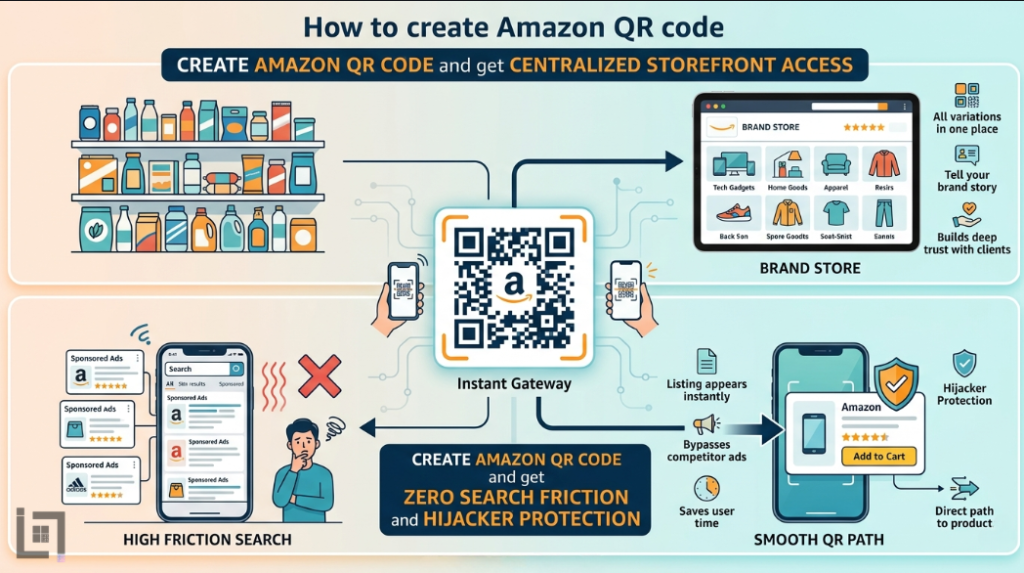
    create Amazon QR code and get Centralized Storefront Access

    High-quality platforms allow you to house all your product variations and brand story in one place. To simplify the journey for your customers, you must create Amazon QR code links right now. By doing so, a single scan allows users to see your entire brand catalog. In turn, this level of organization builds deep trust with new clients who may be wary of unknown third-party sellers.

    create Amazon QR code

    As a result, they see that your brand is professional, established, and tech-savvy. Moreover, it gives you a direct line to their mobile screens. Specifically, you can send them to specific “Brand Store” pages where you have total control over the layout. Consequently, your conversion rates will reflect this new level of professional intimacy. Furthermore, visual cues and easy navigation create an emotional bond that a standard search result cannot match.

    create Amazon QR code and get Zero Search Friction and Hijacker Protection

    Users do not need to hunt for your specific product among thousands of sponsored ads. Instead, they scan the code and your listing appears instantly. Consequently, this removes every barrier between the user and your “Add to Cart” button. Ultimately, high friction—such as having to scroll past five competitor ads—always leads to a lower sales velocity.

    Therefore, you must make the path to your product as smooth as possible. In addition, this ease of use encourages users to share your product with friends via a quick scan. As a result, your organic reach grows without extra PPC (Pay-Per-Click) spend. Moreover, you capture their attention before they get distracted by lightning deals from other brands. Thus, you secure more loyal customers with very little effort.

    The Strategic Power of Custom Design

    One unique feature of modern codes is the use of integrated graphics. In fact, you can link your QR code directly to a promotional landing page or a “Social Media Promo Code” page on Amazon. Furthermore, this creates an interactive experience for your customers that feels premium. Consequently, they are not just buying a product; they are experiencing your brand’s vibe.

    Moreover, this type of engagement is highly memorable for shoppers who receive dozens of packages a week. As a result, users are more likely to remember your specific shop for future needs. Therefore, your packaging becomes an experience rather than just a cardboard box. Ultimately, this builds a fun and loyal community around your brand. Specifically, your logo within the QR code defines the mood of your brand perfectly and builds “Scan Confidence.”

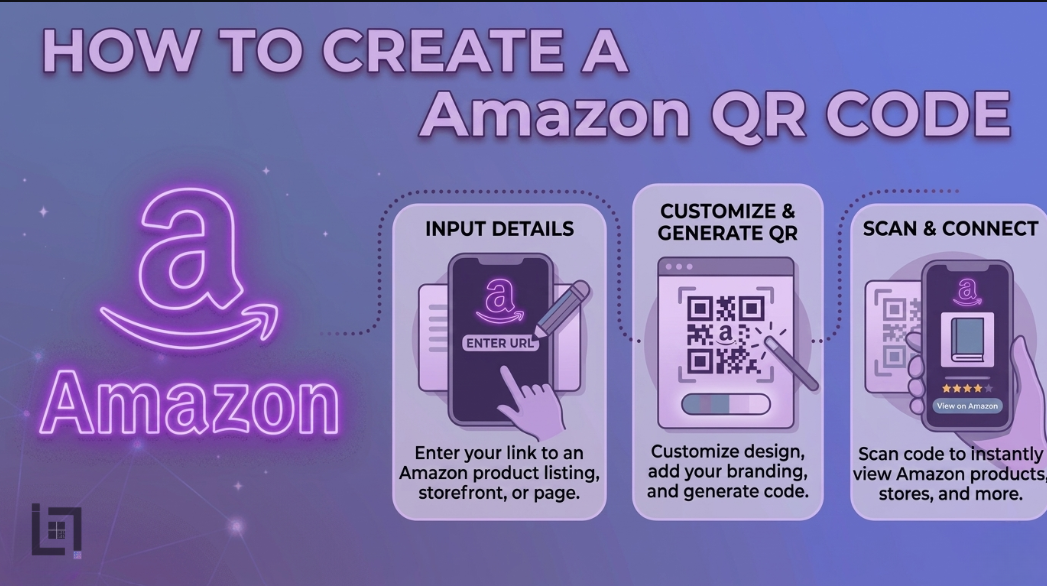
    How to Create Amazon QR Code

    The process is quick and efficient, even for those who are not tech-oriented. Follow these steps to generate your professional Amazon-specific code now:

    1. Access the Professional Generator: Log in to your ScanMyQR dashboard or preferred generator right away. Then, navigate to the specialized “E-commerce” or “URL” section.
    2. Select Content Type: Choose the Website or URL icon. To truly succeed, ensure you are using an Amazon Attribution link if you are a Brand Registered seller to track your external traffic metrics.
    3. Find Your Destination Link: To create Amazon QR code assets that actually convert, get your unique product link or Storefront URL from your Amazon Seller Central dashboard. Ensure the link leads to a mobile-optimized page.
    4. Upload Your Brand Mark: Click the button to add your official logo to the center of the code. This allows you to create a code that is visually distinct from generic, “scammy-looking” codes.
    5. Generate and Customize: Click the generate button now. Consequently, you can download your high-resolution image file (SVG or PNG). Finally, it is now ready for high-quality printing on your product inserts or shipping labels today.

    create Amazon QR code But Where to Place?

    Strategic placement ensures a much higher rate of engagement and more frequent “Subscribe & Save” sign-ups.

    Product Packaging and Inserts

    Do not let your packaging go to waste. Add a branded code to your “Thank You” inserts. By doing this, you keep the relationship alive after the first sale. Furthermore, it invites the person to leave a review or see your other products. Moreover, it makes the unboxing experience much more interactive.

    Retail and Event Pop-ups

    If you sell at local markets or trade shows, a code can lead to your Amazon Storefront. Furthermore, it can link to a specific “Bundle” deal you are running. As a result, customers can buy on the spot even if you run out of physical stock. Consequently, your sales never stop, even when your inventory is low.

    Building Trust Through Visual Clarity

    A scan is just the start of the user journey; the quality of your branding closes the deal. Users scan your code looking for convenience and expert quality. To succeed, you must use professional tools that ensure the QR code doesn’t pixelate when printed. Using these high-end tools shows you are a reliable, professional partner in the eyes of the consumer.

    Specifically, it provides a clear record of your commitment to quality. This transparency, in turn, builds a layer of reliability that “generic” sellers lack. Ultimately, it turns a simple scan into a long-term customer relationship. Furthermore, consistent updates to your Amazon Storefront keep that trust alive over time. Consequently, your brand becomes the go-to choice in your niche.

    3 Golden Rules for Amazon QR Success

    To ensure your codes work perfectly and don’t result in frustrated customers, follow these rules.

    • Always Use a Call to Action: A code without a “Scan for 10% Off” or “Scan to See Tutorial” is a mystery. Therefore, tell users exactly why they should scan it.
    • Prioritize Size and Contrast: If the code is printed too small on a tiny product label, cameras will fail to focus. Specifically, keep it at least 2cm wide for standard scanning.
    • The Pre-Flight Test: Never skip this final step before sending 10,000 units to an Amazon warehouse. Always scan the code yourself using both iOS and Android devices to ensure the deep link works.

    Data-Driven Decisions for Growth

    Using specialized QR codes allows you to gather vital intelligence regarding your “Off-Amazon” marketing efforts. Specifically, you can see which geographic regions are scanning your flyers the most. This helps you, in turn, identify where to focus your next ad campaign. Consequently, you can then focus your budget on high-performing areas. Therefore, data takes the guesswork out of your brand management.

    Ultimately, it empowers you to grow with total confidence. In addition, you can see which product inserts result in the most repeat visits. As a result, you can optimize your marketing budget effectively and stop wasting money on flyers that don’t convert. You make smarter, faster choices based on real-world user behavior.

    Ready to Supercharge Your Amazon Business?

    In a competitive market, you cannot afford digital friction or lost traffic. Removing barriers to your listing makes it easy for customers to trust and buy from you. A professional Amazon QR code is more than a convenience; it is a vital conversion tool. Specifically, it shows your business is modern, responsive, and customer-centric.

    If you’re looking for more ways to connect with customers using QR codes, check out our detailed guide on how to create a Facebook QR code. It covers everything you need to know about setting up a Facebook QR code to let customers reach your community instantly with just a scan. Combining these tools will ensure your brand dominates both social media and the world’s largest marketplace.

    If you’re looking for more ways to connect with customers using QR codes, check out our detailed guide on How to Create a Facebook qr code. It covers everything you need to know about setting up a Facebook qr code to let customers reach you instantly with just a scan.

  • How to create a logo QR code for your business

    How to create a logo QR code for your business

    Overview

    In the modern business world, speed is your primary advantage. If a client sees your flyer, you have seconds to connect. The biggest obstacle to growth is digital friction. Manual searches for a specific brand often lead to lost interest. To solve this, you should create a logo QR code for your business today. These assets act as an instant gateway to your identity.

    They move users from the physical world into your digital ecosystem. This transition happens in a single second with one scan. Consequently, you reduce the bounce rate of potential leads significantly. Furthermore, your brand stays top of mind because the connection is immediate. Ultimately,create a logo QR code this small digital upgrade creates a massive ripple effect for your growth.

    Moreover, it allows you to share your aesthetic through visual branding. Therefore, your marketing strategy becomes much more immersive and modern. You turn every static surface into a dynamic touchpoint. As a result, your audience interacts with your brand more frequently. This constant engagement builds a strong foundation for long-term loyalty.

    What Exactly is a Logo QR Code?

    A logo QR code acts as a scannable bridge for your corporate identity. In fact, it connects your offline marketing to your digital presence perfectly. Furthermore, scanning the code opens your website on any smartphone. Consequently, it eliminates the need for users to type complex URLs.

    create a logo QR code

    Moreover, this tool turns passive observers into active participants. As a result, it makes sharing your brand vision completely effortless. Therefore, you no longer need to rely on printed text alone. Ultimately, your users can access your services with a single tap. In turn, your site traffic will likely see a steady increase.

    Specifically, users value the time you save them during their busy day. Additionally, these codes help you stand out in a crowded market. They offer a unique blend of functionality and visual appeal. Therefore, you gain an edge over competitors using standard, plain codes.

    Why Your Business Needs a Visual Scan

    Consider why this tool is vital for modern entrepreneurs. It offers several key advantages for your consolidated branding strategies.

    create a logo QR code and get Centralized Brand Access

    High-quality platforms house all your brand assets in one place. To simplify this, you must create a logo QR code right now. By doing so, a single code allows users to see your story. In turn, this level of organization builds deep trust with clients.

    As a result, they see that your brand is professional and modern. Moreover, it gives you a direct line to their mobile screens. Specifically, you can send promotions that land right in their pocket. Consequently, your conversion rates will reflect this new level of intimacy. Furthermore, images create an emotional bond that text cannot match.

    create a logo QR code and get Zero Search Friction

    Users do not need to hunt for your specific social media pages. Instead, they scan the code and your profile appears instantly. Consequently, this removes every barrier between the user and your brand. Ultimately, high friction always leads to a lower engagement count.

    Therefore, you must make the path as smooth as possible. In addition, this ease of use encourages users to share your content. As a result, your organic reach grows without extra ad spend. Moreover, you capture their attention before they get distracted by others. Thus, you secure more loyal followers with very little effort.

    create a logo QR code and get Professional Brand Image

    Using custom codes shows your business is modern and tech-savvy. Specifically, it signals to clients that you value their limited time. Therefore, professionalism is often judged by how easily people find you. Furthermore, a branded QR code looks much better than a plain link.

    In fact, it becomes a piece of your visual identity. Ultimately, it sets you apart from old-fashioned competitors. Additionally, it adds a creative layer to your physical ads. Moreover, it shows you understand modern consumer habits. Consequently, your reputation as an innovator will grow quickly.

    The Strategic Power of Custom Design

    One unique feature of modern codes is the use of integrated graphics. In fact, you can link your QR code directly to a landing page. Furthermore, this creates an interactive experience for your customers. Consequently, they are not just looking; they are feeling your vibe.

    Moreover, this type of engagement is highly memorable for them. As a result, users are more likely to remember your shop. Therefore, your marketing becomes an experience rather than a flat ad. Ultimately, this builds a fun and loyal community around you. Specifically, your logo defines the mood of your brand perfectly.

    How to Create a Logo QR Code

    The process is quick and efficient for your business. Follow these steps to generate your professional code now:

    1. Access the Generator: Log in to your ScanMyQR dashboard right away. Then, navigate to the create section.
    2. Select Content Type: Choose the Website or URL icon from the selection menu. Specifically, this opens fields for your primary link.
    3. Find Your Destination Link: Get your unique site link from your browser bar. Ensure the link leads to the correct mobile-optimized page.
    4. Upload Your Brand Mark: Click the button to add your official logo. This allows you to create a logo QR code that is unique.
    5. Generate and Customize: Click the purple generate QR code button now. Consequently, you can download your high-resolution image file. Finally, it is now ready for high-quality printing today.

    Where to Place Your Branded Codes

    Place your codes where your users naturally want to learn more. Strategic placement ensures a much higher rate of engagement.

    create a logo QR code and get Professional Business Cards

    Do not clutter your card with many social links. Instead, add a single branded code to the back. By doing this, you keep the design clean. Furthermore, it invites the person to see your work. Moreover, it makes your networking much more memorable.

    Modern Restaurant Menus

    In food services, a code can lead to digital menus. Furthermore, it can link to chef stories or ingredient lists. As a result, customers stay engaged while they wait. Consequently, their overall dining experience feels more personal. Additionally, it creates a signature look for your establishment.

    Retail Product Packaging

    Place a code on your physical product tags. Specifically, link it to a tutorial video or guide. Consequently, buyers get a feel for the item instantly. In turn, you create a multi-sensory shopping trip. Ultimately, this leads to higher customer satisfaction scores.

    Building Trust Through Visual Clarity

    A scan is just the start of the user journey. In fact, the quality of your branding closes the deal. Users scan your code looking for expert answers. To succeed, you must use professional tools. Using these tools shows you are a reliable partner.

    Specifically, it provides a clear record of your quality. This transparency, in turn, builds a layer of reliability. Ultimately, it turns a simple scan into a relationship. Furthermore, consistent updates keep that trust alive over time. Consequently, your brand becomes a household name for clients.

    Community Benefits for Innovators

    Modern technology allows you to engage with fans in real-time. Moreover, a custom code makes this effort easier. For instance, fans can scan to find your latest news. In turn, this fosters a culture of brand immersion. As a result, no one has to wait for links.

    Ultimately, the conversation flows better when everyone is connected. In addition, real-time data helps you improve your services. Consequently, your community feels heard and valued by you. Specifically, you create a direct bridge to your loyal fans.

    Strategic Content for Global Engagement

    When you use a QR code, you essentially open a door. In fact, for businesses, the key to conversion is exposure. For example, imagine a real estate firm using a branded code. Specifically, the code leads to a virtual home tour. Consequently, clients feel motivated before they even visit.

    By doing so, this immediate value positions you well. Similarly, a local gym could use a code on flyers. In turn, this code could lead to a free class. Ultimately, seeing the logo is a very powerful trigger. Therefore, it makes people choose your brand over others.

    3 Golden Rules for QR Success

    To ensure your codes work perfectly, follow these rules.

    • Always Use a Call to Action: A code without instructions is a mystery box. Therefore, tell users why they should scan it.
    • Prioritize Size and Contrast: If the code is too small, cameras fail. Specifically, keep it at least 2cm wide on items.
    • The Pre-Flight Test: Never skip this final step before printing. Always scan the code yourself using different mobile devices.

    Troubleshooting Common Scan Issues

    Technical hiccups can occur even with the best tools. For instance, one common issue is a broken link. In fact, if you change your URL, the code fails. However, professional tools allow you to update the destination. Consequently, you can fix links without re-printing assets.

    Furthermore, another common issue is poor physical placement. Specifically, avoid placing codes behind highly reflective glass. Additionally, dimly lit areas also make scanning very difficult. Therefore, ensure your codes are placed in well-lit spots.

    Data-Driven Decisions for Growth

    Using QR codes allows you to gather vital intelligence. Specifically, you can see the time of every scan. This helps you, in turn, identify peak traffic hours. Consequently, you can then focus your efforts on those times. Therefore, data takes the guesswork out of your management.

    Ultimately, it empowers you to grow with total confidence. In addition, you can see which physical posters work best. As a result, you can optimize your marketing budget effectively. You make smarter choices based on real user behavior.

    Ready to Supercharge Your Business

    In a competitive market, you cannot afford digital friction. Removing barriers to your brand makes it easy to trust. A professional logo QR code is more than a convenience. Specifically, it shows your business is modern and responsive.

    If you’re looking for more ways to connect with customers using QR codes, check out our detailed guide on How to Create a Facebook qr code. It covers everything you need to know about setting up a Facebook qr code to let customers reach you instantly with just a scan.

  • How to create an Office 365 QR code for your business

    How to create an Office 365 QR code for your business

    Overview

    In the modern business world, speed is your primary advantage. If a client sees your flyer, you have seconds to connect. The biggest obstacle to growth is digital friction. Manual searches for specific documents often lead to lost interest. To solve this, you should learn How to create an Office 365 QR code today.

    These assets act as an instant gateway to your professional files. They move users from the physical world into your digital ecosystem. This transition happens in a single second with one scan. Consequently, you reduce the bounce rate of potential collaborators significantly. Furthermore, your brand stays top of mind because the connection is immediate.

    Ultimately, this small digital upgrade creates a massive ripple effect for your growth. Moreover, it allows you to share your productivity through direct links. Therefore, your marketing strategy becomes much more immersive and modern. You transform static paper into a dynamic workstation instantly.

    What Exactly is an Office 365 QR Code?

    An Office 365 QR code acts as a scannable bridge for your corporate identity. In fact, it connects your offline marketing to your cloud profile perfectly. Furthermore, scanning the code opens your spreadsheets or presentations on any smartphone. Consequently, it eliminates the need for users to search for complex file names.

    Moreover, this tool turns passive viewers into active collaborators. As a result, it makes sharing your daily reports completely effortless. Therefore, you no longer need to email long, confusing links. Ultimately, your users can access your folders with a single tap. In turn, your document views will likely see a steady increase.

    Specifically, users value the time you save them during their busy day. Additionally, these codes help you stand out in a crowded, competitive market. They prove that your business processes are streamlined and efficient.

    Why Your Business Needs to Create an Office 365 QR Code

    Consider why this tool is vital for modern entrepreneurs. It offers several key advantages for your consolidated branding strategies.

    Create an Office 365 QR Code and get Centralized Document Access

    Microsoft 365 is famous for housing all your business data in one place. To simplify this, you must learn How to create an Office 365 QR code right now. By doing so, a single code allows users to view your latest pitch. In turn, this level of organization builds deep trust with clients.

    As a result, they see that your brand is professional and modern. Moreover, it gives you a direct line to their mobile screens. Specifically, you can send Excel sheets that land right in their pocket. Consequently, your conversion rates will reflect this new level of intimacy. Furthermore, visual data creates a logical bond that text cannot match.

    Create an Office 365 QR Code and get Zero Search Friction

    Users do not need to hunt for your specific PowerPoint series. Instead, they scan the code and your slides appear instantly. Consequently, this removes every barrier between the user and your brand. Ultimately, high friction always leads to a lower engagement count. Therefore, you must make the path as smooth as possible.

    In addition, this ease of use encourages users to share your files. As a result, your organic reach grows without extra ad spend. Moreover, you capture their attention before they get distracted by emails. Thus, you secure more loyal clients with very little effort.

    Create an Office 365 QR Code and get Professional Brand Image

    Using QR codes shows your business is modern and tech-savvy. Specifically, it signals to clients that you value their limited time. Therefore, professionalism is often judged by how easily people find your work. Furthermore, a branded QR code looks much better than a plain URL.

    In fact, it becomes a piece of your visual identity. Ultimately, it sets you apart from old-fashioned competitors. Additionally, it adds a creative layer to your physical ads. Moreover, it shows you understand modern consumer habits. Consequently, your reputation as an innovator will grow quickly.

    The Strategic Power of Live Collaboration

    One unique feature of Office 365 is the use of live documents. In fact, you can link your QR code directly to a shared Word file. Furthermore, this creates an interactive experience for your customers. Consequently, they are not just reading; they are contributing in real-time.

    create an Office 365 QR code

    Moreover, this type of engagement is highly memorable for them. As a result, users are more likely to remember your services. Therefore, your marketing becomes an experience rather than a static ad. Ultimately, this builds a collaborative and loyal community around you. Specifically, accessibility defines the mood of your brand perfectly.

    How to Create an Office 365 QR Code

    The process is quick and efficient for your business. Follow these steps to generate your professional code now:

    1. Access the Generator: Log in to your ScanMyQR dashboard right away. Then, navigate to the create QR section.
    2. Select Content Type: Choose the Document or URL icon from the selection menu. This allows you to learn How to create an Office 365 QR code for specific files.
    3. Find Your Share Link: Get your unique file link from your OneDrive settings. Ensure the link leads to a public or shared document.
    4. Assign a Name: Give it a custom name like “Q3 Financial Report.” This helps you, in turn, track scan points.
    5. Generate and Customize: Click the purple generate QR code button now. Consequently, you can download your high-resolution image file. Finally, it is now ready for high-quality printing today.

    Where to Place Your QR Code

    Place your codes where your users naturally want information. Strategic placement ensures a much higher rate of engagement.

    Business Cards

    Do not clutter your card with many social links. Instead, add a single QR code to the back. By doing this, you keep the design clean. Furthermore, it invites the person to view your portfolio. Moreover, it makes your networking much more memorable.

    Conference Presentations

    In meeting rooms, a code can lead to your digital handouts. Furthermore, it can link to live surveys or feedback forms. As a result, attendees stay engaged while you speak. Consequently, their overall learning experience feels more personal. Additionally, it creates a signature tech-forward vibe for your talk.

    Real Estate Signs

    Place a code on your physical property signs. Specifically, link it to a detailed PDF brochure. Consequently, buyers get a feel for the home instantly. In turn, you create a multi-sensory viewing trip. Ultimately, this leads to higher customer satisfaction scores.

    Building Trust Through Professional Clarity

    A scan is just the start of the user journey. In fact, the quality of your content closes the deal. Users scan your code looking for expert answers. To succeed, you should master the digital landscape now. Using professional tools shows you are a reliable partner.

    Specifically, it provides a clear record of your quality. This transparency, in turn, builds a layer of reliability. Ultimately, it turns a simple scan into a relationship. Furthermore, consistent updates keep that trust alive over time. Consequently, your brand becomes a household name for clients.

    Community Benefits for Teams

    Microsoft 365 allows you to engage with teams in real-time. Moreover, a QR code makes this effort easier. For instance, staff can scan to find the latest schedule. In turn, this fosters a culture of brand immersion. As a result, no one has to wait for emails.

    Ultimately, the conversation flows better when everyone is connected. In addition, real-time data helps you improve your workflow. Consequently, your community feels heard and valued by you. Specifically, you create a direct bridge to your employees.

    Strategic Content for Global Engagement

    When you use a QR code, you essentially open a door. In fact, for professionals, the key to conversion is exposure. For example, imagine a consultant using a professional code. Specifically, the code leads to a high-value white paper. Consequently, clients feel informed before they even meet.

    By doing so, this immediate value positions you well. Similarly, a library could use a code on shelves. In turn, this code could play a sample digital book. Ultimately, seeing the data is a very powerful trigger. Therefore, it makes people choose your brand over others.

    3 Golden Rules for QR Code Success

    To ensure your codes work perfectly, follow these rules.

    • Always Use a Call to Action: A code without instructions is a mystery box. Therefore, tell users why they should scan it.
    • Prioritize Size and Contrast: If the code is too small, cameras fail. Specifically, keep it at least 2cm wide on items.
    • The Pre-Flight Test: Never skip this final step before printing. Always scan the code yourself using different mobile devices.

    Troubleshooting Common Scan Issues

    Technical hiccups can occur even with the best tools. For instance, one common issue is a broken link. In fact, if you move the file, the code fails. However, professional tools allow you to update the destination. Consequently, you can fix links without re-printing posters.

    Furthermore, another common issue is poor physical placement. Specifically, avoid placing codes behind highly reflective glass. Additionally, dimly lit areas also make scanning very difficult. Therefore, ensure your codes are placed in well-lit spots.

    Data-Driven Decisions for Growth

    Using QR codes allows you to gather vital intelligence. Specifically, you can see the time of every scan. This helps you, in turn, identify peak working hours. Consequently, you can then focus your updates on those times. Therefore, data takes the guesswork out of your management.

    Ultimately, it empowers you to grow with total confidence. In addition, you can see which physical flyers work best. As a result, you can optimize your marketing budget effectively. You will know exactly where your audience lives.

    Ready to Supercharge Your Business Growth

    In a competitive market, you cannot afford digital friction. Removing barriers to your data makes it easy to trust. A professional Office 365 QR code is more than a convenience. Specifically, it shows your business is modern and responsive.

    If you’re looking for more ways to connect with customers using QR codes, check out our detailed guide on How to Create a Facebook qr code. It covers everything you need to know about setting up a Facebook qr code to let customers reach you instantly with just a scan.

  • How to create a Spotify QR code

    How to create a Spotify QR code

    Overview

    In the modern business world speed is your primary advantage. If a client sees your flyer you have seconds to connect. The biggest obstacle to growth is digital friction. Manual searches for a specific track often lead to lost interest. To solve this, you should how to create a Spotify QR code for your brand today. These assets act as an instant gateway to your music. They move users from the physical world into your digital ecosystem. This transition happens in a single second with one scan. Consequently, you reduce the bounce rate of potential listeners significantly. Furthermore, your brand stays top of mind because the connection is immediate. Ultimately, this small digital upgrade creates a massive ripple effect for your growth. Moreover, it allows you to share your aesthetic through sound. Therefore, your marketing strategy becomes much more immersive and modern.

    What Exactly is a Spotify QR Code?

    A Spotify QR code acts as a scannable bridge for your audio identity. In fact, it connects your offline marketing to your profile perfectly. Furthermore, scanning the code opens your playlist on any smartphone. Consequently, it eliminates the need for users to search for complex titles. Moreover, this tool turns passive listeners into active followers. As a result, it makes sharing your daily sounds completely effortless. Therefore, you no longer need to spell out long artist names. Ultimately, your users can access your albums with a single tap. In turn, your stream numbers will likely see a steady increase. Specifically, users value the time you save them during their day. Additionally, these codes help you stand out in a crowded market.

    Why Your Business Needs to Create a Spotify QR Code

    Consider why this tool is vital for modern entrepreneurs. It offers several key advantages for your consolidated branding strategies.

    create a Spotify QR code and get Centralized Audio Access

    Spotify is famous for housing all your brand audio in one place. To simplify this, you must how to create a Spotify QR code right now. By doing so, a single code allows users to hear your message. In turn, this level of organization builds deep trust with clients. As a result, they see that your brand is professional and modern. Moreover, it gives you a direct line to their headphones. Specifically, you can send podcasts that land right in their pocket. Consequently, your conversion rates will reflect this new level of intimacy. Furthermore, sound creates an emotional bond that text cannot match.

    create a Spotify QR code and get Zero Search Friction

    Users do not need to hunt for your specific podcast series. Instead, they scan the code and your audio appears instantly. Consequently, this removes every barrier between the user and your brand. Ultimately, high friction always leads to a lower stream count. Therefore, you must make the path as smooth as possible. In addition, this ease of use encourages users to share your tracks. As a result, your organic reach grows without extra ad spend. Moreover, you capture their attention before they get distracted. Thus, you secure more loyal listeners with very little effort.

    create a Spotify QR code and get Professional Brand Image

    Using QR codes shows your business is modern and tech-savvy. Specifically, it signals to clients that you value their limited time. Therefore, professionalism is often judged by how easily people find you. Furthermore, a branded QR code looks much better than a plain link. In fact, it becomes a piece of your visual identity. Ultimately, it sets you apart from old-fashioned competitors. Additionally, it adds a creative layer to your physical ads. Moreover, it shows you understand modern consumer habits. Consequently, your reputation as an innovator will grow quickly.

    The Strategic Power of Branded Playlists

    One unique feature of Spotify is the use of curated playlists. In fact, you can link your QR code directly to one. Furthermore, this creates an interactive experience for your customers. Consequently, they are not just listening; they are feeling your vibe. Moreover, this type of engagement is highly memorable for them. As a result, users are more likely to remember your shop. Therefore, your marketing becomes an experience rather than an ad. Ultimately, this builds a fun and loyal community around you. Specifically, music defines the mood of your brand perfectly.

    How to Create a Spotify QR Code

    The process is quick and efficient for your business. Follow these steps to generate your professional code now:

    1. Access the Generator Log in to your ScanMyQR dashboard right away. Then, navigate to the create QR section.
    2. Select Content Type Choose the Music icon from the selection menu. Specifically, this opens fields for your Spotify link.
    3. Find Your Spotify Link Get your unique track link from your app settings. Ensure the link leads to the correct public playlist.
    4. Assign a Name Give it a custom name like “Launch Event Playlist.” This helps you, in turn, track scan points.
    5. Generate and Customize Click the purple generate QR code button now. Consequently, you can download your high-resolution image file. Finally, it is now ready for high-quality printing today.

    Where to Place Your QR Code

    Place your codes where your users naturally want music. Strategic placement ensures a much higher rate of engagement.

    Business Cards

    Do not clutter your card with many social links. Instead, add a single QR code to the back. By doing this, you keep the design clean. Furthermore, it invites the person to hear your story. Moreover, it makes your networking much more memorable.

    create a Spotify QR code

    Restaurant Menus

    In food services a code can lead to dining music. Furthermore, it can link to chef interviews or podcasts. As a result, customers stay engaged while they eat. Consequently, their overall dining experience feels more personal. Additionally, it creates a signature sound for your cafe.

    Retail Product Tags

    Place a code on your physical product tags. Specifically, link it to a mood-setting song or guide. Consequently, buyers get a feel for the item instantly. In turn, you create a multi-sensory shopping trip. Ultimately, this leads to higher customer satisfaction scores.

    Building Trust Through Professional Clarity

    A scan is just the start of the user journey. In fact, the quality of your audio closes the deal. Users scan your code looking for expert answers. To succeed, you should how to create a Spotify QR code now. Using professional tools shows you are a reliable partner. Specifically, it provides a clear record of your quality. This transparency, in turn, builds a layer of reliability. Ultimately, it turns a simple scan into a relationship. Furthermore, consistent updates keep that trust alive over time. Consequently, your brand becomes a household name for clients.

    Community Benefits for Creators

    Spotify allows you to engage with fans in real-time. Moreover, a QR code makes this effort easier. For instance, fans can scan to find your latest track. In turn, this fosters a culture of brand immersion. As a result, no one has to wait for links. Ultimately, the conversation flows better when everyone is connected. In addition, real-time data helps you improve your songs. Consequently, your community feels heard and valued by you. Specifically, you create a direct bridge to your fans.

    Strategic Content for Global Engagement

    When you use a QR code, you essentially open a door. In fact, for artists, the key to conversion is exposure. For example, imagine a gym using a professional code. Specifically, the code leads to a high-energy workout mix. Consequently, clients feel motivated before they even start. By doing so, this immediate value positions you well. Similarly, a bookstore could use a code on covers. In turn, this code could play a sample audiobook. Ultimately, hearing the voice is a very powerful trigger. Therefore, it makes people choose your brand over others.

    3 Golden Rules for QR Code Success

    To ensure your codes work perfectly follow these rules.

    1. Always Use a Call to Action A code without instructions is a mystery box. Therefore, tell users why they should scan it.
    2. Prioritize Size and Contrast If the code is too small cameras fail. Specifically, keep it at least 2cm wide on items.
    3. The Pre-Flight Test Never skip this final step before printing. Always scan the code yourself using different mobile devices.

    Troubleshooting Common Scan Issues

    Technical hiccups can occur even with the best tools. For instance, one common issue is a broken link. In fact, if you delete the playlist, the code fails. However, professional tools allow you to update the destination. Consequently, you can fix links without re-printing posters. Furthermore, another common issue is poor physical placement. Specifically, avoid placing codes behind highly reflective glass. Additionally, dimly lit areas also make scanning very difficult. Therefore, ensure your codes are placed in well-lit spots.

    Data-Driven Decisions for Growth

    Using QR codes allows you to gather vital intelligence. Specifically, you can see the time of every scan. This helps you, in turn, identify peak listening hours. Consequently, you can then focus your releases on those times. Therefore, data takes the guesswork out of your management. Ultimately, it empowers you to grow with total confidence. In addition, you can see which physical posters work best. As a result, you can optimize your marketing budget effectively.

    Ready to Supercharge Your Business Growth

    In a competitive market you cannot afford digital friction. Removing barriers to your music makes it easy to trust. A professional Spotify QR code is more than a convenience. Specifically, it shows your business is modern and responsive. Integrating these codes turns casual listeners into active fans. Ultimately, every physical sign becomes a 24/7 growth tool. Therefore, start using this technology to lead your market. In conclusion, modern tools are the key to success.

    If you’re looking for more ways to connect with customers using QR codes, check out our detailed guide on How to Create a Facebook qr code. It covers everything you need to know about setting up a Facebook qr code to let customers reach you instantly with just a scan.