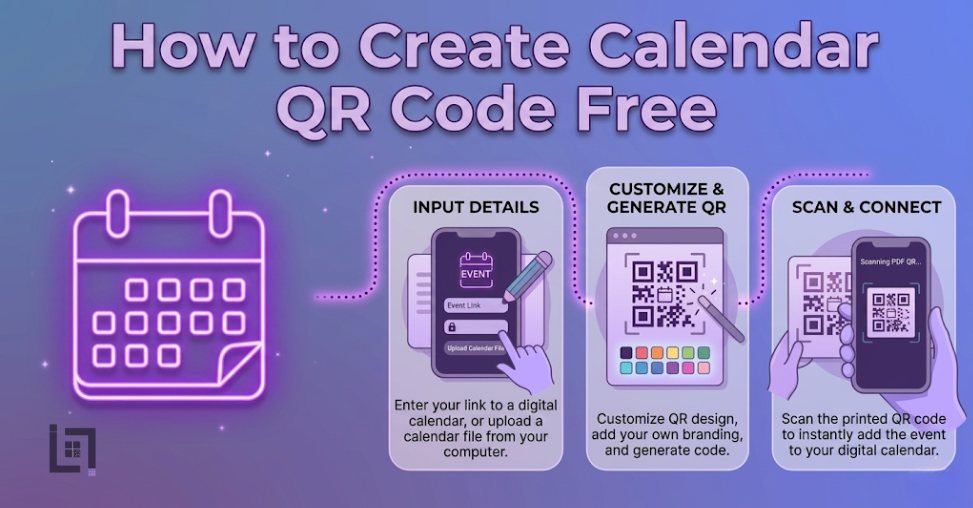
How to Create Calendar QR Code Free
Managing a successful event schedule in todays world requires more than just a date and a venue because the digital landscape is noisier than ever before. Currently, event organizers and business owners face a massive hurdle in converting physical impressions into actual attendance. Specifically, when a potential attendee sees your poster or social media ad, they often intend to come, but they forget to add the details to their personal schedules. Consequently, your conversion rates drop because of simple human forgetfulness. Therefore, understanding How to Create Calendar QR Code Free represents the most effective way to remove this friction and bridge the gap between interest and action. In this deep-dive guide, we explore the technical infrastructure, strategic placement, and psychological triggers that turn a simple scan into a locked-in appointment.
The Evolution of Event Entry and The Friction Gap
In previous years, marketers relied on the hope that users would manually type event details into their phones. However, this old method creates too many opportunities for error and distraction. Specifically, a user might get a notification while opening their calendar app, causing them to abandon the entry process entirely. Moreover, if your event has a complex name or location, the likelihood of a typo increases. Consequently, your guests might show up at the wrong place or at the wrong time. Ultimately, these small points of friction destroy your return on investment.
Instead, a calendar-specific barcode automates the entire transaction. When a user points their camera at your code, the smartphone immediately recognizes the standardized calendar format. Subsequently, the device prompts the user to save the event with one single tap. This transition from manual entry to automated syncing is why businesses are searching for ways to implement this technology right now. Furthermore, as mobile-first markets like India continue to dominate the global digital economy, providing instant solutions is no longer optional; it is a fundamental requirement for success.
Why Your Business Needs This Solution Immediately
Before we walk through the technical generation process, you must understand the strategic advantages of this tool. If you are not using automated scheduling, you are essentially leaving your event attendance to chance.
First, you guarantee data integrity across all user devices. Specifically, whether your attendee uses an iPhone or an Android, the code communicates the exact start and end times regardless of the operating system. Consequently, everyone receives the same accurate information. Therefore, you prevent the chaos of mismatched schedules.
Second, you benefit from the “set and forget” psychology. When someone saves your event to their calendar, they often receive automated reminders one hour or one day before the start. Thus, your brand stays at the top of their mind without you having to send a single follow-up email. Moreover, these system-level notifications are far more effective than social media posts, which algorithms often hide.
Third, you drastically reduce your long-term marketing costs. Specifically, when you use a dynamic solution, you can update your event location or time on the backend without reprinting your physical flyers. Consequently, you save thousands on printing and distribution fees. This flexibility is particularly vital for growing startups that may need to adjust venues based on registration numbers.
Deep Dive Step-by-Step: The Professional Generation Process
Generating a high-quality, professional-grade barcode is a straightforward process when you use the right infrastructure. Specifically, our ScanMyQR platform provides the specific tools needed to handle complex data fields efficiently.
Step 1: Data Preparation and Time Zone Alignment
Initially, you must gather every piece of relevant information. This includes the event title, the full physical address or digital link, and the exact duration. Furthermore, you should pay close attention to time zones, especially if you are hosting a webinar or a global event. If you enter the wrong time zone, your attendees will miss the event entirely. Subsequently, write a short, persuasive description that reminds the user why they wanted to attend in the first place.
Step 2: Utilizing the Generator Interface
Next, navigate to the creation dashboard and select the calendar category. Once you arrive at this section, you will see fields specifically designed for event data. Type your information carefully into each box. Additionally, ensure that your location data is specific enough for a GPS application to recognize it. Consequently, when a user scans the code, they can also get one-tap directions to your venue.
Step 3: Visual Branding and Customization
Many users ask us How to Create Calendar QR Code Free without making it look like a generic, robotic square. Fortunately, modern tools allow you to inject your brand personality into the design. Specifically, you should adjust the color palette to match your company logo. Moreover, you can change the corner styles and the internal pattern to make the code look more inviting. Therefore, the barcode becomes an integrated part of your marketing design rather than an eyesore. [Image Placeholder: A side-by-side comparison of a boring black-and-white QR code versus a branded, colorful calendar QR code].
Step 4: Testing and Verification and Create Calendar QR Code Free
Finally, you must conduct a pre-flight test before you print a single copy. Specifically, scan your generated code with multiple devices to ensure the event drafts correctly. Consequently, you confirm that the title appears correctly and the notification triggers are active. Only after you verify these details should you download the high-resolution PNG or SVG file for your design team.
Strategic Placement for High-Impact Results After Create Calendar QR Code Free
Even the most beautiful barcode will fail if nobody sees it. Therefore, you must think like your customer and place the code where they have the time and motivation to scan.
In the Indian market, for instance, placing these codes at the entrance of local festivals or near UPI payment counters is incredibly effective. Specifically, as people wait for a transaction to complete, they have a few seconds of idle time. Consequently, they are much more likely to scan a code for a future event.
Furthermore, consider these high-conversion locations:
- Direct Mail and Invitations: Placing the code on a physical wedding or wedding invitation ensures guests save the date before they lose the paper.
- Storefront Windows: If you are hosting an in-store sale, place the code at eye level on your front window. Thus, even after-hours window shoppers can save the sale date.
- Email Signatures: Add a small calendar code to your professional email signature. Specifically, this allows clients to save recurring meeting times or special webinars with every communication you send.
- Product Packaging: If you sell physical goods, include a code that schedules a “How-to-Use” live session. Consequently, you improve your customer onboarding experience and build long-term loyalty.
Common Mistakes That Kill Your Conversion Rates After Create Calendar QR Code Free
While the process is simple, many businesses make avoidable errors that prevent scans. Specifically, you must avoid these four major pitfalls:
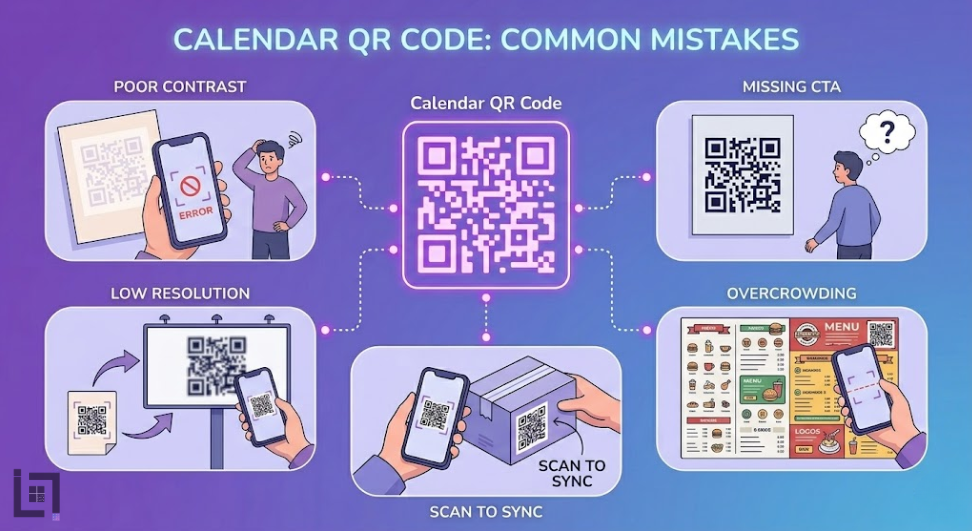
- Poor Contrast: If you make the code too light or use colors that blend into the background, smartphone cameras will struggle to read it. Consequently, the user gets frustrated and walks away.
- Missing Call to Action (CTA): A code sitting alone is a mystery. Therefore, you must always include text that says, Scan to Save the Event! or Don’t Miss Out – Add to Calendar.
- Low Resolution: If you download a small file and stretch it to fit a poster, the code will become blurry. Thus, the camera will fail to decode the information. Always use SVG files for large prints.
- Overcrowding: Do not place the code too close to other text or images. Specifically, give it quiet zone space so the scanner can identify the boundaries of the barcode clearly.
Advanced Features: Dynamic vs. Static Codes
As you learn How to Create Calendar QR Code Free, you will encounter the choice between static and dynamic types.
A static code embeds the data directly into the pattern. Specifically, once you print it, you cannot change it. However, a dynamic code allows you to change the destination data at any time. For instance, if your guest speaker changes or the event moves from 2:00 PM to 4:00 PM, a dynamic code lets you update that information instantly. Consequently, you don’t have to throw away thousands of printed flyers. Moreover, dynamic codes offer analytics, allowing you to see exactly how many people scanned your code and from which location.
Frequently Asked Questions (FAQ)For Create Calendar QR Code Free
Can I create a code for a recurring meeting? Yes, you can. Specifically, most calendar formats support recurring rules. However, it is often better to create a code for each specific major event to avoid confusion.
Which calendar apps are supported? The code supports all major applications, including Google Calendar, Apple Calendar, and Outlook. Therefore, you can reach 100% of your smartphone-using audience.
Is there a limit to how many events I can create? No, you can generate as many codes as you need for various campaigns. Specifically, our tool is built for high-velocity builders who need to ship multiple systems quickly.
Does the user need a special app to scan? No, in 2026, almost every native smartphone camera includes a built-in scanner. Consequently, the experience is completely frictionless for the end user.
Can I add a link to a Zoom or Google Meet? Absolutely. Furthermore, adding the meeting link directly into the location field allows users to join the call with one tap when the reminder pops up on their screen.
How do I track my scan data? By using a professional dashboard, you can view real-time analytics. Specifically, you can see which posters or flyers are driving the most attendance. Thus, you can optimize your marketing spend.
What is the best size for printing? For business cards, aim for at least 2cm. For posters, the code should be large enough to be seen from the typical walking distance. Ultimately, bigger is usually safer for scannability.
Can I include multiple dates in one code? Generally, one code should represent one specific event to ensure a clean user experience. However, you could link to a landing page that contains multiple calendar download buttons instead.
Will the code work in areas with poor internet? The initial scan usually requires a data connection to load a dynamic link. However, a static calendar code contains the data within the pattern and can often work offline.
Can I use this for university or school schedules? Yes, this is an excellent use case. Specifically, students can scan a syllabus and have all their exam dates populated instantly. Consequently, you reduce the number of missed deadlines.
The Human Psychology Behind the Scan
Ultimately, your goal is to trigger a specific behavior. People scan things because they believe it will save them time or provide immediate value. By offering a “Calendar Sync” option, you are promising the user that they won’t have to worry about remembering your event. Specifically, you are taking a mental load off their shoulders. Therefore, when you present your code, frame it as a benefit rather than a task. Specifically, use language like “Secure your spot” or “Sync for instant reminders.” Consequently, you tap into the user’s desire for organization and efficiency.
Conclusion: Finalizing Your Growth Strategy
Mastering How to Create Calendar QR Code Free is a vital skill for any modern marketer or developer. By removing the manual entry barrier, you ensure that your audience actually follows through on their intent to attend. Stop letting your hard-earned leads slip through the cracks of a busy schedule. Instead, leverage the power of automated syncing to lock in your attendance and grow your brand. Whether you are hosting a local workshop in India or a global tech summit, the principles of friction-free scheduling remain the same. Start generating your professional event codes today and watch your engagement metrics transform instantly.
If you’re looking for more ways to connect with customers using QR codes, check out our detailed guide on How to Create a Facebook qr code. It covers everything you need to know about setting up a Facebook qr code to let customers reach you instantly with just a scan.
Leave a Reply