OVERVIEW
In today’s hyper-connected world, speed is the ultimate currency. If a potential client sees your van, flyer, or website, you have only seconds to capture their interest and attention.
The problem is that the physical and digital worlds often feel disconnected. If a customer must manually type a complex social media handle, it creates significant digital friction and discourages engagement. In business, friction costs you money. When a customer is forced to work for information, they often simply give up and move on to a competitor. To solve this, you should create Instagram QR code assets that act as an instant portal, moving customers from the physical street to your digital portfolio in a single second.
What Exactly is an Instagram QR Code
An Instagram QR code is a scannable bridge between your offline marketing and your online presence. When a customer scans the code with their smartphone camera, it instantly opens your Instagram profile, reel, or pre-filled Direct Message.
It skips the search process, ensuring users land exactly where intended without getting distracted by competing profiles or content. This simple tool turns passive observers into active high intent leads regardless of where your business is located.
Why Your Business Needs an Instagram QR Code
We think we might have gotten this wrong. If you’re looking for an image, please try again with “Create Image” enabled in the chat bar.
- Instant Visual Proof For many services seeing is believing. A QR code lets customers jump straight to your latest project photos instantly boosting your credibility.
- Zero Typos Zero Lost Leads Handles with underscores or dots are easy to mistype. A QR code is 100% accurate every time ensuring you never lose a lead to a spelling error.
- Frictionless Following It is much easier to get a follow when the person is already looking at your grid on their phone. You are capturing their interest while it is at its peak.
- Global Marketing Data Professional generators allow you to track which flyers or signs are actually being scanned. This helps you spend your marketing budget where it actually works whether you are advertising in London New York or Tokyo.
How to Make a Custom QR for Instagram
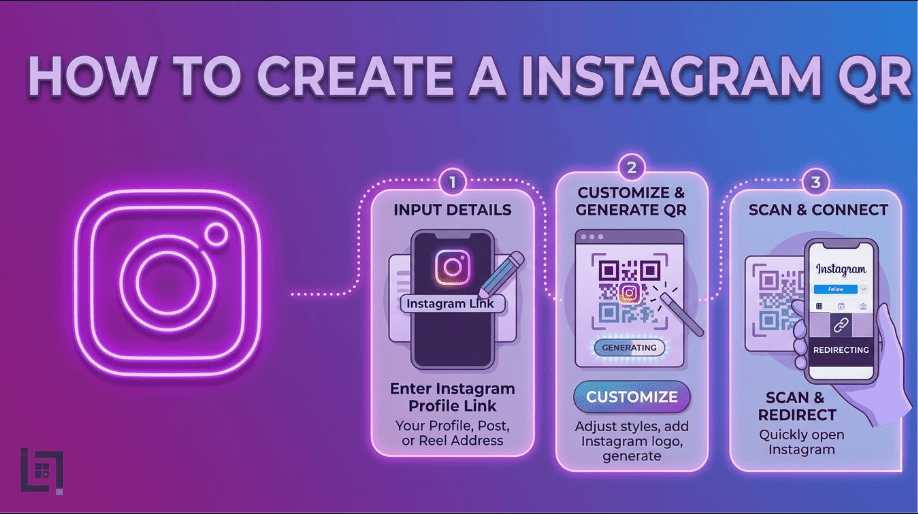
We have made the process simple so you can create Instagram QR code versions for different campaigns in under a minute:
- Access the Generator Log in to your ScanMyQR dashboard and head to the create QR section.
- Select Content Type Click the Instagram icon from the menu to open the specialized configuration fields for social media links.
- Enter Your Details Paste your full Instagram Profile URL such as your official business link.
- Give it a custom name like Summer Promo Flyer or Fleet Vehicle Rear to help you identify which campaign is driving the most engagement.
- Generate and Customize Click the purple generate QR code button. You can then download your high resolution code ready for your marketing materials.
Where to Place Your QR Code for Maximum Scans
To turn your physical assets into a lead generation machine put your codes where people naturally look:
- Fleet Vehicles Put a large code on your back doors. A simple see our latest work message next to the code turns every traffic jam into a marketing opportunity.
- Business Cards Do not clutter your card with text. A clean QR code on the back looks modern and allows prospects to follow you while your conversation is still fresh in their minds.
- In Store Signage If you have a physical shop or a checkout counter a QR code is the perfect way to turn a walk in visitor into a long term social media follower.
- Invoices and Receipts This is a great place to create Instagram QR code links to a post where you ask for tagged photos or reviews turning happy customers into brand ambassadors.
Bridging the Physical to the Digital
Simply getting a scan is the start not the finish line. In the service industry your digital proof is what seals the deal. When someone scans your code and lands on Instagram, they expect consistency, quality content, and a clear way to contact you.
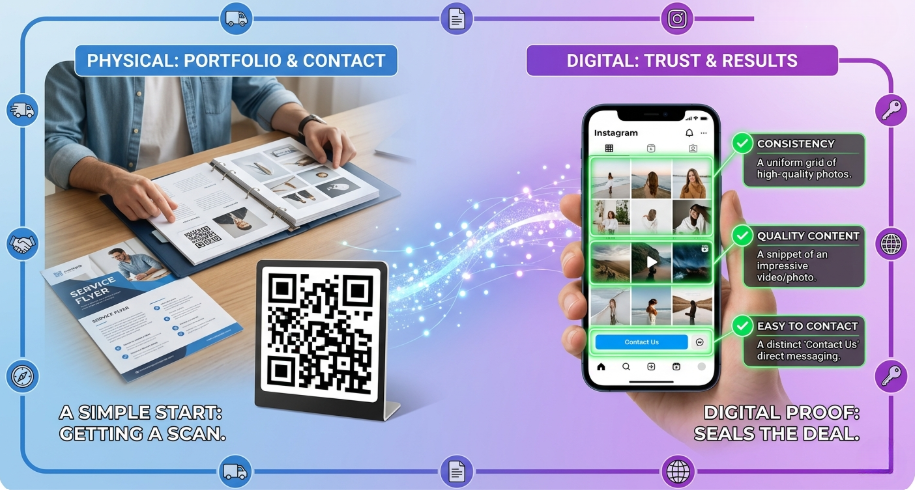
Your Instagram serves as a living portfolio that updates in real time. Unlike a static website that might be months out of date your social feed shows that you are active and reliable. Use your QR code to link to a specific highlights reel that shows your team in action. This builds a layer of trust that global customers appreciate before they ever pick up the phone to call you.
Creative Content Strategies for Service Professionals
If you are a service provider you should use your Instagram QR code to lead people to behind the scenes content. People everywhere love seeing how things are made or fixed.
For example an interior designer could have a QR code on a site sign that leads to a before and after reel of that specific project. A landscaping company can place a code on equipment linking to a satisfying time-lapse video of a garden transformation. This kind of content is highly engaging and much more likely to result in a direct message or a follow than a standard home page. By choosing the right destination for your scan you are providing an experience that validates your expertise.
3 Golden Rules for QR Code Success
- Always Use a Call to Action A code by itself is just a box of dots and invites confusion. Always tell the user why they should scan such as scan to see our portfolio or scan for daily tips.
- Size and Contrast If the code is too small or the colors are too light a phone camera will not be able to scan it. Keep it at least 2cm wide on small items and use high contrast designs like black on white.
- The Pre Flight Test Never skip this step. Always scan the code yourself with both an iPhone and an Android to ensure it opens the app before you send 1000 flyers to the printer.
Troubleshooting Common Scan Issues
Sometimes a customer might struggle to scan your code. This usually happens for a few avoidable reasons. First check the lighting. If a QR code is placed behind a reflective glass window in bright sunlight the glare might prevent the camera from reading the pixels.
Second check the scan distance. If you put a small code high up on a billboard no phone will be able to focus on it. Ensure the code is at eye level and large enough for the environment it is in. Lastly check the link. If you change your Instagram handle your old QR code will break. This is why professional tools are vital as they allow you to update the destination link without needing to reprint your materials.
Ready to Supercharge Your Growth
In a competitive global market you cannot afford to make your customers work to find you. By removing every possible barrier to entry you make it effortless for potential fans to join your community and see the value you provide.