Overview
Create a YouTube QR Code which helps in the landscape of modern digital marketing, video content has undeniably become the king of engagement. Whether you are a plumber sharing a “how-to” tip, a real estate agent filming a property walkthrough, or a consultant hosting an educational webinar, video allows you to build trust, demonstrate expertise, and showcase your personality in ways that static text never can.
However, a major bottleneck remains: discoverability. If a potential customer has to open their YouTube app, navigate the search bar, mistype your channel name, and sift through dozens of irrelevant search results, you have allowed massive amounts of digital friction to seep into their experience.
The goal is to move the viewer from your physical presence to your digital video library in the blink of an eye. The bridge to that goal is a YouTube QR Code. By simplifying the journey from I’m curious to I’m watching, you ensure your high-quality video content actually gets the views it deserves.
What Exactly is a YouTube QR Code?
A YouTube QR code is a sophisticated digital shortcut that serves as a direct pipeline to your video content. When a user scans this barcode with their smartphone, their device instantly launches the YouTube application and navigates directly to your channel, your latest video upload, or a specific playlist you’ve curated. It removes every barrier that stands between a viewer and your content. No more spelling errors, no more searching, and no more distraction from competing channels. It turns your physical marketing material—like a business card or a brochure—into a dynamic streaming platform, allowing you to provide deep, educational, or entertainment value to your customers right where they are.
Why Your Business Needs a YouTube QR Code
Before you pour more resources into video production, you must ensure that your distribution strategy is airtight. Here is why every business needs a YouTube QR code.
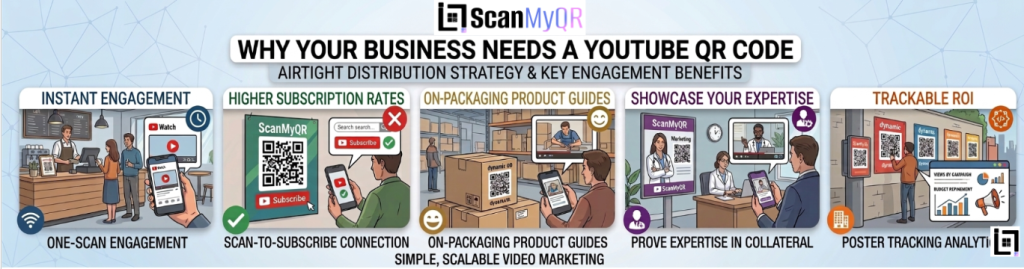
- Instant Engagement: Video is the most effective medium for building rapport. By making your videos accessible via a single scan, you can increase your watch time and viewer count immediately.
- Higher Subscription Rates: It is significantly easier for a user to scan a code and land on your channel page where they can hit “Subscribe” than it is for them to search for you from scratch.
- Showcase Product Knowledge: If you sell physical products, a QR code on the packaging linking to an assembly or “how-to” video dramatically reduces customer service inquiries and improves post-purchase satisfaction.
- Showcase Your Expertise: For service-based businesses, a QR code on your marketing collateral that links to a video of you solving a real-world problem is the single best way to prove that you are the expert they need to hire.
- Trackable ROI: Using professional dynamic QR codes, you can see exactly which physical posters or mailers are actually driving views to your channel, allowing you to refine your marketing budget based on real data.
How to make custom Qr for YouTube: The Custom Link Method
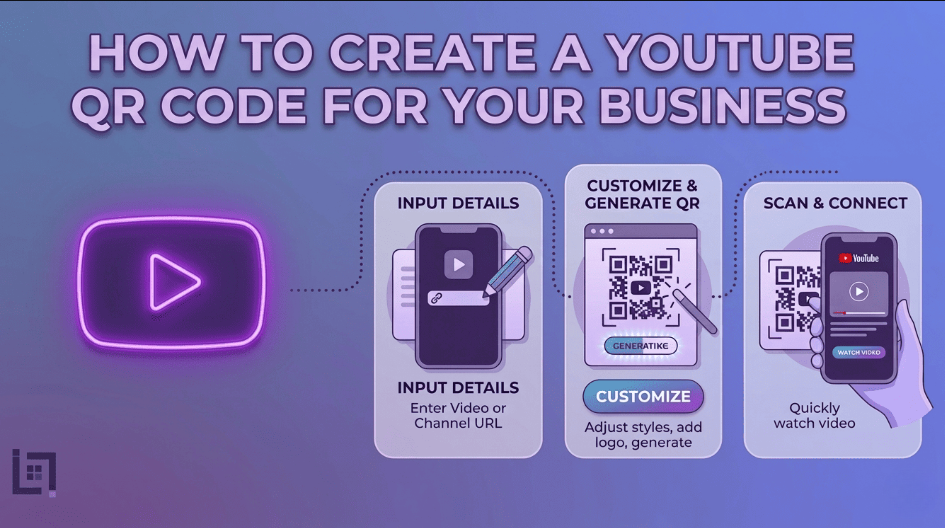
Generating a custom YouTube QR code is a seamless, four-step process designed for both beginners and seasoned marketers:
- Access the QR Generator: Navigate to the “Create QR” section in the main dashboard menu of your platform.
- Select Content Type: From the content selection menu, click on the YouTube icon. This will trigger the configuration screen specifically built for video links.
- Enter Details: * Paste the direct URL of your YouTube channel, playlist, or individual video into the required field.
- Provide a custom name in the “Name Your QR” field. This is crucial if you have different campaigns, as it allows you to distinguish between “Business Card QR,” “Van Decal QR,” or “Flyer QR.”
- Generate Code: Click the purple Generate QR Code button. Your code is now live and ready to be downloaded and integrated into your design files.
Where to Place Your YouTube QR Code for Maximum Scans
To turn your physical assets into a video-viewing experience, consider these high-impact locations:
- Product Tags and Manuals: Place the code on your product box or in the user manual. A link to a “Tips and Tricks” video is a major value-add that customers love.
- End of Physical Presentations: If you give speeches or run workshops, put a QR code on the final slide of your presentation. It’s the perfect place to offer a “bonus video” to attendees as they leave.
- Trade Show Booths: Large-format QR codes on your display banners allow booth visitors to quickly pull up a video of your services or testimonials while they are standing there, providing social proof in real-time.
- Business Cards: Use a simple design on the back of your card: “Scan to see our latest project results.” It adds a level of professionalism and depth that a standard business card cannot match.
3 Golden Rules for QR Code Success
To ensure your YouTube QR code actually leads to meaningful views and subscribers, adhere to these golden rules:
- Always Include a Call to Action (CTA): Never leave a QR code hanging. The user needs to know what they are getting. Use a clear, benefit-driven CTA like “Scan to see our 5-minute home maintenance guide” or “Scan to meet our team.
- Prioritize Mobile-Friendly Links: Since almost all QR scans happen on mobile devices, ensure that your video settings are optimized for mobile. Avoid long, confusing intro sequences that might cause a viewer to click away before the value is delivered.
- Test Before You Print: Always perform a pre-flight test. Scan the generated code with multiple devices to ensure it opens the YouTube app correctly. There is nothing worse than printing 5,000 flyers only to realize the link is broken or redirects to a browser-based login screen.
Ready to Supercharge Your Lead Generation?
Your YouTube content is a valuable asset, but it can only generate leads if people actually watch it. By implementing YouTube QR codes, you close the gap between your physical brand identity and your digital storytelling. But why stop at video? Your entire lead generation ecosystem from how you gather reviews to how you schedule appointments should be this seamless. Stop guessing which marketing channels are working and start using data-driven, trackable QR solutions to streamline your entire client journey.
If you want to make it easier for customers to connect to your network, check out our detailed guide on How to Create a App store qr Code for Your Business. It covers everything you need to know about setting up a App store code so customers can connect instantly with just a scan.