Overview
In modern business speed is your greatest advantage. If a client sees your flyer you have seconds to connect. The biggest obstacle is digital friction. Manual searches often lead to lost customers. To solve this you should create Telegram QR code assets. These act as an instant gateway to your team. They move customers from the physical world into a secure chat.
What Exactly is create a Telegram QR Code
A Telegram QR code is a scannable link for your business. It bridges the gap between offline ads and digital chats. Scanning the code opens the Telegram app directly to your profile. It eliminates the need for manual searching or sharing phone numbers. This tool turns casual observers into high intent leads instantly. It makes the first point of contact completely effortless for everyone.
Why Your Business Needs to create a Telegram QR Code
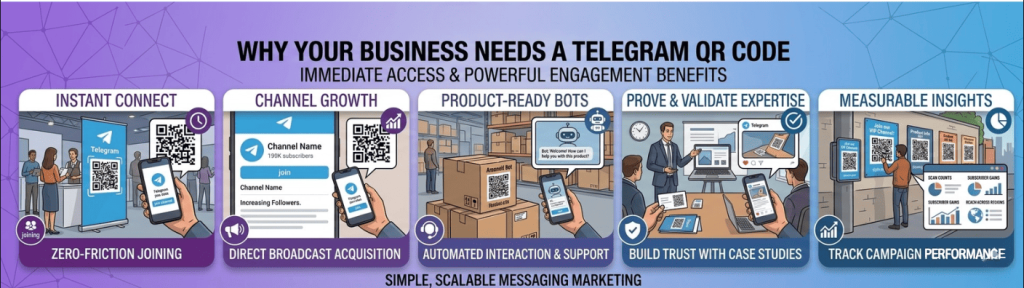
Consider why this tool is vital for service based businesses globally:
- Instant Customer Support Telegram is famous for high speed responses. A QR code allows customers to ask questions immediately. This level of responsiveness builds deep trust with new clients.
- Privacy First Connection Telegram lets users connect without sharing private phone numbers. This lowers the barrier for cautious potential leads.
- Broadcast to Thousands Link your QR code to a Telegram Channel. Send updates and offers to unlimited subscribers instantly.
- Automation and Bots Telegram supports powerful automation and custom bots. Your code can lead to a bot that handles bookings. It can also answer FAQs or process orders 24/7.
- Rich Media Sharing Share high resolution videos and large files easily. Other messaging apps often struggle with high quality documents.
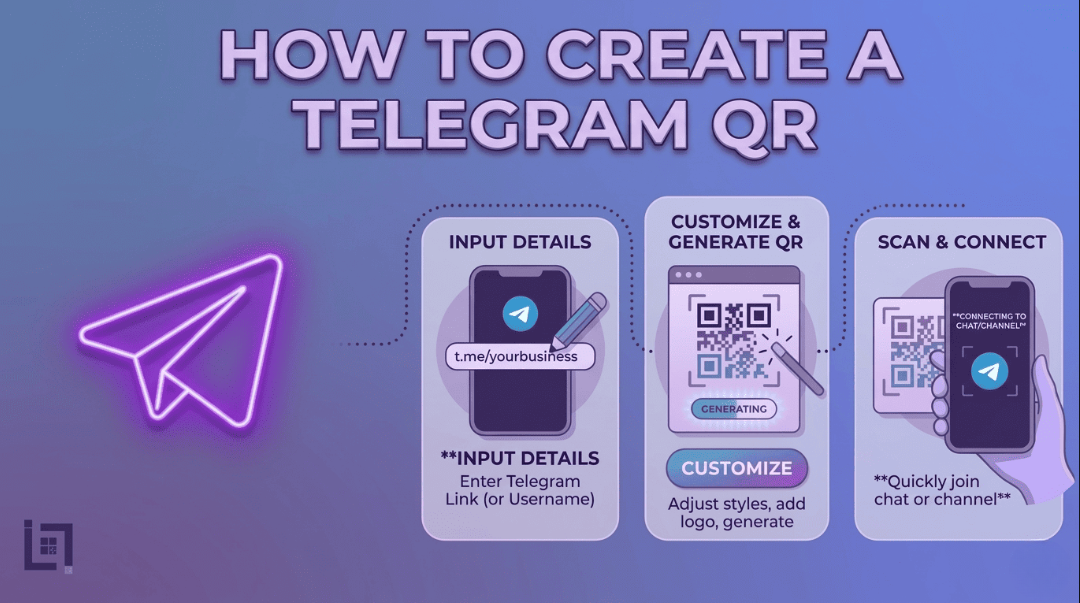
How to Create a QR for Telegram
The process is quick and efficient for your marketing touchpoints:
- Access the Generator Log in to your ScanMyQR dashboard now. Navigate to the create QR section in the menu.
- Select Content Type Choose the Telegram icon from the selection menu. This opens specialized configuration fields for social media links.
- Enter Your Details Paste your Telegram Username link or your Channel link. Ensure the URL starts with the correct prefix.
- Give it a custom name like Office Front Desk. This helps you identify which scan point is performing best.
- Generate and Customize Click the purple generate QR code button. You can then download your high resolution image file. It is now ready for high quality printing.
Where to Place Your QR Code
Place your codes where your customers naturally need assistance:
- Product Packaging Include a QR code on your product packaging. Use a message like scan for setup support. This moves the customer directly to your support team.
- Service Vehicles Mobile businesses should use large codes on their vans. Neighbors can scan and book a service while you work.
- Event Banners At trade shows a code allows attendees to join. They can receive digital brochures and event only discounts.
- In Store Checkout Place a code at the physical counter. Encourage customers to join your VIP Telegram group. This gives them early access to new sales.
Building Trust Through Secure Conversations
A scan is just the start of the journey. The quality of your digital communication closes the deal. Customers scan your code looking for security and professionalism.
Telegram’s encrypted environment provides a sense of safety for everyone. Using a QR code shows you value their privacy. Use your bio to provide clear info on hours. This transparency builds a layer of long term reliability. It turns a simple scan into a loyal relationship.
Strategic Content for Global Engagement
When you create Telegram QR code links you open a door. For service providers the key to conversion is education.
Imagine a real estate agent using a QR code. The code leads to a high definition video walkthrough. Prospects can also download PDF floor plans instantly. This immediate value positions the business as a top professional.
A fitness coach could use a code for a bot. This bot could send a free meal plan instantly. Instant gratification is a powerful psychological trigger for sales. It makes people choose your service over any competitor.
3 Golden Rules for QR Code Success
- Always Use a Call to Action A code without instructions is just a mystery. Tell users why they should scan your code today. Use phrases like scan for free estimates now.
- Prioritize Size and Contrast If the code is too small cameras cannot focus. Keep it at least 2cm wide on small items. Use high contrast designs like black on white.
- The Pre Flight Test Never skip this vital final step. Always scan the code yourself using multiple different devices. Ensure it opens the Telegram app perfectly every time.
Troubleshooting Common Scan Issues
Technical hiccups can occur even with the best tools. One common issue is link decay over time. If you delete a group the code will break. Professional management tools allow you to update scan destinations. You can change links without needing to re print materials.
Another common issue is poor physical placement. Avoid placing codes behind highly reflective glass surfaces. Dimly lit hallways also make scanning very difficult. Ensure your codes are placed in well lit areas. If placed on a vehicle make the code large. This ensures it is captured quickly at red lights.
Ready to Supercharge Your Business Growth?
In a competitive market you cannot afford digital friction. Removing barriers to communication makes it easy to hire you.
A Telegram QR code is more than a convenience. It shows your business is modern and responsive. Integrating these codes turns flyers into lead generation engines. Every sign becomes a 24/7 tool for your growth.