Overview
In the modern business world speed is your primary advantage. If a client sees your flyer you have seconds to connect. The biggest obstacle to growth is digital friction. Manual searches for a specific profile often lead to lost interest. To solve this you should create a X QR code for your brand today. These assets act as an instant gateway to your social profile. They move users from the physical world into a digital conversation. This transition happens in a single second with one scan.
What Exactly is an X QR Code?
An X QR code acts as a scannable link for your profile. In fact, it bridges the gap between offline ideas and digital posts. Furthermore, scanning the code opens your profile directly on any smartphone. Consequently, it eliminates the need for manual handle searching or typing. Moreover, this tool turns passive readers into active followers instantly. As a result, it makes sharing your thoughts completely effortless for everyone. Therefore, there is no more asking clients to search for your username. Ultimately, your users can access your feed with a single tap.
Why Your Business Needs to Create a X QR Code
Consider why this tool is vital for businesses globally. It offers several key advantages for modern social strategies.
create a X QR code and get Instant Profile Access
Users do not need to hunt for your specific handle. Instead, they scan the code and your profile appears instantly. Consequently, this removes every barrier between the user and your content. Ultimately, high friction always leads to a lower follower count.
create a X QR code and get Zero Search Friction
Users do not need to hunt for your specific handle. They scan the code and your profile appears instantly. This removes every barrier between the user and your content. High friction always leads to a lower follower count.
create a X QR code and get Professional Brand Image
Using QR codes shows your business is modern and tech-savvy. It signals to clients that you value their time. Professionalism is often judged by how easily you connect.
Dynamic Interaction Updates
You can pin a new post without changing the code. This ensures your printed materials always lead to fresh news. It saves your team time and reduces re-printing costs.
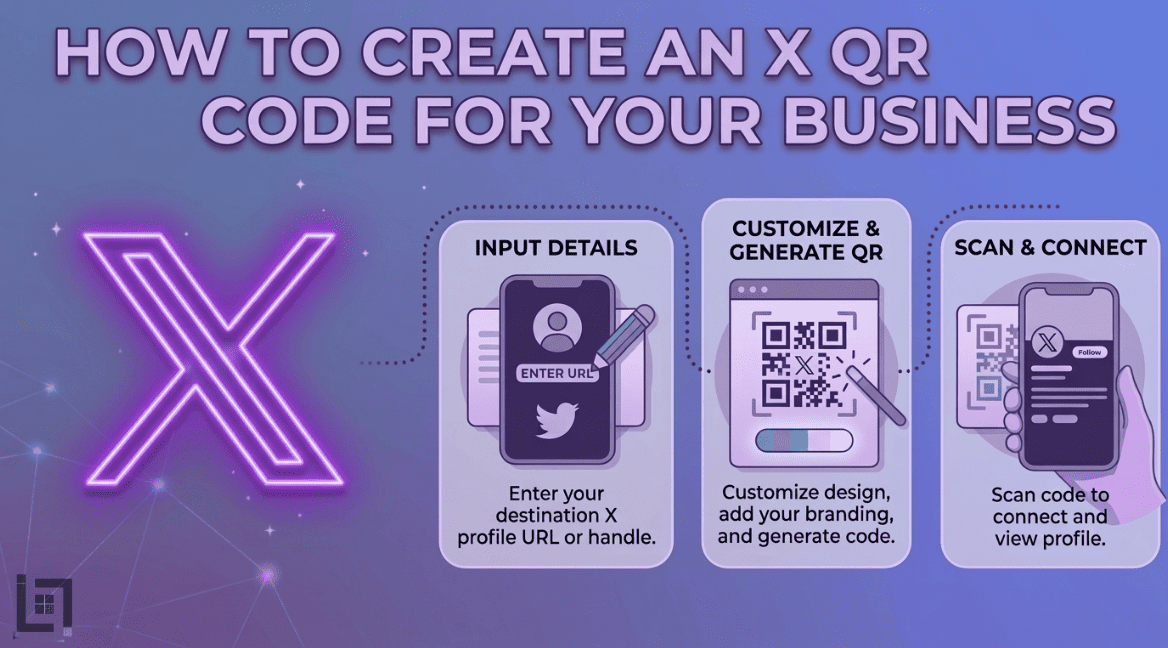
How to Create a QR for X
The process is quick and efficient for your business touchpoints. Follow these steps to generate your professional code now:
- Access the Generator Log in to your ScanMyQR dashboard right away. Navigate to the create QR section in the menu.
- Select Content Type Choose the Social Media icon from the selection menu. This opens fields for your X profile URL.
- Find Your Profile Link Get your unique profile URL from your X settings. Ensure the link leads directly to your main feed.
- Assign a Name Give it a custom name like “Store Window Code.” This helps you track which scan point works best.
- Generate and Customize Click the purple generate QR code button now. You can then download your high-resolution image file. It is now ready for high-quality printing.
Where to Place Your QR Code
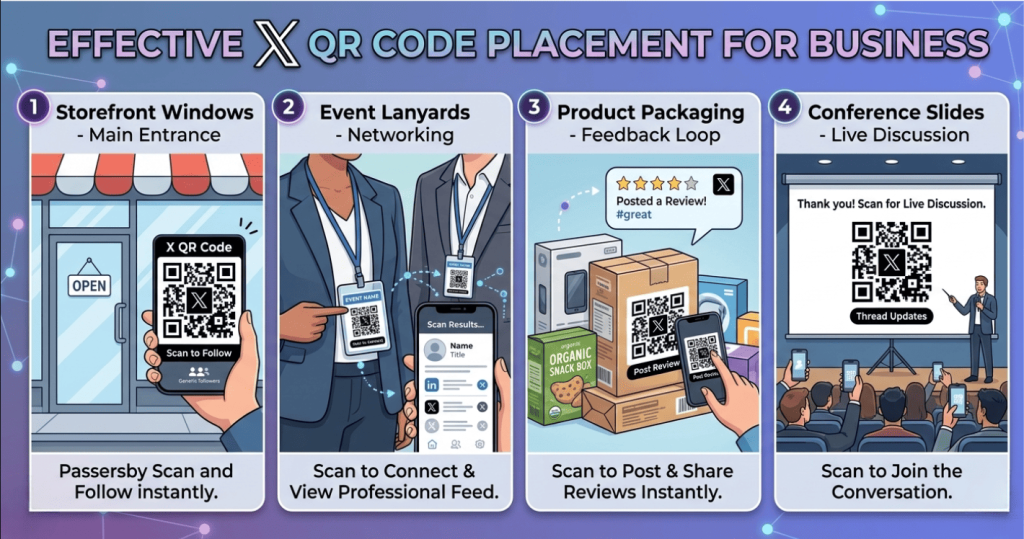
Place your codes where your users naturally need information. Strategic placement ensures a much higher rate of engagement.
Storefront Windows
Do not just list your handle on your glass. Add a QR code to the main entrance. This allows passersby to follow you on their own devices.
Event Lanyards
At networking events a code allows peers to connect. They can view your professional feed while you talk. This replaces the need for bulky physical resumes.
Product Packaging
Include a QR code on your physical product boxes. Encourage buyers to scan and post their reviews. This moves them into your digital community quickly.
Conference Slides
Place a code on your final presentation slide. Link it to a thread for live event updates. This provides immediate value before the session ends.
Building Trust Through Professional Clarity
A scan is just the start of the journey. The quality of your content closes the deal. Users scan your code looking for clear expert answers. Using professional social tools shows you are a reliable partner. It provides a clear record of your business quality. This transparency builds a layer of long-term reliability. It turns a simple scan into a loyal relationship.
Community Benefits for Brands
X allows multiple people to engage in real-time. Moreover, a QR code makes this group effort easier to start. For instance, fans can scan a code to join a thread. In turn, this fosters a culture of transparency and public talk. As a result, no one has to wait for a direct link. Ultimately, the conversation flows better when everyone is connected.
Strategic Content for Global Engagement
When you create a X QR code, you essentially open a new door. In fact, for service providers, the key to conversion is education. For example, imagine a consultant using a professional QR code. Specifically, the code leads to a helpful thread in the lobby. Consequently, clients read your advice before they even start. By doing so, this immediate value positions the firm as a leader. Similarly, a creative agency could use a code on portfolios. In turn, this code could show the client a live project. Ultimately, seeing real-time updates is a powerful trigger for sales. Therefore, it makes people choose your service over any competitor. In essence, you are providing the path of least resistance.
3 Golden Rules for QR Code Success
To ensure your codes work perfectly follow these rules.
- Always Use a Call to Action A code without instructions is just a mystery box. Tell users exactly why they should scan it. Use phrases like “Scan to follow our news.”
- Prioritize Size and Contrast If the code is too small cameras cannot focus. Keep it at least 2cm wide on small items. Use high-contrast designs like black on white.
- The Pre-Flight Test Never skip this vital final step before printing. Always scan the code yourself using different phones. Ensure it opens the profile perfectly every time.
Troubleshooting Common Scan Issues
Technical hiccups can occur even with the best tools. For instance, one common issue is an incorrect profile link. In fact, if the username changes, the code will fail. However, professional management tools allow you to update the destination. Consequently, you can update the link without re-printing materials. Furthermore, another common issue is poor physical placement. Specifically, avoid placing codes behind highly reflective glass surfaces. Additionally, dimly lit areas also make scanning very difficult. Therefore, ensure your codes are placed in well-lit areas. Finally, if placed on a poster, make the code large. This ensures, in turn, it is captured by users easily.
Data-Driven Decisions for Growth
Using QR codes allows you to gather vital intelligence. Specifically, you can see the time and date of scans. This helps you, in turn, identify when your users are active. Consequently, you can then focus your posts on peak hours. Therefore, data takes the guesswork out of your social management. Ultimately, it empowers you to grow with total confidence.
Enhance Your Networking Game
Stop sending profile links via long text messages. Instead, put a QR code on your phone screen. Then, let colleagues scan it during your final meeting. By doing this, it creates an immediate digital connection on their device. Consequently, they will have your data while they are excited. In turn, networking becomes faster and much more effective. Ultimately, it shows you are ahead of the digital curve.
Ready to Supercharge Your Business Growth
In a competitive market you cannot afford digital friction. Removing barriers to connection makes it easy to trust. A professional X QR code is more than a convenience. It shows your business is modern and responsive. Integrating these codes turns viewers into active leads. Every sign becomes a 24/7 tool for your growth.
If you’re looking for more ways to connect with customers using QR codes, check out our detailed guide on How to Create a WhatsApp QR Code for Business. It covers everything you need to know about setting up a WhatsApp QR Code to let customers reach you instantly with just a scan.
Leave a Reply