Overview
In the hyper-competitive world of e-commerce, every millisecond counts toward your conversion rate. If a potential customer sees your product on social media or a physical flyer, you have a fleeting window to turn that interest into a sale. The biggest obstacle to scaling your storefront is digital friction—the awkward gap between a customer seeing your product and actually landing on the “Add to Cart” page. Manual searches for a specific ASIN or brand name often lead to lost interest or, worse, customers finding a competitor’s listing instead. To solve this and ensure your traffic stays within your ecosystem, you should create Amazon QR code assets for your business today. These digital gateways act as an instant bridge to your product listings.
They move users from the physical world or external social platforms directly into the Amazon app. This transition happens in a single second with one scan, bypassing the mobile browser and landing them right where the “Buy Now” button lives. Consequently, you reduce the bounce rate of potential leads significantly. Furthermore, your brand stays top of mind because the path to purchase is immediate and frictionless. Ultimately, this small digital upgrade creates a massive ripple effect for your storefront’s growth and organic ranking.
Moreover, utilizing these tools allows you to share your product aesthetic through cohesive visual branding. Therefore, your marketing strategy becomes much more immersive and modern, turning every shipping box or insert into a dynamic touchpoint. As a result, your audience interacts with your listings more frequently. This constant engagement builds a strong foundation for long-term loyalty and recurring revenue.
What Exactly is an Amazon QR Code?
An Amazon QR code acts as a scannable bridge for your e-commerce identity. In fact, it connects your offline marketing—such as packaging, business cards, or print ads—to your Amazon store presence perfectly. Furthermore, scanning the code triggers a “deep link” that opens the Amazon app directly on any smartphone, rather than a slow-loading web browser. Consequently, it eliminates the need for users to type complex URLs or search for generic keywords.
Moreover, this tool turns passive observers into active shoppers. As a result, it makes sharing your brand vision and specific product benefits completely effortless. Therefore, you no longer need to rely on printed text or long instructions alone. Ultimately, your users can access your storefront with a single tap. In turn, your unit session percentage will likely see a steady and measurable increase.
Specifically, Amazon customers value the time you save them during their busy day. Additionally, these codes help your brand stand out in a crowded marketplace where “search find buy” methods are becoming increasingly cumbersome. They offer a unique blend of functionality and professional appeal. Therefore, you gain a significant edge over competitors who are still using standard, plain text links.
Why Your E-commerce Brand Needs a Visual Scan
Consider why this tool is vital for modern Amazon FBA (Fulfillment by Amazon) sellers and vendors. It offers several key advantages for your consolidated branding and ranking strategies.
create Amazon QR code and get Centralized Storefront Access
High-quality platforms allow you to house all your product variations and brand story in one place. To simplify the journey for your customers, you must create Amazon QR code links right now. By doing so, a single scan allows users to see your entire brand catalog. In turn, this level of organization builds deep trust with new clients who may be wary of unknown third-party sellers.
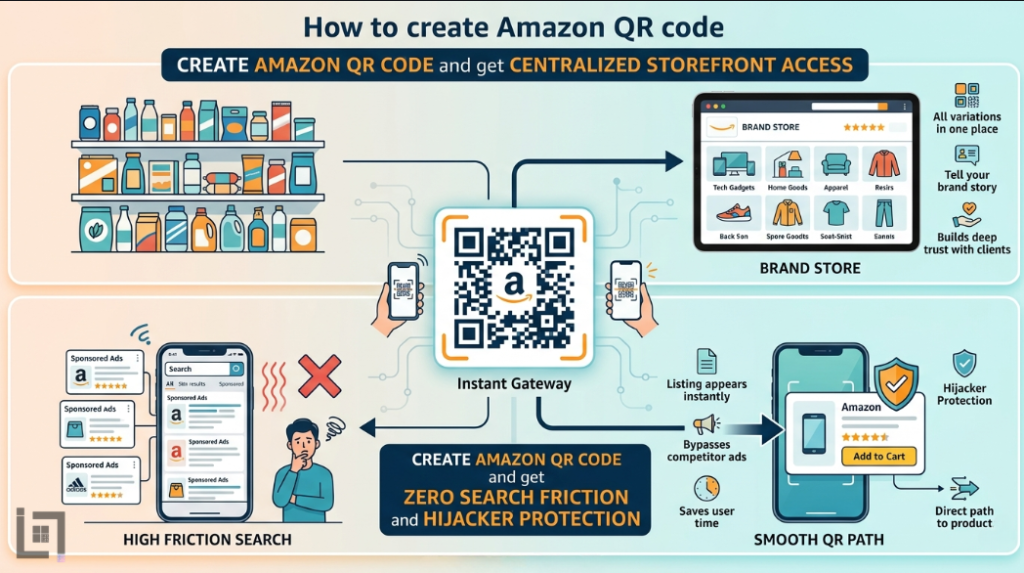
As a result, they see that your brand is professional, established, and tech-savvy. Moreover, it gives you a direct line to their mobile screens. Specifically, you can send them to specific “Brand Store” pages where you have total control over the layout. Consequently, your conversion rates will reflect this new level of professional intimacy. Furthermore, visual cues and easy navigation create an emotional bond that a standard search result cannot match.
create Amazon QR code and get Zero Search Friction and Hijacker Protection
Users do not need to hunt for your specific product among thousands of sponsored ads. Instead, they scan the code and your listing appears instantly. Consequently, this removes every barrier between the user and your “Add to Cart” button. Ultimately, high friction—such as having to scroll past five competitor ads—always leads to a lower sales velocity.
Therefore, you must make the path to your product as smooth as possible. In addition, this ease of use encourages users to share your product with friends via a quick scan. As a result, your organic reach grows without extra PPC (Pay-Per-Click) spend. Moreover, you capture their attention before they get distracted by lightning deals from other brands. Thus, you secure more loyal customers with very little effort.
The Strategic Power of Custom Design
One unique feature of modern codes is the use of integrated graphics. In fact, you can link your QR code directly to a promotional landing page or a “Social Media Promo Code” page on Amazon. Furthermore, this creates an interactive experience for your customers that feels premium. Consequently, they are not just buying a product; they are experiencing your brand’s vibe.
Moreover, this type of engagement is highly memorable for shoppers who receive dozens of packages a week. As a result, users are more likely to remember your specific shop for future needs. Therefore, your packaging becomes an experience rather than just a cardboard box. Ultimately, this builds a fun and loyal community around your brand. Specifically, your logo within the QR code defines the mood of your brand perfectly and builds “Scan Confidence.”
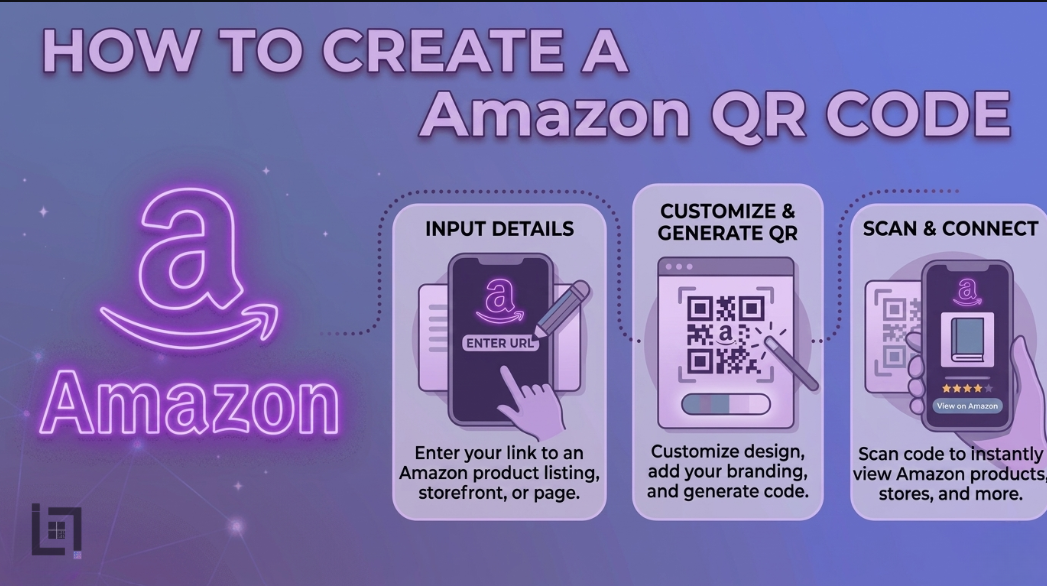
How to Create Amazon QR Code
The process is quick and efficient, even for those who are not tech-oriented. Follow these steps to generate your professional Amazon-specific code now:
- Access the Professional Generator: Log in to your ScanMyQR dashboard or preferred generator right away. Then, navigate to the specialized “E-commerce” or “URL” section.
- Select Content Type: Choose the Website or URL icon. To truly succeed, ensure you are using an Amazon Attribution link if you are a Brand Registered seller to track your external traffic metrics.
- Find Your Destination Link: To create Amazon QR code assets that actually convert, get your unique product link or Storefront URL from your Amazon Seller Central dashboard. Ensure the link leads to a mobile-optimized page.
- Upload Your Brand Mark: Click the button to add your official logo to the center of the code. This allows you to create a code that is visually distinct from generic, “scammy-looking” codes.
- Generate and Customize: Click the generate button now. Consequently, you can download your high-resolution image file (SVG or PNG). Finally, it is now ready for high-quality printing on your product inserts or shipping labels today.
create Amazon QR code But Where to Place?
Strategic placement ensures a much higher rate of engagement and more frequent “Subscribe & Save” sign-ups.
Product Packaging and Inserts
Do not let your packaging go to waste. Add a branded code to your “Thank You” inserts. By doing this, you keep the relationship alive after the first sale. Furthermore, it invites the person to leave a review or see your other products. Moreover, it makes the unboxing experience much more interactive.
Retail and Event Pop-ups
If you sell at local markets or trade shows, a code can lead to your Amazon Storefront. Furthermore, it can link to a specific “Bundle” deal you are running. As a result, customers can buy on the spot even if you run out of physical stock. Consequently, your sales never stop, even when your inventory is low.
Building Trust Through Visual Clarity
A scan is just the start of the user journey; the quality of your branding closes the deal. Users scan your code looking for convenience and expert quality. To succeed, you must use professional tools that ensure the QR code doesn’t pixelate when printed. Using these high-end tools shows you are a reliable, professional partner in the eyes of the consumer.
Specifically, it provides a clear record of your commitment to quality. This transparency, in turn, builds a layer of reliability that “generic” sellers lack. Ultimately, it turns a simple scan into a long-term customer relationship. Furthermore, consistent updates to your Amazon Storefront keep that trust alive over time. Consequently, your brand becomes the go-to choice in your niche.
3 Golden Rules for Amazon QR Success
To ensure your codes work perfectly and don’t result in frustrated customers, follow these rules.
- Always Use a Call to Action: A code without a “Scan for 10% Off” or “Scan to See Tutorial” is a mystery. Therefore, tell users exactly why they should scan it.
- Prioritize Size and Contrast: If the code is printed too small on a tiny product label, cameras will fail to focus. Specifically, keep it at least 2cm wide for standard scanning.
- The Pre-Flight Test: Never skip this final step before sending 10,000 units to an Amazon warehouse. Always scan the code yourself using both iOS and Android devices to ensure the deep link works.
Data-Driven Decisions for Growth
Using specialized QR codes allows you to gather vital intelligence regarding your “Off-Amazon” marketing efforts. Specifically, you can see which geographic regions are scanning your flyers the most. This helps you, in turn, identify where to focus your next ad campaign. Consequently, you can then focus your budget on high-performing areas. Therefore, data takes the guesswork out of your brand management.
Ultimately, it empowers you to grow with total confidence. In addition, you can see which product inserts result in the most repeat visits. As a result, you can optimize your marketing budget effectively and stop wasting money on flyers that don’t convert. You make smarter, faster choices based on real-world user behavior.
Ready to Supercharge Your Amazon Business?
In a competitive market, you cannot afford digital friction or lost traffic. Removing barriers to your listing makes it easy for customers to trust and buy from you. A professional Amazon QR code is more than a convenience; it is a vital conversion tool. Specifically, it shows your business is modern, responsive, and customer-centric.
If you’re looking for more ways to connect with customers using QR codes, check out our detailed guide on how to create a Facebook QR code. It covers everything you need to know about setting up a Facebook QR code to let customers reach your community instantly with just a scan. Combining these tools will ensure your brand dominates both social media and the world’s largest marketplace.
If you’re looking for more ways to connect with customers using QR codes, check out our detailed guide on How to Create a Facebook qr code. It covers everything you need to know about setting up a Facebook qr code to let customers reach you instantly with just a scan.
Leave a Reply