In today’s hyper connected world, speed is the ultimate currency. If a potential client spots your company van, reads your flyer, or visits your website, you have a tiny window of time to capture their interest.
If they have to manually type in your 10 digit phone number, save it to their contacts, open WhatsApp, search for your name, and finally type out a message… you’ve already lost them. That process is full of “digital friction.” In the service industry, friction costs you money.
The solution? A WhatsApp QR Code.
By turning your contact number into a scannable code, you reduce the journey from I need help to I m chatting with a professional down to a single second. In this comprehensive guide, we will show you exactly how to create a WhatsApp QR code for your business, where to put it, and how to use it to generate more leads.
What Exactly is a WhatsApp QR Code?
A WhatsApp QR (Quick Response) code is a unique barcode that, when scanned by a smartphone camera, instantly opens a WhatsApp chat window with your business. It bypasses the need for the user to manually save your phone number.
Think of it as a digital bridge. It takes a customer from the physical world (looking at your business card, storefront, or invoice) directly into a private, one-on-one digital conversation with your sales team.

Why Your Business Needs a WhatsApp QR Code
Before we dive into the steps, let’s look at why this simple tool is an absolute game-changer for service-based businesses like plumbers, electricians, cleaners, and real estate agents:
Zero Typos, Zero Lost Leads: Humans make mistakes. A single wrong digit typed into a phone means a lost customer. A QR code guarantees 100% accuracy every single time.
Instant Gratification: Customers love WhatsApp because it’s casual, immediate, and convenient. Giving them a QR code caters to their desire for fast communication.
Pre-Filled Intent: As you’ll see in the steps below, you can program your QR code so that when the customer scans it, a message like “Hi, I’d like to request a quote” is already typed out for them. All they have to do is hit send! Bridging Offline and Online: It turns static, offline marketing materials (like brochures and billboards) into interactive, lead-generating assets.
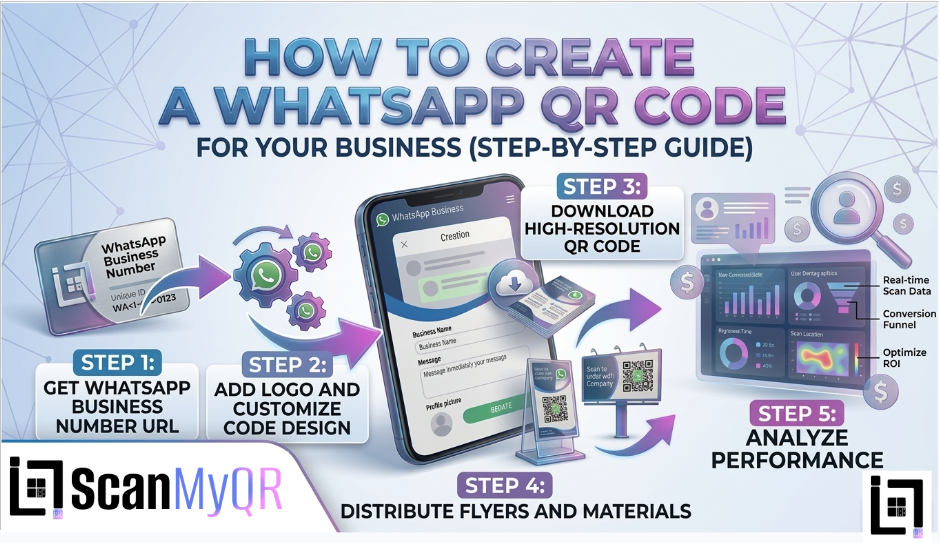
How to make custom Qr for whatsapp: The Custom Link Method (With Pre-Filled Messages)
● Access the QR Generator: Navigate to the platform’s “Create QR” section in the top menu.
● Select Content Type: From the content selection menu, click on the WhatsApp icon to load the specific generator fields.
● Enter Details: Provide the necessary information requested in the fields below:
○ Enter your Phone Number in the required field.
○ Enter your desired Text Message in the required field.
○ Optionally, provide a custom name in the Name Your QR field to help you organize your generated codes.
● Generate Code: Once you have entered all the required details, click the purple Generate QR Code button located at the bottom of the page.
Where to Place Your WhatsApp QR Code for Maximum Scans
Creating the code is only half the battle; placement is where the magic happens. Here are the most effective places to put your new QR code:
On Your Fleet Vehicles: If you drive a branded van or truck, put a large QR code on the back doors with a Call to Action (CTA) like, “Need emergency repairs? Scan to chat with us now!”
Invoices and Receipts: Make it easy for repeat customers to book you again. A QR code on an invoice that says “Scan here to book your next maintenance check” works wonders.

Business Cards: Stop making people type out your details. A simple “Scan to WhatsApp me” on the back of your card is modern and efficient.
Social Media & Website: While people are already online, giving them a QR code they can scan off their desktop monitor straight to their phone bridges the gap perfectly.
Golden Rules for QR Code Success
To ensure your code actually converts, follow these strict best practices:
Always Include a Call to Action (CTA): A naked QR code is confusing. Always tell the user why they should scan it (e.g., “Scan for a Free Quote”).
Size it Right: A QR code on a business card should be at least 2cm x 2cm. If it’s on a billboard or van, it needs to be massive. If a phone camera can’t focus on it, it’s useless.
Test Before You Print: Never send a QR code to the printers without testing it on both an iPhone and an Android device first.
Ready to Supercharge Your Lead Generation?
Creating a basic WhatsApp QR code is a great first step toward modernizing your business. But if you want to treat your physical marketing with the same precision as your digital ads, you need trackable, dynamic tools.
Stop guessing how many leads your physical signs are generating. Take control of your customer journey with intelligent routing, real-time analytics, and seamless digital entry points.
Leave a Reply