Category: Customer Experience

  • QR Codes for Fitness Centers: The Ultimate Guide

    QR Codes for Fitness Centers: The Ultimate Guide

    Member retention is the biggest hurdle for gyms. Statistics show that up to 50% of gym members quit within the first six months, making engagement the difference between a thriving fitness facility and one struggling to fill its classes. But what if there was a simple, tech-forward solution to keep your members engaged and reduce churn?

    Time for using: Dynamic QR codes for fitness centers.

    Today’s gym members expect convenience. They want quick access to class schedules, seamless payment experiences, and personalized content—without friction. The good news? A strategic QR code for gym workflow can deliver all of this with a single scan.

    The QR Code Mix That Works for Fitness

    Modern fitness centers operate across multiple platforms: music for motivation, calendars for scheduling, payment systems for memberships, and social media for community building. Rather than forcing members to navigate between apps, a dynamic QR for studios strategy brings everything together.

    Here’s the winning combination:

    1. Spotify Playlist QR Codes

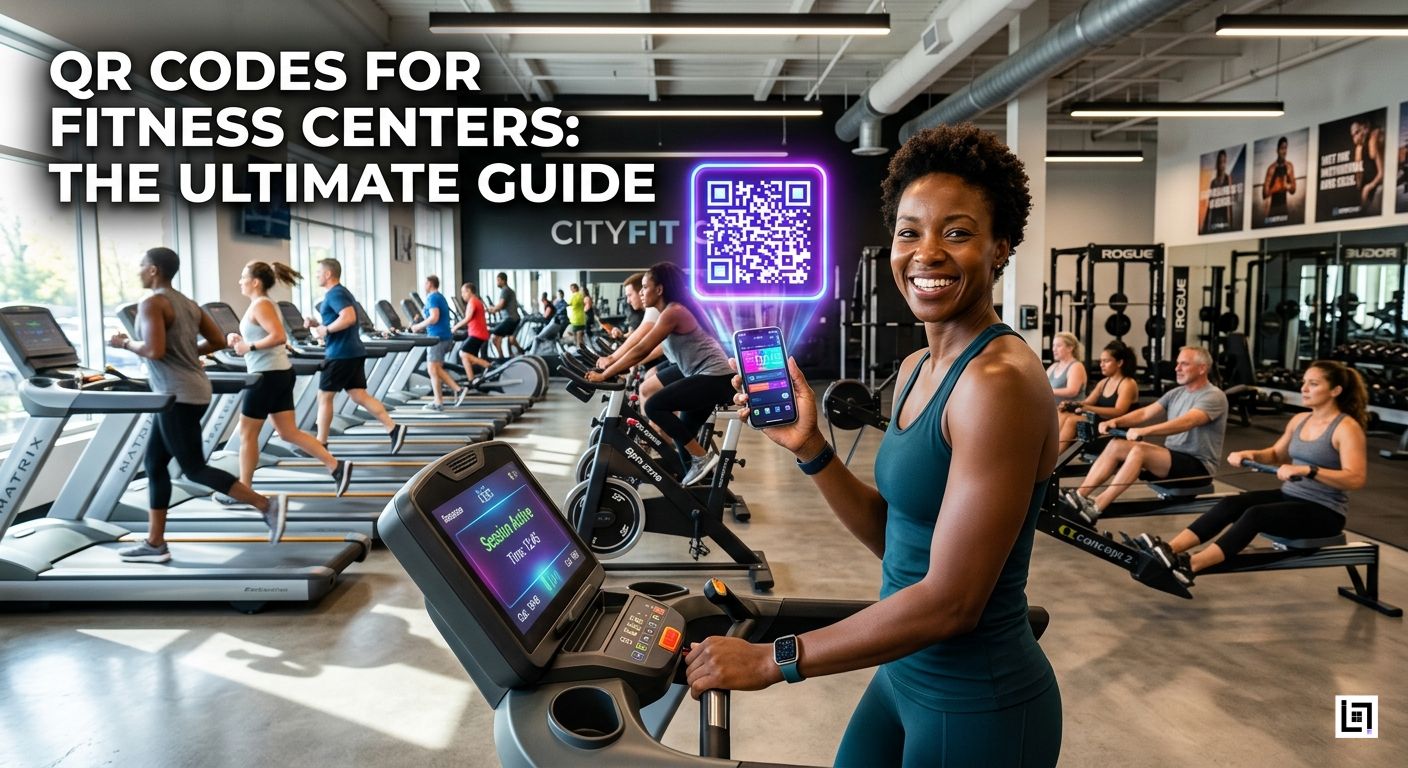
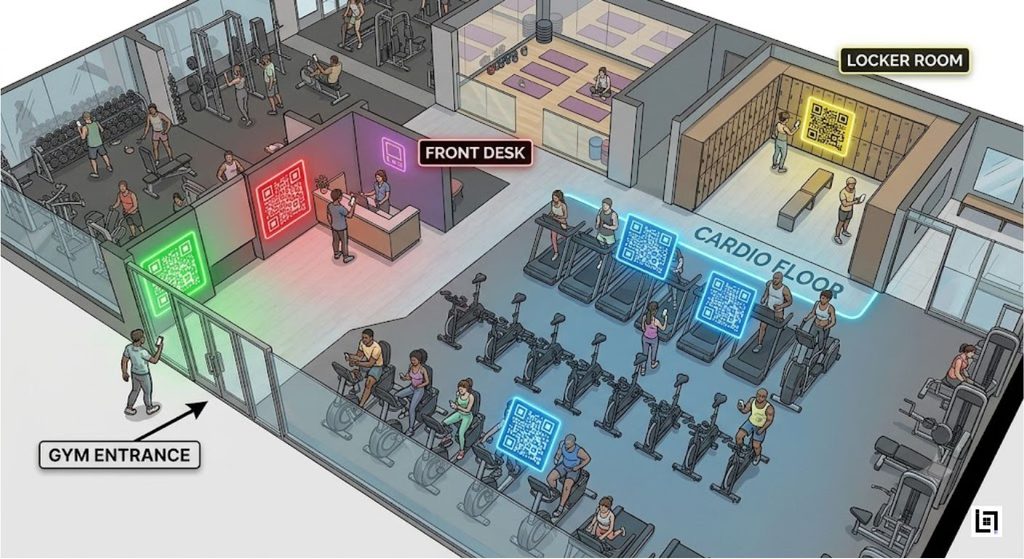
    Place a high-energy Spotify playlist QR on cardio machines—treadmills, stationary bikes, and rowing machines. Members scan once and instantly access a perfectly curated workout mix. The result? Longer, more motivated workouts and increased machine utilization.

    2. Google Calendar Integration

    Post a gym class schedule QR code at your front desk. Members scan and automatically save your weekly Zumba, yoga, HIIT, and spin classes to their phones. No more missed sessions, better attendance rates, and reduced scheduling confusion.

    3. Membership Payment QR

    Streamline sign-ups and membership renewals with a gym membership payment QR at the registration desk. First-time visitors can join instantly. Existing members can renew their subscriptions without paperwork.

    4. Instagram Fitness Tips

    A Spotify playlist QR code isn’t your only social tool. Post an Instagram fitness QR at your entrance leading to your community feed, workout challenges, and member transformations. This builds social proof and encourages members to engage with your brand beyond the gym walls.

    5. Wi-Fi Access

    Include Wi-Fi login QR codes for members who want to stream content while working out. Seamless connectivity = happier members.

    Why Traditional QR Codes Fall Short

    Most gyms print static QR codes and hope they work. But what happens when you update your class schedule next month? That printed QR on the front desk is now outdated. Members scan it, see incorrect information, and trust erodes.

    This is where traditional QR codes fail fitness centers.

    The ScanMyQR Difference: Dynamic QR Codes for Studios

    A dynamic QR code manager solves this problem entirely. With ScanMyQR, you manage all your QR codes from one centralized account. The printed code stays the same—but the destination link updates in real-time.

    Here’s the workflow:

    1. Create your QR codes in ScanMyQR (Spotify playlists, class schedules, payment links, Instagram profiles, Wi-Fi login)
    2. Print them across your facility—machines, front desk, bathroom mirrors, locker rooms
    3. Update the destinations whenever you need—no reprinting required
    4. Track scan analytics to see which playlists drive engagement, which class times are most popular, and which marketing channels convert

    When your Zumba class moves from Tuesday to Wednesday, simply update the calendar link in your ScanMyQR dashboard. Every printed code redirects to the new schedule automatically. Your members get accurate, up-to-date information every single time.

    Practical Implementation for Gyms

    On the Cardio Floor: Place Spotify playlist QRs on treadmills, ellipticals, and stationary bikes. Label them: “High-Energy Cardio Mix” or “Running Motivation.” Members instantly access music without fumbling with Bluetooth pairing.

    At the Front Desk: Post a prominent gym class schedule QR code so members can save weekly schedules directly to their calendars. Add a Google review QR for fitness facilities nearby so satisfied members can leave testimonials—critical for new member acquisition.

    In the Lobby: Display a unified QR linking to your latest Instagram content, member transformations, and fitness challenges. This drives social engagement and community building.

    Membership Area: Keep a gym membership payment QR readily available for renewals, upsells to premium tiers, or personal training packages.

    Measuring Success: The Analytics Advantage

    ScanMyQR’s analytics dashboard reveals critical insights:

    • Which Spotify playlists drive the longest workouts
    • Which class times have the highest scan rates
    • Which Instagram content converts members to social followers
    • Peak scanning hours (optimize your marketing timing)

    This data directly informs your gym marketing strategy. If evening yoga classes see double the scans at 5 PM, promote that time slot. If a particular playlist drives 3x more cardio machine usage, expand that collection.

    The Retention Impact

    Here’s what gyms typically see after implementing a unified QR code manager strategy:

    • Class attendance increases by 15-25% (members don’t forget schedules)
    • Member check-in frequency rises by 10-20% (frictionless access to schedules and playlists)
    • Social media growth accelerates (Instagram QR codes build community)
    • Membership renewal rates improve (seamless payment options reduce friction)
    • Churn rate drops (higher engagement = stronger commitment)

    Getting Started: Your QR Code Action Plan

    1. Audit your facility: Where do friction points exist? (Schedule sharing? Playlist access? Payment delays?)
    2. Create 5-7 key QR codes in ScanMyQR (Spotify, Calendar, Payment, Instagram, Wi-Fi)
    3. Print and place strategically—high-traffic areas first (cardio floor, front desk, entrance)
    4. Train staff to explain the QR code benefits to new and existing members
    5. Monitor analytics weekly—adjust destinations and placement based on scan data
    6. Update seasonally (new workout playlists, class schedule changes, promotional offers)

    Why Fitness Centers Love ScanMyQR

    Unlike basic static QR generators, ScanMyQR is purpose-built for businesses that evolve:

    • Dynamic updates without reprinting
    • Unified dashboard for all your codes
    • Real-time analytics on member engagement
    • Scalability from single studios to multi-location chains
    • Integration-ready with your existing tech stack

    Conclusion: The Future of Gym Engagement

    Member retention doesn’t require expensive redesigns or complicated technology. A strategic dynamic QR for studios approach—powered by ScanMyQR—delivers convenience, engagement, and data insights that drive growth.

    Your members want quick access to music, schedules, payments, and community. QR codes bridge that gap in a single scan.

    Start today. Your retention rate—and your bottom line—will thank you.

  • 5 Essential QR Codes For  Restaurants & Cafes 2026

    5 Essential QR Codes For Restaurants & Cafes 2026

    The Death of Table Tents: Why Physical Menus Are Becoming Obsolete

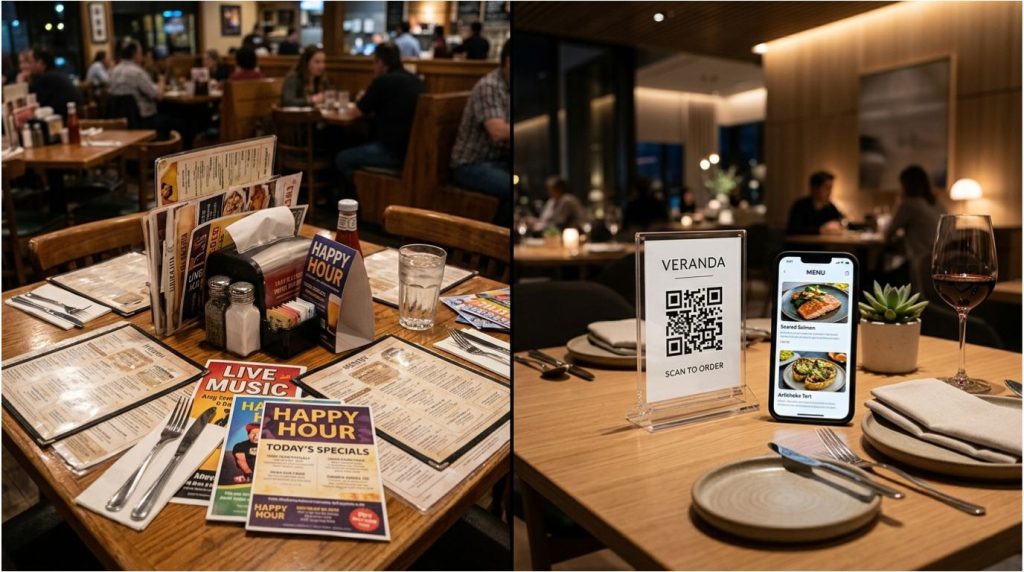
    Walk into most restaurants today, and you’ll still see the same scene your grandmother witnessed decades ago: laminated menus stuffed in baskets, worn table tents promoting specials, and printed flyers advertising upcoming events.

    But the hospitality landscape is shifting—and fast.

    In 2026, the most successful restaurants and cafes aren’t printing static menus anymore. They’re using a modern alternative that costs pennies to deploy yet delivers incredible flexibility, engagement, and operational efficiency.

    The culprit? Dynamic QR codes.

    The problem with traditional menus is brutal: every price change, seasonal item swap, or promotional update requires reprinting. For a restaurant with 50 tables, that’s not just annoying—it’s expensive and wasteful. But more importantly, it’s outdated.

    Customers today expect frictionless experiences. They want to connect on social media, pay without touching the terminal, leave feedback instantly, and access Wi-Fi seamlessly—all from their table.

    That’s where the tabletop bundle comes in.

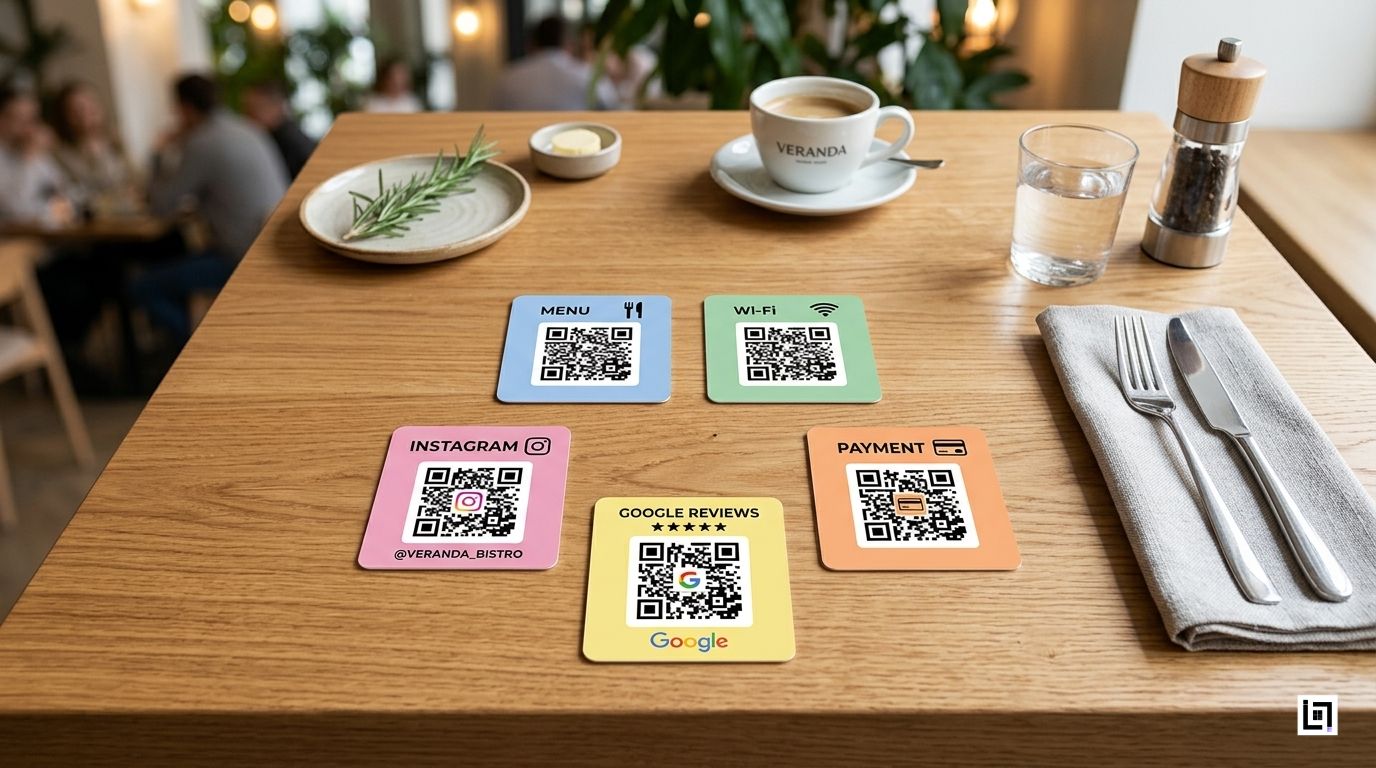
    The Tabletop Bundle: Five QR Codes for Restaurants that Complete the Customer Journey

    Imagine this: A customer sits at a table. Within 30 seconds, they’ve:

    1. Connected to Wi-Fi (no password chaos)
    2. Viewed your digital menu (and added items to a cart)
    3. Completed a contactless payment (no card swapping)
    4. Left a Google Review (you got a 5-star rating)
    5. Followed your Instagram (they’re now a brand advocate)

    This isn’t a fantasy—it’s the new standard for hospitality.

    Here are the 5 essential QR codes for restaurants:

    1. Digital Menu QR Code (PDF)

    Menu QR code

    The centerpiece of your tabletop bundle. A single QR code on your table tent links customers to your complete menu as a PDF. They tap, they browse, they order.

    Why this matters: No printing costs. No outdated items on the menu. No confusion about which dishes are available today.

    With a dynamic QR code for a restaurant menu, you update prices or items in real time—all from a single dashboard. Your Tuesday lunch special? Add it in seconds. That appetizer is out of stock? Remove it instantly. Customers always see the truth.

    2. Wi-Fi Connect QR Code

    Stop repeating your Wi-Fi password 50 times a shift.

    A simple scan of the Wi-Fi QR code auto-connects customers to your network without typing a single character. It’s frictionless, faster, and leaves a positive first impression.

    Hidden benefit: You can track which tables are connecting and when—valuable data for understanding peak usage and customer behavior.

    3. Google Reviews QR Code

    Getting customers to leave reviews is notoriously difficult. They have to find you on Google, navigate to Reviews, and write something meaningful—all from their phone, mid-experience.

    A Google review QR code for a restaurant placed strategically on your table tent changes everything. After they’ve finished eating and are satisfied, one tap takes them directly to your Google Review page.

    The result? More authentic reviews, better visibility in local search, and stronger credibility signals to potential customers.

    4. Instagram Follow QR Code

    Building a loyal community on Instagram is essential for modern restaurants. But asking customers to search and follow manually? That’s a lost opportunity.

    An Instagram QR code for cafes on your table tent makes it effortless. They scan, they follow, they see your latest content next week. Over time, this builds genuine engagement and a repeatable marketing channel you own (unlike Google or Facebook advertising).

    5. Contactless Payment QR Code

    The final piece: touchless payment QR codes streamline checkout without requiring a card terminal.

    Whether customers use Stripe, PayPal, or another payment processor, a single scan completes the transaction. It’s faster, safer, and eliminates the awkward moment of handing over a card or waiting for the terminal to come around.

    Why Dynamic QR Codes for Restaurants Beat Static Alternatives

    Here’s where most restaurants get it wrong: they print QR codes into their materials and call it a day.

    Static QR codes are the menu equivalent of a printed contract—once it’s out, it’s locked.

    Dynamic QR codes let you:

    • Update menu items and prices instantly (no reprinting)
    • Change destinations on the fly (point to different pages, promotions, or campaigns)
    • Track analytics (see which tables scan the most, when, and what they’re engaging with)
    • Manage from a single dashboard (no technical skills required)

    This is the competitive advantage that separates thriving restaurants from struggling ones.

    The ScanMyQR Advantage: One Dashboard, Complete Control

    Managing five separate QR codes shouldn’t require five separate accounts. That’s chaos.

    With ScanMyQR, you get:

    • Centralized Dashboard: Manage your menu QR, Wi-Fi QR, review QR, social QR, and payment QR all in one place
    • Real-Time Menu Updates: Change prices, mark items out of stock, add seasonal specials—all reflect instantly across every table
    • Analytics Insights: See which tables are scanning for menus vs. payments vs. reviews. Understand customer behavior patterns
    • Dynamic Management: Update where your QR codes point without reprinting a single table tent
    • Professional Branding: Maintain consistency across all QR implementations with your brand colors and logos

    When your menu changes seasonally (and it always does), you’re not reprinting table displays or tablecloths. You’re updating a database. When you launch a new promotional campaign, customers who scanned your menu last month see the updated content automatically.

    For restaurants managing multiple locations, this efficiency multiplies.

    Why This Matters for You?

    QR codes for Restaurant marketing aren’t just about convenience — they’re about revenue generation and operational cost reduction:

    • Increase restaurant reviews through friction-free feedback
    • Drive social media growth (Instagram, TikTok, Facebook)
    • Reduce operational friction (fewer customer questions about Wi-Fi passwords, menu items, payments)
    • Gain competitive intelligence (which items are scanned most? When? By how many tables?)

    The restaurants and cafes winning in 2026 aren’t the ones with fancier plating. They’re the ones with smarter operations.

    Start Your Tabletop Bundle Today

    The “Invisible Waiter” isn’t a person—it’s a system. It’s the quiet efficiency of QR codes working in concert to serve your customers better, gather data smarter, and let your team focus on what they do best: hospitality.

    Ready to modernize your restaurant or cafe? Manage restaurant QR codes with a platform built for hospitality. One dashboard. Five powerful codes. Unlimited possibilities.

    Your customers are ready for 2026. Is your menu?

  • Entertainment QR Code: Revolutionizing the Fan Experience

    Entertainment QR Code: Revolutionizing the Fan Experience

    The Problem: Losing Fans the Moment the Show Ends

    The curtain drops. The final chord fades. The crowd erupts—thousands of people experiencing a live moment together, connected by shared energy.

    Then? They leave. And you lose them.

    Entertainment marketers face a critical challenge: converting physical attendance into digital engagement. Once fans step outside the venue, they disconnect. No follow-up stream, podcast episode, or online merchandise purchase.

    Why? Friction.

    The typical experience:

    • Even if a fan loved the show, they may not remember the artist’s name afterward.
    • They try typing a URL on their phone at the venue (WiFi is slow)
    • Then, when they search for the streaming app, they can easily get lost in endless recommendations.
    • By the time they finally find the artist, the moment has already passed.

    The result: Missed sales. Lost followers. Broken fan connections.

    Event organizers and artists know this problem intimately. They book venues, promote unforgettable shows, and build loyal audiences. Yet they can’t effectively bridge the gap between live experience and digital platform—and that costs them direct revenue, streaming numbers, and long-term fan loyalty.

    But what if, instead, fans could access your digital presence instantly with a single scan?

    The Solution: Dynamic Entertainment QR Code

    Dynamic QR codes solve this problem by removing friction entirely.

    Here’s the shift: Instead of asking fans to type, search, or remember, you simply give them a QR code. One scan is all it takes to unlock instant access to your entire digital ecosystem.

    But here’s the catch—not all QR codes are the same.

    Static QR codes (free) embed data permanently in their design. Useful for one-time campaigns, but they can’t be updated without reprinting thousands of tickets.

    Dynamic QR codes (powered by platforms like ScanMyQR) live on a cloud dashboard. Change the destination anytime. Update instantly. Track every scan.

    For entertainment? Dynamic QR codes are the game-changer.

    Two Powerful Use Cases: PDF Playbills & Spotify Integration

    Use Case #1: PDF QR Codes for Digital Playbills and Festival Maps

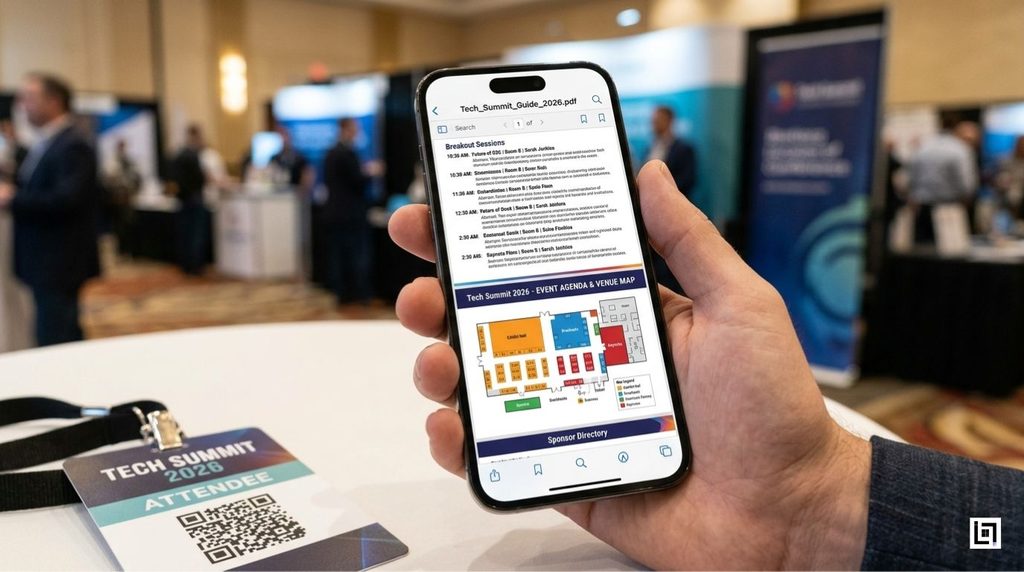
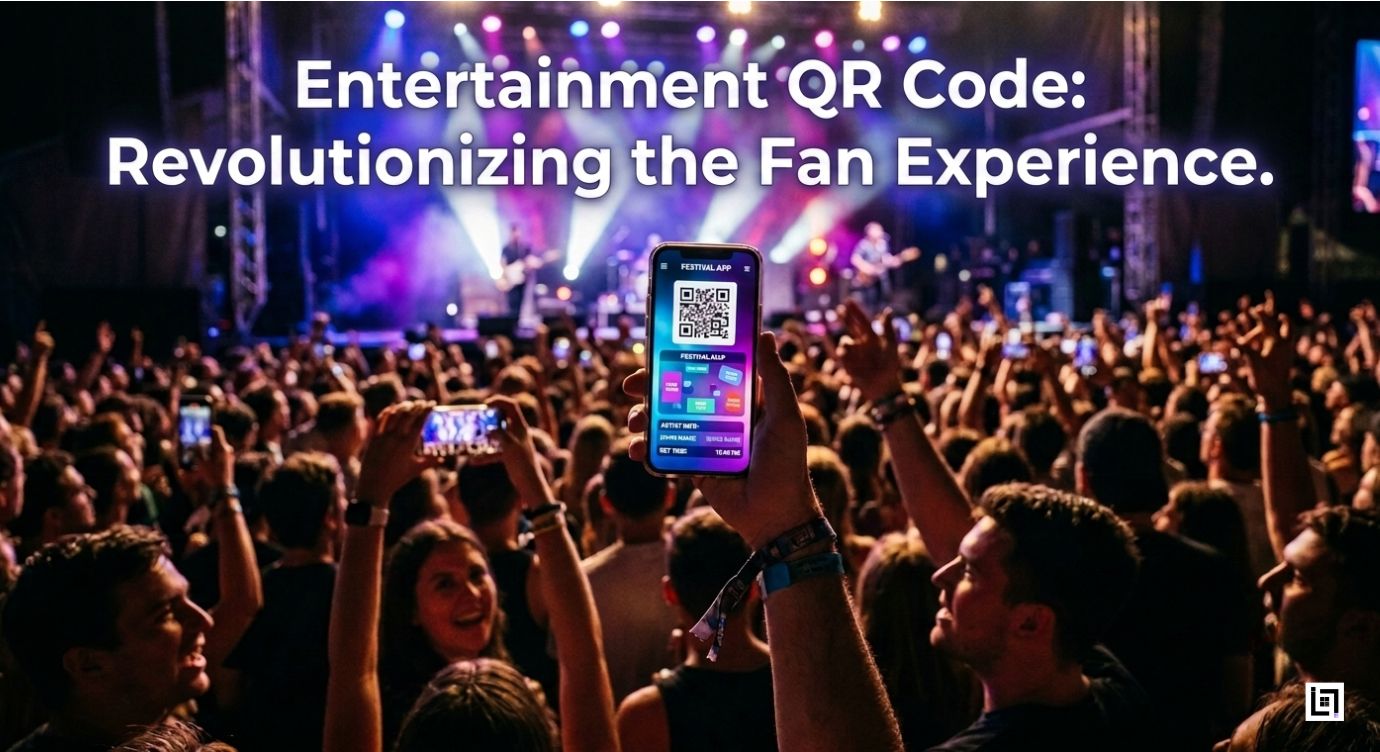
    Imagine this: A fan walks into your concert venue. Instead of grabbing a paper program—which costs money to print and often ends up crumpled or discarded—they simply scan a QR code at the entrance.

    Instantly, they download a digital playbill that includes:

    • Complete artist lineup with bio links
    • Interactive stage map showing bathroom and food locations
    • Real-time schedule updates (artist running late? Update instantly)
    • Hyperlinks to each artist’s Spotify profile
    • Merchandise ordering links
    • Social media handles for live tweeting

    Benefits:

    • Cost savings: No printing expenses
    • Instant updates: Price drop? Lineup change? Update the PDF in seconds—all phones get the new version
    • Data capture: Track how many fans downloaded the guide, which sections they viewed
    • Eco-friendly: Zero paper waste

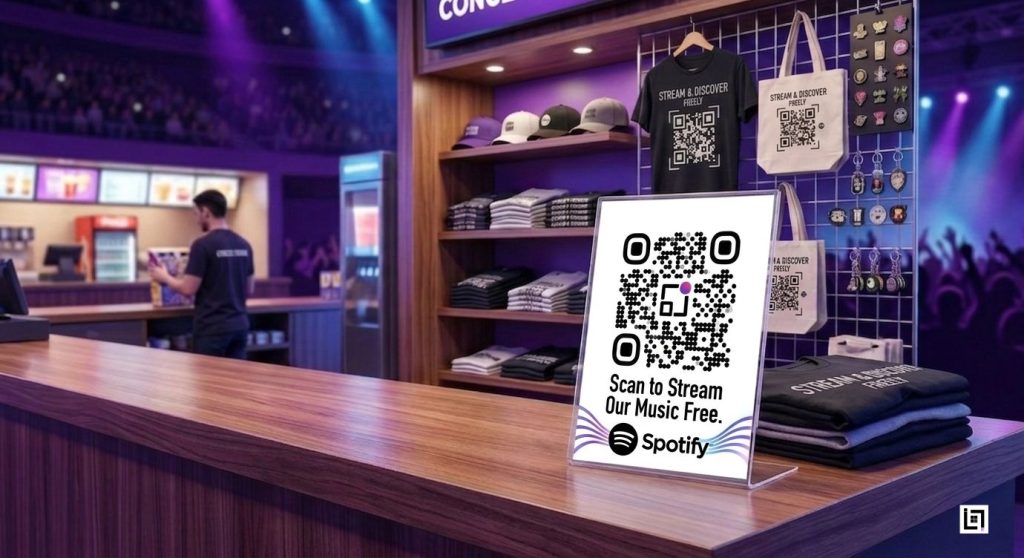
    Use Case #2: Spotify QR Codes for Direct Streaming

    Next, place a dynamic Spotify QR code on concert merchandise, ticket stubs, or table tents.

    When fans scan, they can instantly reach your Spotify artist page; as a result, with just one tap, there’s no searching and no typing required.

    Where to place these codes:

    • On concert tickets (drives streams immediately after purchase)
    • On merch packaging (merchandise becomes a marketing tool)
    • On venue table tents (captures impulse listeners)
    • On band press kits (industry professionals stream instantly)

    The magic: Fans listen immediately. Spotify counts streams. Algorithms recommend your music to similar listeners. You build a streaming audience that night.

    Step-by-Step: How to Launch Your First Campaign on ScanMyQR

    Ready to implement this? Here’s exactly how:

    Step 1: Create Your ScanMyQR Account

    Action: Go to https://scanmyqr.co/ and sign up.

    Enter your email, create a password, and verify your account. Then login to the dashboard.

    Step 2: Generate a Dynamic PDF QR Code (for Your Digital Playbill)

    In the ScanMyQR dashboard:

    1. Click “Create New QR Code”
    2. Select “PDF” as the code type
    3. Upload your playbill PDF (or click the template builder to design one)
    4. Name it: Concert Playbill_[Venue Name]_[Date].
    5. Click “Generate Code”

    Now the magic happens: You have a dynamic PDF QR code.

    Update the PDF anytime from your dashboard. Because all previously printed codes automatically point to the latest version, there’s no need for reprinting.

    Step 3: Customize the QR Code Design

    Still in the dashboard:

    1. Click “Design” on your newly created code
    2. Change the color to match your brand
    3. Add your artist logo in the center (optional but powerful)
    4. Add a label: “Scan for Full Festival Map & Artist Info”
    5. Preview on your phone to ensure it scans properly

    Step 4: Download & Print

    1. Download the code as PNG (for digital use) or SVG (for printing)
    2. Print on large-format posters for the venue entrance
    3. Embed digital versions in email promotions
    4. Post on social media leading up to the event

    Step 5: Generate a Dynamic Spotify QR Code (for Music Promotion)

    Spotify QR Code

    Back in the dashboard:

    1. Click “Create New QR Code”
    2. Select “URL” as the code type
    3. Paste your Spotify artist link: https://open.spotify.com/artist/[YOUR-ARTIST-ID]
    4. Name it: Spotify Stream_[Event Name]
    5. Click “Generate Code”

    The key difference is that this code is dynamic; therefore, if you want to promote a specific album or playlist instead, you can instantly update the URL without needing a new code.

    Step 6: Deploy on Merchandise & Tickets

    1. Print Spotify codes on concert tickets (before printing)
    2. Add to merch packaging (t-shirts, hoodies, vinyl)
    3. Place table tents on venue concession stands
    4. Add to band press kits sent to media

    Step 7: Monitor & Update in Real Time

    As the event approaches:

    1. Log into your ScanMyQR dashboard
    2. Check “Analytics” to see real-time scan data
    3. If an artist cancels? Update your PDF playbill instantly
    4. If a price changes? Update that link immediately
    5. Fans with already-printed codes get the updated information

    Analytics Breakdown: Measuring ROI

    Here’s what separates dynamic QR codes from paper flyers: data.

    The ScanMyQR analytics dashboard shows you exactly how fans engaged with your physical-to-digital strategy:

    MetricWhat It ShowsWhy It Matters
    Total ScansHow many fans engaged with your codeBaseline engagement rate
    Scan HotspotsWhich venue locations generated the most scans?Optimize placement for future events
    Geographic DataWhere scans originated (which city/neighborhood)Understand your audience’s geography
    Device TypeiOS vs Android breakdownKnow your audience’s tech preferences
    Peak HoursWhen fans scanned most (during show? after?)Time follow-up marketing perfectly
    Conversion RateScans → Spotify follows or downloadsTrue ROI measurement
    Repeat ScansDid fans scan multiple times?Indicates high engagement/interest

    Real example: Your venue’s main entrance generated 340 scans between 7-8 PM (show start time). Your merch table generated 180 scans during intermission. This tells you: place more codes near the entrance next time.

    Removing Friction = Securing Fan Loyalty

    The entertainment industry thrives on moments. Live performances create an emotional connection that recorded music cannot replicate.

    Dynamic QR codes preserve that connection by removing barriers.

    Instead of “I’ll find them later” (and never do), fans convert to followers instantly. Instead of asking fans to type URLs in a noisy venue, you give them a 2-second path to your digital ecosystem.

    The result?

    • Higher streaming numbers
    • Direct merchandise sales
    • Larger email lists (if you gate the playbill)
    • Quantified marketing ROI
    • Fan data for future campaigns

    Entertainment marketers no longer have to choose between physical presence and digital engagement. Dynamic QR codes enable both—and measure the bridge between them.

    Take Action: Launch Your First Campaign Today

    Your next show, your next festival, or your next album release.

    The fans are there, ready to engage. They just need a frictionless path forward.

    Ready to revolutionize your fan experience?

    Start building your first dynamic QR code campaign at ScanMyQR. Generate a PDF playbill. Create a Spotify code. Track every scan. Update instantly.

    The future of entertainment marketing isn’t about printing more flyers. It’s about connecting physical moments to digital platforms—instantly.

    Begin now. Your next breakthrough fan engagement is one scan away.

  • How Salon QR Codes Automate Bookings & Google Reviews

    How Salon QR Codes Automate Bookings & Google Reviews

    The Problem Every Salon Owner Faces

    Your phone rings constantly. A client calls to reschedule. Another wants to know your pricing. A third needs to leave a Google review but can’t find your location on Google Maps. Meanwhile, you’re missing the opportunity to actually work with clients—the part of the business you genuinely love.

    The reality? Salon owners spend too much time answering the phone and not enough time with clients.

    This inefficiency doesn’t just frustrate you; it costs you money. Research shows that 72% of salon customers expect online booking options, yet most salons still rely on phone calls. Every missed opportunity is revenue walking out the door.

    What if there was a simple, code-based solution that could handle bookings, reviews, pricing information, and portfolio showcasing all without you lifting a finger?

    Welcome to the receptionist in a code: dynamic QR codes designed specifically for beauty and wellness businesses.

    What Is a Dynamic QR Code for Salons?

    A salon booking QR code isn’t just a static link. It’s a dynamic, data-driven tool that can:

    • Direct clients to your appointment calendar for 24/7 booking
    • Display your service and pricing menu instantly (as a PDF or interactive page)
    • Collect Google reviews while clients are relaxed and happy
    • Showcase your Instagram portfolio, so prospects see your work
    • Process payments for deposits or full services
    • Track every scan with analytics to measure which marketing channels work

    Unlike generic QR codes, these are customizable, trackable, and purpose-built for the beauty industry.

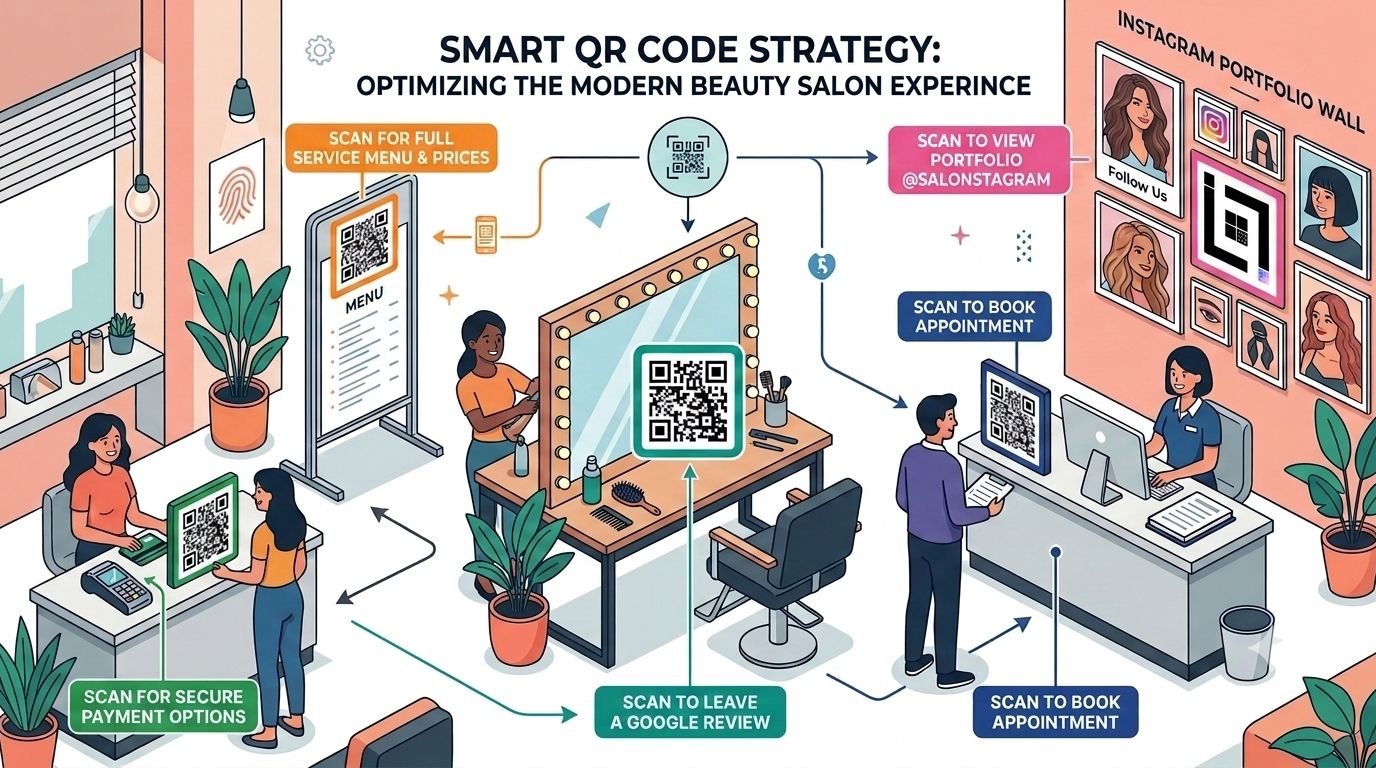
    The 5 Essential QR Code Touchpoints for Your Salon


    1. Schedule Appointment QR Code (At Your Storefront)

    Location: Window display, business cards, flyers

    What it does: Sends clients directly to your online calendar—even after hours.

    Why it matters:

    • Clients can book at midnight without calling you at 9 AM
    • Reduces double-bookings and miscommunications
    • Works for walk-ins curious about availability
    • Particularly powerful for salons with extended hours or online-first models

    SEO Benefit: Drives organic traffic to your booking page, signals “appointments available online” to search engines.

    2. Spa Menu QR Code PDF (At Check-In Counter)

    Location: Reception desk, service stations, appointment confirmations

    What it does: Instantly displays your complete service menu, pricing, and duration as a professional PDF.

    Why it matters:

    • New clients don’t have to ask verbal questions
    • Reduces staff interruptions
    • Clients can review services before committing to a chair
    • Upsell opportunities (clients see premium services they didn’t know existed)

    Pro Tip: Update your PDF monthly with seasonal promotions. The QR code stays the same, but the destination updates dynamically.

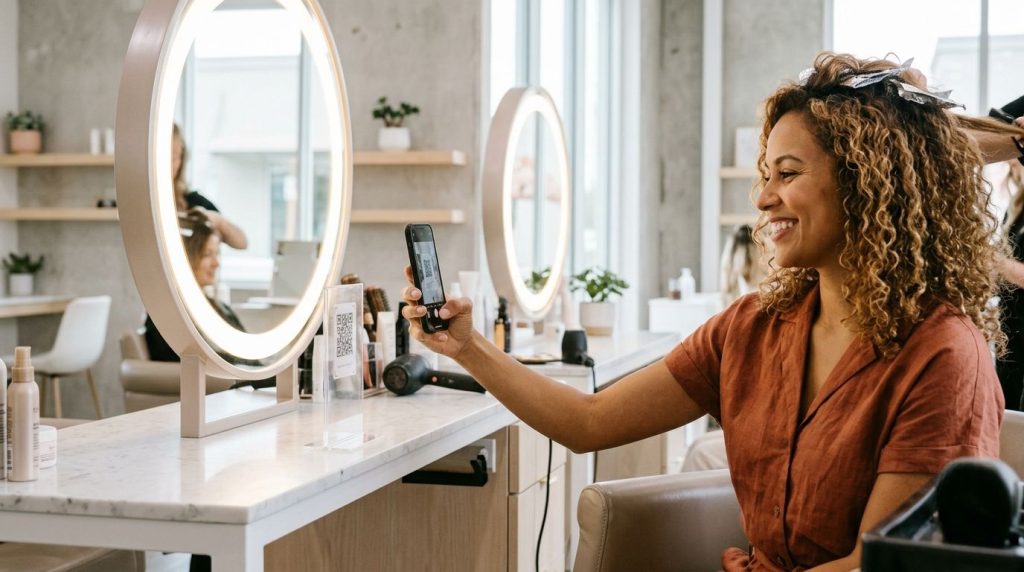
    3. Google Review QR for Salons (At Mirror Stations)

    salon mirror qr code google review

    Location: Station mirrors, makeup areas, finishing stations

    What it does: One scan takes clients directly to your Google Reviews page while they’re looking fabulous and feeling great about their service.

    Why it matters:

    • Timing is everything clients are most likely to leave reviews when they’re happy
    • Increases review volume (average increase: 300-400% when placed at mirror stations)
    • Google reviews directly impact your local search rankings
    • Trust signals for new clients searching for “salons near me”

    4. Instagram Portfolio QR Code (At Waiting Area)

    Location: Reception area, waiting chairs, appointment reminders

    What it does: Lets clients scroll through your recent work while they wait for their appointment to start.

    Why it matters:

    • Keeps clients entertained and engaged
    • Increases Instagram followers organically
    • Creates social proof (more followers = more trust)
    • Encourages clients to tag and share your salon on their own posts

    Strategic Insight: Clients waiting 10-15 minutes will often follow you, save images, and share your work. That’s organic marketing you don’t have to pay for.

    5. Beauty Salon Payment QR (At Checkout)

    Location: Billing counter, invoice receipts, service cards

    What it does: Enables contactless, secure payments through Razorpay, PayU, or your preferred processor.

    Why it matters:

    • Faster checkout (no cash handling, no card reader waiting)
    • Secure and PCI-compliant
    • Clients can deposit for future appointments
    • Creates a record for accounting and GST compliance

    How to Set Up Your Salon QR Code System: Step-by-Step

    Step 1: Choose Your QR Code Platform (ScanMyQR or Similar)

    What to look for:

    • Dynamic QR codes (not static—they let you update destinations without reprinting)
    • Detailed analytics dashboard
    • Customization options (add your logo, brand colors)
    • Integration with calendars (Google, Calendly, Acuity Scheduling)
    • Support for multiple file types (PDFs, URLs, VCards, SVG)

    Recommended Setup Time: 30 minutes

    Step 2: Create Your QR Codes (One for Each Purpose)

    Do this:

    1. Booking QR:
      • Generate URL: Your online calendar link (Calendly, Acuity, or Google Calendar)
      • Customize: Add salon logo in the center
      • Name it: “Appointment_Booking_QR”
    2. Menu QR:
      • Upload your service menu PDF (include prices, durations, therapist specialties)
      • Customize with salon colors
      • Name it: “Service_Menu_QR”
    3. Google Review QR:
      • Get your Google Business Profile review link
      • Generate QR code
      • Customize and name: “Google_Review_QR”
    4. Instagram QR:
      • Use Instagram’s built-in QR code feature or platform-generated code
      • Customize with salon branding
      • Name it: “Instagram_Portfolio_QR”
    5. Payment QR:
      • Generate through your payment processor
      • Customize with salon name
      • Name it: “Payment_QR”

    Pro Tip: Keep a spreadsheet tracking all QR code names, links, and placement locations. This helps you manage updates and troubleshoot scanning issues.

    Step 3: Place QR Codes Strategically

    Booking QR Code Placement:

    • Window display (largest, most visible)
    • Business cards (for appointment reminders)
    • Flyers and local advertisements
    • Email signatures

    Menu QR Placement:

    • Reception counter (eye level)
    • Each service station
    • Appointment confirmation emails
    • SMS reminders to returning clients

    Review QR Placement:

    • Behind mirror stations (the golden location—clients are in the best mood here)
    • Billing counter
    • Exit area (clients can scan on their way out)
    • Follow-up thank-you cards

    Instagram Portfolio Placement:

    • Waiting area seating (kills boredom)
    • Above service stations
    • Printed portfolio books (alongside traditional photos)

    Payment QR Placement:

    • Checkout counter
    • Service invoices
    • Receipt printouts
    • Appointment reminder cards

    Step 4: Train Your Staff

    What to teach:

    • Where each QR code is and what it does
    • How to explain QR codes to clients (“Scan here to book your next appointment”)
    • When to suggest scanning (e.g., “While we finish your nails, why not follow us on Instagram?”)
    • How to troubleshoot common issues (bad WiFi, camera focus)

    Step 5: Monitor Analytics (The Profit Part)

    This is where Salon booking QR Code analytics becomes your superpower.

    Open your ScanMyQR dashboard and track:

    Scan Volume by Location

    Which mirror station gets the most review scans?

    Does your window QR or printed flyer get more traffic?

    Answer: Focus marketing spend on the highest-performing channel

    Time-Based Insights

    Peak booking times (e.g., Mondays 6-8 PM)

    Seasonal trends (e.g., bridal season bookings spike in October)

    Action: Schedule extra staff during peak periods

    Conversion Tracking

    How many people scan vs. actually book?

    Calculate your “booking conversion rate”

    Example: 200 scans → 40 bookings = 20% conversion rate

    Device & Browser Data

    Are users scanning on iPhone or Android?

    Are they mobile or desktop?

    Action: Optimize your calendar for the dominant device type

    Marketing ROI Measurement

    Place different QR codes on different marketing materials

    Track which brings the most bookings

    Example: “Window display QR brought 3x more bookings than local magazine ad”

    Conclusion: Invest more in storefront visibility, reduce magazine ad spend

    The ScanMyQR Value: Analytics Dashboard for Salon Marketing ROI

    Here’s the game-changer:

    Imagine you spend ₹5,000 on a beautiful printed flyer with a QR code. You also spend ₹5,000 on a local magazine advertisement with a different QR code.

    With traditional marketing, you’d guess which one worked better. With dynamic QR for beauty parlor analytics:

    ChannelScansBookingsBooking RateCost per Booking
    Printed Flyer3406820%₹74
    Magazine Ad2102110%₹238

    Decision: Flyers are 3x more effective. Next month, print 3,000 flyers instead of buying another magazine ad.

    This is actual data-driven decision making—not guesswork.

    Other metrics ScanMyQR provides:

    • Geolocation tracking: See where your highest-converting clients come from
    • Repeat scans: Identify loyal clients who scan multiple times
    • Bounce rates: If your booking page has a 70% bounce rate, your UX needs work
    • A/B testing: Create two versions of a QR code destination and see which converts better
    • Custom reports: Export data for board meetings or financial planning

    Real-World Example: How One Salon Increased Bookings 250%

    The Business: Elite Unisex Salon, Ahmedabad (60-seat operation, 40+ staff)

    The Challenge:

    • Receptionist was answering 80+ calls per day
    • Clients complained about wait times to book
    • Google reviews stalled at 3.2 stars (clients couldn’t find the review option)
    • Social media wasn’t growing

    The Solution (Salon Booking QR Code System):

    1. Placed booking QR on storefront (large, professional)
    2. Placed review QR at each of the 15 mirror stations
    3. Added Instagram portfolio QR to waiting area
    4. Integrated menu QR with digital pricing updates
    5. Set up a payment QR for deposits

    Results (After 90 Days):

    • Bookings: Up 250% (phone-based + online combined)
    • Google Reviews: From 3.2 to 4.6 stars (118 new reviews)
    • Instagram Followers: From 1,200 to 4,800
    • Receptionist Time: Freed up 30 hours/week (hired one fewer staff, redirected person to client-facing roles)
    • Average Transaction Value: Up 18% (menu QR + upselling worked)

    Analytics Insight: Review QR at mirror stations converted 35% of clients, vs. 8% who organically left reviews before.

    Why Touchless Salon Booking QR Code Matters Now

    The post-pandemic consumer has changed. Clients now expect:

    • Contactless interactions – QR codes eliminate paper forms and face-to-face interactions
    • 24/7 access – Book at 2 AM for a 10 AM appointment
    • Fast checkout – Payment QR instead of waiting for card processing
    • Hygiene – No shared tablets or keypads
    • Convenience – One scan instead of a 10-minute phone call

    Salons without QR booking are losing younger clients (Gen Z and millennials expect this as standard).

    Common Mistakes to Avoid

    MistakeWhy It HurtsSolution
    Static QR codesCan’t update destination; must reprint if link changesUse dynamic QR codes only
    Poor placementClients never see the QR codePlace booking QR at eye level on storefront; review QR at mirror stations
    No staff trainingStaff don’t promote QR codes; clients don’t know they existTrain the team on why and when to suggest scanning
    Ugly, low-contrast QR codes40% of users can’t scan due to poor designUse branded QR codes with adequate contrast; test with multiple phones
    Broken linksQR code goes to 404 error; clients get frustratedTest all QR codes weekly; monitor broken links in analytics
    No analytics monitoringYou can’t measure ROI or optimize placementCheck the ScanMyQR dashboard daily; export reports monthly
    Too many QR codesClients are confused about which to scanLimit to 5-6 codes; clear signage explaining each

    Getting Started: Your 7-Day Action Plan for Salon Booking QR Code Preparation

    Day 1: Choose ScanMyQR or a similar platform; sign up
    Day 2: Create 5 QR codes (booking, menu, review, Instagram, payment)
    Day 3: Design custom QR codes with salon branding
    Day 4: Print high-quality codes; place at all locations
    Day 5: Train staff on locations and promotion
    Day 6: Monitor first scans; troubleshoot any issues
    Day 7: Check analytics dashboard; plan optimization for next month

    The Future of Salon Operations Is Here!

    Salon owners no longer need to choose between client time and administrative work. Dynamic QR codes for beauty parlors automate the friction points that waste your day:

    • Bookings happen 24/7 without staff involvement
    • Clients leave reviews when they’re happiest (at the mirror station)
    • Pricing and menu questions are answered instantly
    • Portfolio showcase drives Instagram growth
    • Payments are contactless and secure
    • You get real data to optimize your marketing

    The salons that implement this now are gaining a competitive advantage. Clients choose salons that respect their time and offer convenience. QR-enabled salons deliver exactly that.

    Ready to become the tech-forward salon that clients rave about? Start with your storefront booking QR this week. Add review QRs at mirror stations next week. Monitor analytics religiously.

    Your future self—the one with less phone work and more client time will thank you.

  • Retail QR Code Strategy: Turn Window Shoppers Into Buyers

    Retail QR Code Strategy: Turn Window Shoppers Into Buyers

    Have you ever watched someone admire your storefront window, pull out their phone, and then simply walk away? In retail, that isn’t a missed moment, it’s a lost customer. The fastest way to recover those walk-aways is a branded retail QR code strategy that hands every passer-by a one-scan path into your store, your socials, and your online shop, even after closing time.

    There is a real, frustrating gap between a boutique’s physical storefront and its online presence. When your doors close for the evening, or when a specific size sells out, your sales shouldn’t grind to a halt. The most successful local boutiques bridge that gap by converting passive window shoppers into active followers, loyalty members, and online buyers, and they do it with intentional, trackable QR touchpoints rather than one generic black-and-white square.

    Retail QR Code Strategy

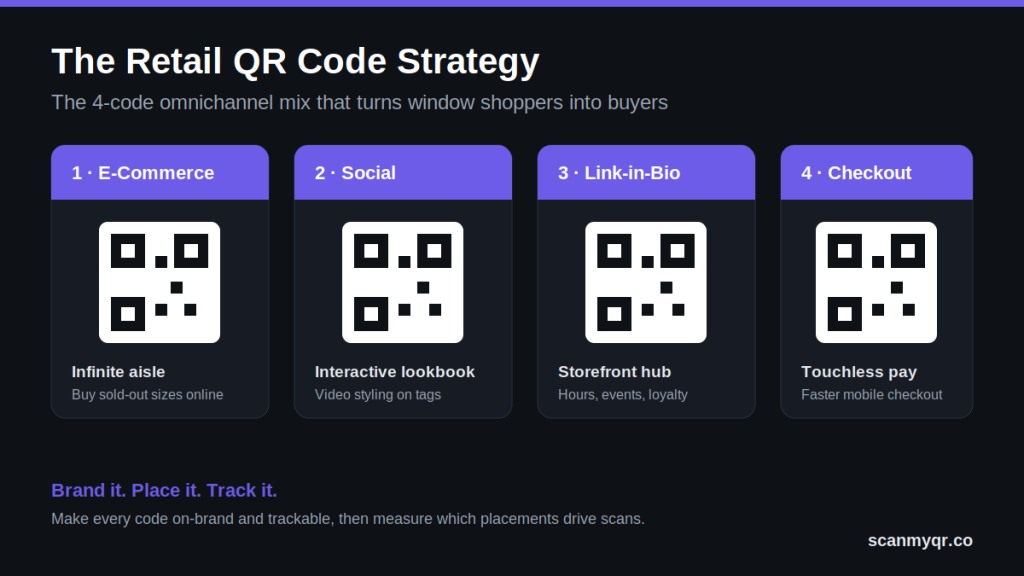
    Place a small set of purpose-built QR codes across your store, from window to receipt, so customers can buy out-of-stock items online, follow your socials, join loyalty, and check out faster. Make every code on-brand and trackable with a dynamic QR code generator so you can see exactly which placements drive scans.

    Why a Retail QR Code Strategy Beats a Generic Square

    A retail QR code strategy works because it removes friction at the exact moment a customer is interested. Instead of hoping a shopper remembers your store name, a single scan moves them from the sidewalk to a sale, a follow, or a sign-up. The difference between a code that performs and one that’s ignored comes down to three things: it’s branded, it’s placed where intent is highest, and it’s measurable.

    Generic codes fail on all three. They clash with a carefully curated display, they sit in low-intent spots, and they give you zero data on what’s working. Switching to trackable dynamic QR codes fixes that, because you can change the destination after printing and watch performance in real time.

    The Omnichannel QR Code Mix for Modern Boutiques

    To blend your brick-and-mortar footprint with your digital channels, you need an interconnected set of intentional touchpoints, not a single link. These four carry the most weight in a retail QR code strategy.

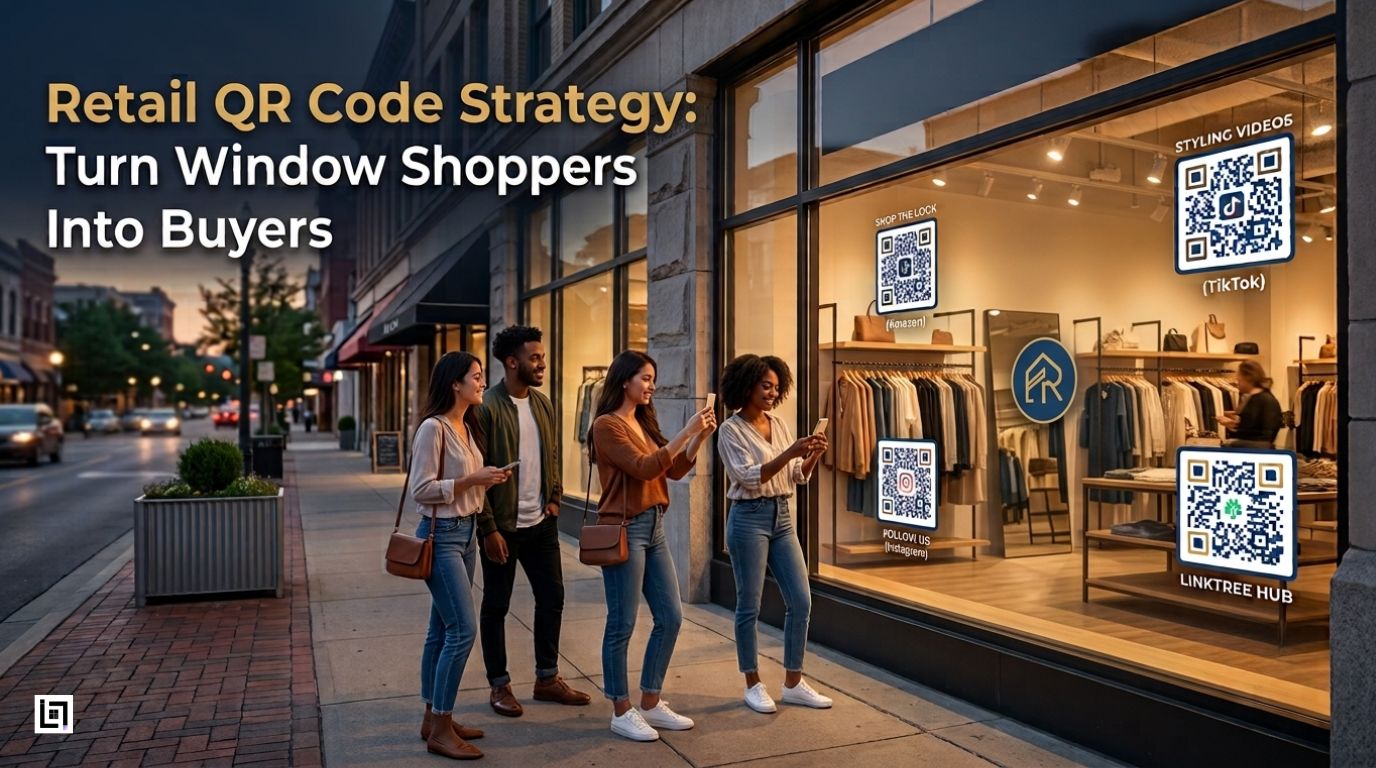
    1. The “Infinite Aisle”: E-Commerce and Amazon Product Codes

    Never let an out-of-stock item dictate your revenue. By placing an Amazon or e-commerce product QR code on product tags, a customer can buy online instantly when their size or color isn’t on the rack. The sale follows the shopper home instead of disappearing the moment they leave.

    2. The Interactive Lookbook: TikTok and Instagram Codes

    Hanger appeal only goes so far. Adding social media QR codes to clothing tags and racks lets you show how a piece fits, moves, and looks on real models through short video styling guides. It turns a static garment into a mini lookbook and grows your following at the same time.

    3. The Digital Storefront Hub: Link-in-Bio Codes

    Consolidate your entire digital footprint into one scan. A link-in-bio QR code placed prominently on your storefront window can house your hours, upcoming events, loyalty sign-up, and every social channel, so even a late-night browser can engage while your doors are locked.

    4. Frictionless Checkout: Touchless Payment Codes

    Keep your cash wrap moving. A touchless checkout QR code at the counter enables quick, secure mobile payments and cuts wait times during weekend rushes, which protects sales you’d otherwise lose to a long line.

    High-Impact Placement: Where to Drive Scans

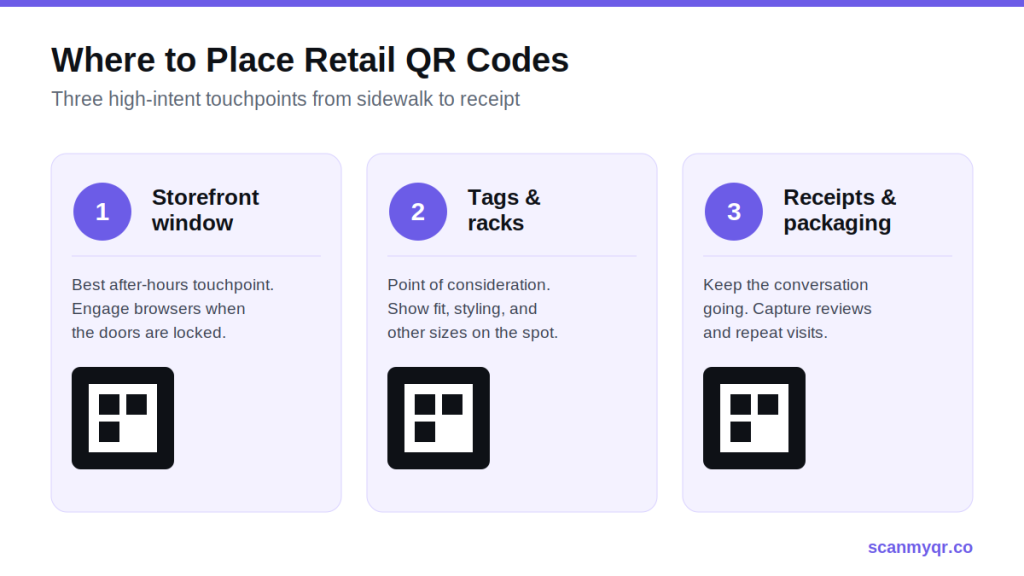
    Where you put a code matters as much as what it links to. A retail QR code strategy only pays off when codes sit where customer attention and intent are highest.

    Retail QR Code Strategy
    • Storefront windows: Turn late-night window shoppers into community members by giving them a way to engage even when you’re closed. This is your single best after-hours touchpoint.
    • Product tags and racks: Deliver instant product info, styling inspiration, and alternative purchase options right at the point of consideration, the exact second a customer is deciding.
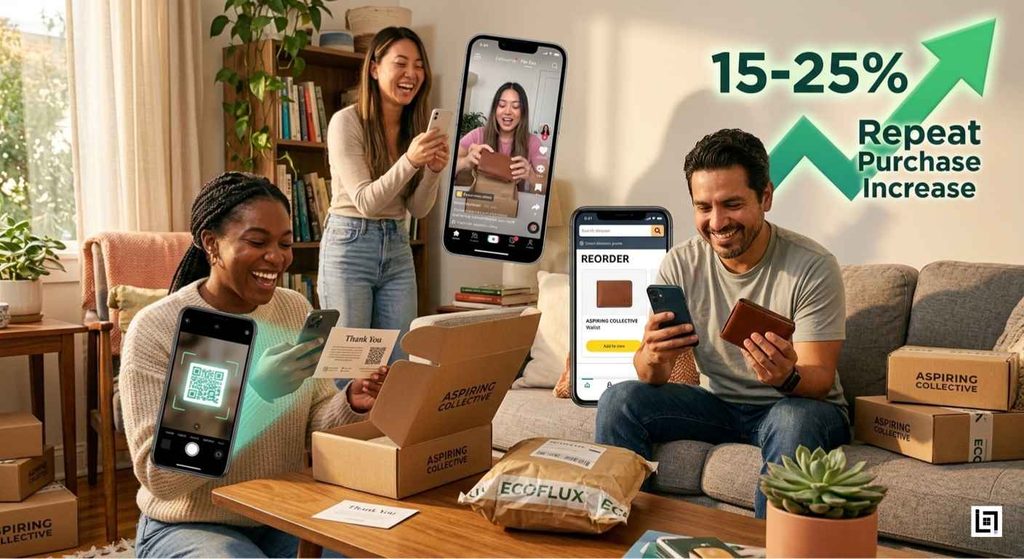
    • Receipts and post-purchase packaging: Keep the conversation going. The bottom of a receipt is perfect for a Google review QR code or Retail QR Code Marketing, an exclusive discount on the next visit, capturing reviews, and repeat business while the experience is fresh.

    Elevating Retail QR code strategy: Aesthetics with ScanMyQR

    Retail is about curation, branding, and aesthetics, and a clunky, generic code instantly disrupts a beautiful display or a thoughtfully designed tag. This is where a  earns its place: you can match every code to your brand so it reads as part of the design, not a sticker slapped on top.

    • Seamless logo customization: Embed your boutique’s logo directly in the center of the code so it’s recognizable at a glance.
    • Brand-matched color palettes: Swap standard black-and-white for your exact signature hex codes.
    • Powerful in-store analytics: Because these are dynamic codes, you can log into the QR code analytics dashboard and see which windows, racks, or receipt campaigns generate the most engagement.

    That last point is the difference between guessing and knowing. When you can see that the window code outperforms the rack code three to one, you stop spreading effort evenly and start doubling down on what works.

    Putting Your Retail QR Code Strategy Together

    Stop letting foot traffic walk out the door. A frictionless, trackable, beautifully branded in-store journey turns casual browsers into lifelong digital advocates, and it starts with one scan. Pick two or three placements to begin, brand each code, and track every scan so your next decision is driven by data rather than guesswork.

    Ready to build it? Start with a free dynamic QR code and add the rest of your retail mix from there.

    Frequently Asked Questions

    What is Retail QR Code Marketing?

    A retail QR code strategy is a coordinated set of branded, trackable QR codes placed across a store, from the window to the receipt, that connect physical shoppers to digital actions like buying online, following socials, joining loyalty, or paying at checkout.

    Are dynamic QR codes better than static ones for retail?

    For most retail uses, yes. Dynamic codes let you change the destination after printing and track scans by location, device, and time, so you can update campaigns and measure performance without reprinting a single tag.

    Where should a boutique place QR codes for the most scans?

    The highest-intent spots are storefront windows (for after-hours engagement), product tags and racks (at the point of consideration), and receipts or packaging (for reviews and repeat visits). Start there before expanding.

    Can I add my logo and brand colors to a QR code?

    Yes. A custom logo QR code generator lets you embed your logo and apply your exact brand colors so the code matches your store’s aesthetic instead of clashing with it, while still scanning reliably.

    How do I know which retail QR codes are working?

    Use dynamic codes with a built-in analytics dashboard. You’ll see scan counts by placement, location, and device, which tells you which windows, racks, or campaigns are driving engagement so you can focus your effort.